The Signify Motorcycle Bluetooth® Kit, model EA2306, is a wireless communication system designed for motorcyclists, enabling hands-free calling, music streaming, GPS navigation audio, and intercom communication. Manufactured to high standards of performance and safety, it comes with a 1-year warranty and customer technical support.
Function Description:
The kit provides a comprehensive solution for in-helmet communication and entertainment. It allows users to:
- Make and receive phone calls: Connects to a smartphone via Bluetooth® to manage calls directly from the headset, including answering, rejecting, and ending calls. It supports automatic call answering after approximately 20 seconds of ringing.
- Stream audio: Play music from compatible devices like smartphones, MP3 players, and GPS navigation systems. Audio streaming automatically pauses for incoming calls and resumes afterward.
- Intercom communication: Pair with up to five other Signify Motorcycle Bluetooth® Kits for two-way or multi-way intercom conversations with other riders or a pillion. The intercom function supports up to 6 paired headsets in a specific sequence.
- Digital assistant integration: Access voice-based digital assistants (e.g., Siri, Google Assistant) on connected Bluetooth® devices to make calls or ask questions using voice commands.
- FM Radio: Features an inbuilt FM tuner to listen to radio stations within the transmission range of the headset.
Important Technical Specifications:
- Model Number: EA2306
- Frequency: 2.4GHz
- Operating Range:
- Bluetooth®: Up to 10m
- Intercom: Up to 1200m
- Talk Time:
- Intercom: Up to 10 hours
- Phone: Up to 10 hours
- Standby Time: Up to 168 hours
- Charging Time: Up to 2.5 hours
- Battery: Rechargeable Li-polymer 500mAh
- Charge Through USB Input: 5V ⎓ 1A
- Weight: 40g (Headset)
- Dimensions: 90 x 40 x 25mm (Headset)
- Version No: 8
- Issue Date: 11th May 2023
- Product Code: 713007
Usage Features:
The headset main unit includes a Jog Dial, Power/Intercom Button, LED Indicator, Multifunction Button, USB Charging Port, and Earphone Input.
Installation:
The headset can be fitted to a helmet using one of two methods:
- Headset clip with clamp: Insert the clip between the internal padding and external shell on the left side of the helmet. Guide the tabs on the rear of the headset into the visible slots on the clip until a click is heard. The multifunction button should face the back of the helmet and be visible on the exterior.
- Headset clip with 3M™ pad: For helmets with thicker padding, peel one side of the 3M™ pad and stick it to the smooth surface of the headset clip. Attach the other side of the 3M™ pad to the left side of the helmet. Guide the tabs into the visible slots until a click is heard.
Earphone mounts with dual hook and loop pads are attached to the inside of the helmet, near the ears. Felted adhesive pads are provided for speakers. Two microphone options are included: a wired boom microphone (with pre-attached felted adhesive pad) and a wired microphone (requiring one of the supplied small felted adhesive pads). The microphone should be positioned on the left side of the helmet, close to the headset and mouth. The microphone cable should ideally exit from the headset.
Operation:
- Charging: Connect the USB-C charging cable to the headset and a 5V USB power supply. The LED indicator will be red while charging and turn off when fully charged (up to 2.5 hours).
- Power On/Off: Press and hold the power/intercom button for approximately 2 seconds to turn on (blue LED flashes quickly, then slowly). Press and hold for approximately 3 seconds to turn off (red LED, then no color).
- Bluetooth® Pairing: With the headset off, press and hold the power/intercom button for about 8 seconds until the LED flashes blue and red, and the voice prompt says 'pairing'. Enable Bluetooth® on the device, scan for 'EA2306', select, and connect (password '0000' if required). The headset will say 'connected', and the LED will flash blue slowly.
- Bluetooth® Disconnection: With the headset on, press and hold the power/intercom button for up to 8 seconds until a hang-up tone is heard. Alternatively, disconnect from the device's Bluetooth® settings.
- Digital Assistant: Ensure the headset and Bluetooth® device are paired, and the device's digital assistant is active. Press and hold the multifunction button for approximately 2 seconds until 'Voice Dial' is heard, then give a voice command. Wake words like "Hey Siri" or "Hey Google" may also be used.
- Phone Call Management:
- Answer Call: Short press Multifunction button.
- Reject Call: Long press (2 seconds) Multifunction button.
- End Call: Short press Multifunction button during a call.
- Adjust Volume: Turn and hold Jog Dial clockwise (increase) or anticlockwise (decrease).
- Call using Digital Assistant: Long press (2 seconds) Multifunction button in standby mode.
- Intercom Pairing: Ensure both headsets are off and placed next to each other. Press and hold the power/intercom button on both units simultaneously for approximately 8 seconds until the LED flashes red and blue, and the voice prompt says 'pairing'. Once paired, headsets will beep, say 'intercom connected', and the LED will flash blue.
- Ending Two-Way Intercom: Short press the power/intercom button on one headset. The voice prompt will say 'intercom disconnected'. To permanently end the connection, perform a headset reset.
- Pairing Additional Headsets (up to 6): Follow a sequential pairing process, turning off subsequent headsets before pairing them with the previously paired ones (e.g., A+B, then C+B, then D+C, etc., finally F+A).
- Switching Language: With the headset on, short press the power/intercom and multifunction buttons simultaneously. The LED will flash, and a message in the other language will be heard.
- Resetting Headset: With the headset on, press and hold the power/intercom button for up to 8 seconds until the LED flashes red twice with a fast hang-up tone. This erases all Bluetooth® connections and intercom pairings.
- Audio Streaming Playback Controls:
- Increase Volume: Turn and hold Jog Dial clockwise.
- Decrease Volume: Turn and hold Jog Dial anticlockwise.
- Play/Pause Music: Short press Multifunction button.
- Next Track: Turn Jog Dial clockwise and quick release.
- Previous Track: Turn Jog Dial anticlockwise and quick release.
- FM Radio Controls:
- Turn on FM: Short press Multifunction button twice in quick succession.
- Pause/Resume FM: Short press Multifunction button.
- Increase Volume: Turn and hold Jog Dial clockwise.
- Decrease Volume: Turn and hold Jog Dial anticlockwise.
- Next Channel: Turn Jog Dial clockwise and quick release.
- Previous Channel: Turn Jog Dial anticlockwise and quick release.
Maintenance Features:
- Cleaning: Ensure the headset is off and disconnected from the USB-C charging cable before cleaning. Use a standard duster or dry soft microfibre cloth for dusting. For soiled exteriors, wipe with a slightly damp cloth and then polish with a soft dry cloth. Avoid moisture entering the unit, especially around buttons and dials. Do not apply excessive pressure or use detergents/abrasive cleaners.
- Storage: When not in use, disconnect from the charging cable and store in a cool, dry, well-ventilated location, out of direct sunlight and humidity.
- Battery: The internal battery is not replaceable. Do not attempt to repair, disassemble, or modify the headset or microphone.
- Disposal: Do not dispose of the battery in fire or a hot oven, or mechanically crush/cut it, as this can result in an explosion. Avoid leaving the battery in extremely high temperatures or low air pressure environments to prevent explosion or leakage of flammable liquid/gas.
- Responsible Disposal: At the end of its working life, do not throw the device out with household rubbish. Electrical and electronic products contain substances that can have a detrimental effect on the environment and human health if disposed of inappropriately. Contact local authorities for advice on recycling facilities.

 Need help?
 General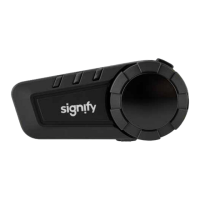

 To Next Page