11
AFTER SALES SUPPORT
1300 777 137
service@unclebills.com.au
MODEL: EA2306 PRODUCT CODE: 713007 08/2023
Installation
Fitting the Headset to your Helmet
Please follow the steps below to t the headset to your helmet. All
necessary accessories required to mount the headset on your helmet have
been provided.
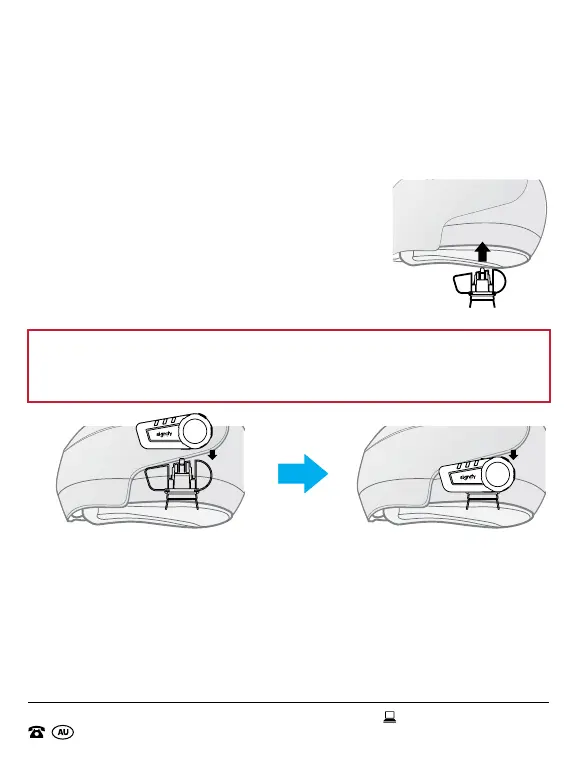
1. Fit the headset clip (with the clamp) to the left
side of your motorcycle helmet making sure
the inside of the headset clip is in between
the internal padding and external shell of the
helmet.
2. Guide the tabs on the rear of the headset into
the visible slots on the headset clip. Push till
you hear a click sound and you cannot go any
further.
NOTE: The multifunction button should be facing to the back of the
motorcycle helmet on the left side and should be visible on the exterior
of the helmet, when attaching it to the headset clip (with clamp).
3. Alternatively, for helmets with thicker inner paddings such as bicycle
helmets, you can use the other headset clip (without the clamp) to x
your headset to the helmet. Peel one side of the 3M™ pad for headset
clip and stick it to the smooth surface side of the headset clip. Undo the
other side of the 3M™ pad for headset clip and attach it to the left side
of the helmet. Guide the tabs on the rear of the headset into the visible
slots on the headset clip. Push till you hear a click sound and you cannot
go any further (see next page for images).
Front of Front of
HelmetHelmet
Front of Front of
HelmetHelmet
Front of Front of
HelmetHelmet


 To Next Page