24
10.13
SIGNODE BXT2-19
6.1 SWITCH TOUCH-PAD LOCK ON AND OFF
The touch-pad lock can be activated to prevent acciden-
tal changes to the settings.
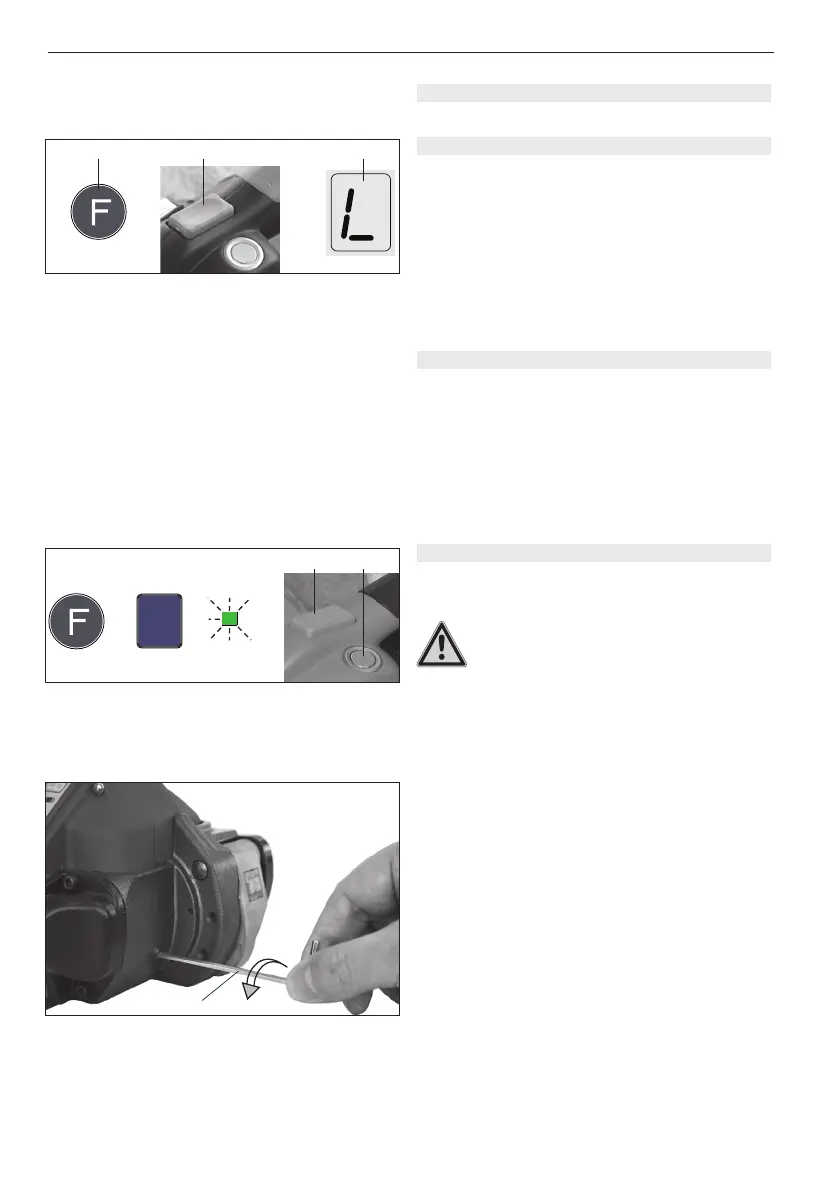
– Press and hold the “Function“ button (17/1) and press
the tension button (17/2) at the same time. The audible
signal sounds and the keypad is blocked. If any key is
pressed, the digital display will show „L“ (Lock) (17/3).
– The keypad block is released in the same way as it is
activated.
6.2 SLEEP MODE
In order to avoid unnecessary battery consumption, the
tool changes after approx. 5 min. to sleep mode, if no
key is pressed.
– The digital display and the LED indicator are switched
off.
Sleep mode is switched off by touching any operating
panel element.
6 SPECIAL FUNCTIONS
AUTO
MAN.
SOFT
➟
2
=
Fig. 18
1
AUT
ashing / intermitente /
clignote
Fig. 17
1
+ =
2 3
Fig. 19
1
6.3 TOOL RESET
The tool reset may be used only if the rocker lever is
blocked:
Never attempt to lift the rocker lever by force.
– Change to mode of operation „Fully-Auto strapping“
(refer to Chapter 5.8).
– Press and hold welding button (18/1) and press
tension button (18/2). Tool reset starts (approx.
0.5 sec. welding).
If this procedure does not succeed, the blockage must
be cleared manually as follows:
– Insert the 3 mm Allen key supplied (19/1) through the
drilledholeandtitintothecylinderscrew(Pos.164/
page 34).
– Turn it counter-clockwise through ten full
rotations. This will require a little force.
– Lift the rocker lever and the welding mechanism must
swing upwards.
If the tool reset could not successfully carried out,
please contact the Service Centre!
ashing / intermitente /
clignote


 To Next Page