18
10.13
SIGNODE BXT2-19
1
2
3
Fig. 9
1
3
2
Fig. 10
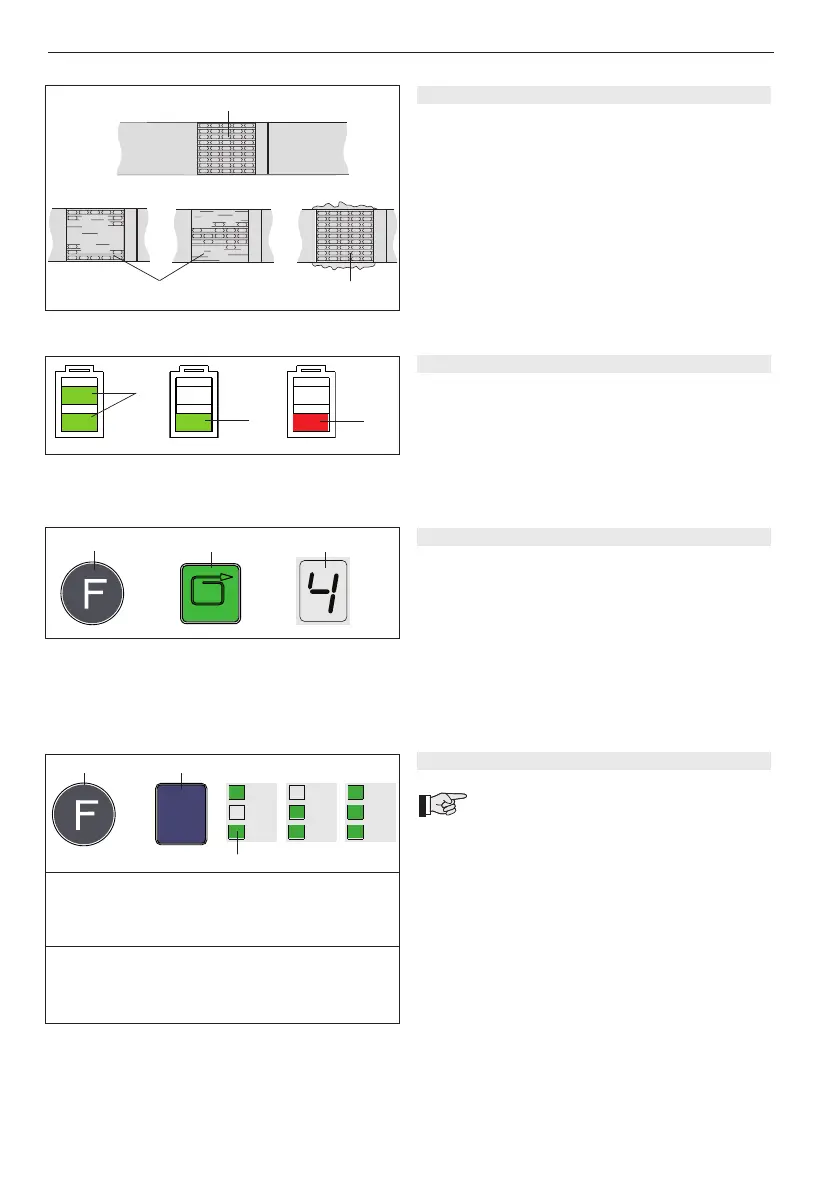
5.3 CHECKING THE SEAL
– Checkappearanceofseal(seeg.9)regularly.Ifthe
straps are poorly welded, check the welding time
setting (refer to chapter 5.7).
1 Good seal (the complete surface is cleanly welded
without excess material being forced out sideways).
2 Poorly welded seal (not welded over the complete
surface), welding time too short.
3 Poorly welded seal (excess material is forced out
sideways), welding time too long.
5.4 CHECKING BATTERY CHARGE
– Read off battery charge on LED indicator (Fig. 10):
1 = Green indicator: maximum battery charge
2 = Green indicator: good battery charge
3 = Red indicator: empty battery
(Battery must be charged)
➟
Fig. 11
1
2
3
=
5.5 SETTING STRAP TENSION
– Pressthe„Function“button(11/1)briey.
– Press the „Strap tension“ button (11/2) until the
ashingdigitaldisplay(11/3)showstherequiredstrap
tension. Wait two seconds until the new setting is
saved.
1 = min. strap tension approx. 400/1200 N*
(88/264 lbs.) (PP)
9 = max. strap tension approx. 1600/4000 N*
(353/882 lbs) (PET)
* refer to Chapter 5.7
5.6 SETTING SOFT TENSION
The following two strap tension ranges can
be set on the tool:
A = 1200–4000 N (264–882 lbs.)
standard, PET straps
B = 400–1600 N (88–353 lbs.)
Soft tension*, PP straps
* Soft tension: tension wheel starts slowly. Prevents
excessive dirt on PP straps.
Setting soft tension:
– Pressthe„Function“button(12/1)briey.
– Press the „Mode of operation“ button (12/2) several
times until the green „SOFT“ LED indicator (12/3)
lights up together with the desired mode of operation
(refer to chapter 5.5).
AUTO
MAN.
SOFT
➟
Fig. 12
1
2
3
=
MAN.
MAN.
MAN.
A)
1 2 3 4 5 6 7 8 9
1200 1550 1900 2250 2600 2950 3300 3650 4000 N
264 341 418 496 573 650 727 804 882 lbs.
B)
1 2 3 4 5 6 7 8 9
400 550 700 850 1000 1150 1300 1450 1600 N
88 121 154 187 220 253 286 319 353 lbs.


 To Next Page