6.2 Replacing the cutting tool
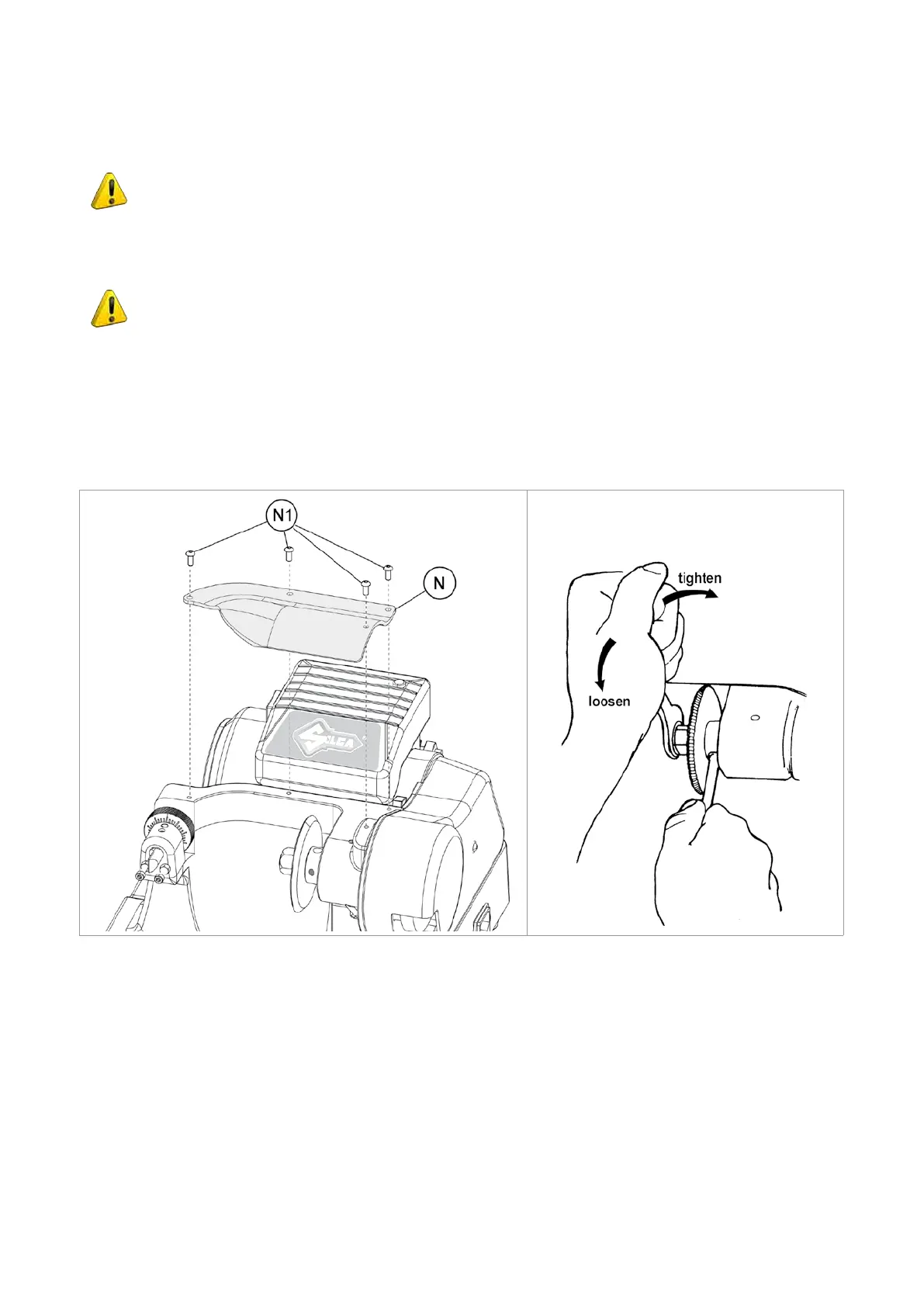
In order to substitute the cutting tool you need to remove the cutting tool protective shield. To replace a worn
cutting tool, proceed as follows:
ATTENTION: remove the mains plug.
1) Remove the cutter locking screw (N1) and remove the cutter protective shield (N) (Fig.29).
2) Slot the locking rod (provided) into the hole (F1) of the cutting tool shaft (Fig.29 and Fig.30).
3) Use the spanner provided to loosen the cutting tool locking nut.
ATTENTION: the thread is left-handed.
1) Remove the worn cutting tool.
2) Carefully clean the new cutting tool and its seat.
3) Install the new cutting tool (pay attention to the rotation direction) and tighten the nut.
4) Remove the locking rod.
5) Re-place the protective shield (N).
6) Check calibration (see chap.4.1)
Fig.29 Fig.30
Operating manual SPEED
Copyright Silca 2013
20


 To Next Page