Click on the button »OK«. e conversion is now nalised. Should you wish to
copy further dictation recordings: Repeat the steps to .
You would like to separate the voice recorder from the PC:
11
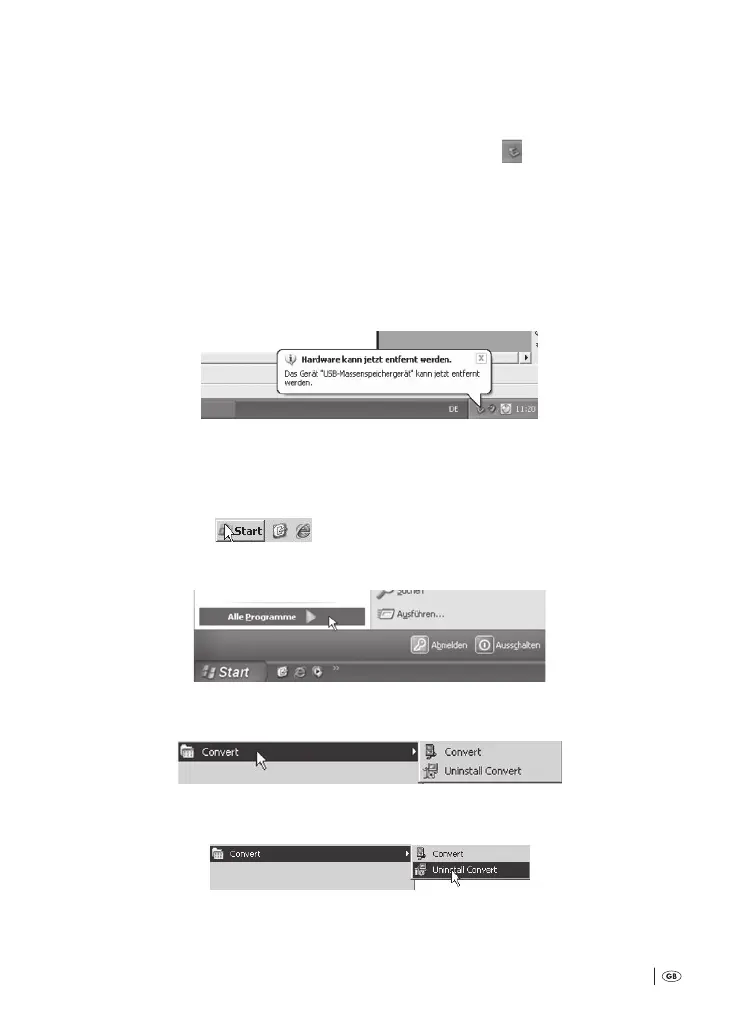
First, click on the symbol »Securely remove hardware« in the Info-area of
the task bar. is is to be found on the lower right edge of the PC monitor.
12
en select the removable media/the USB external hard drive with the drive
letter that was assigned to the voice recorder on being connected to the PC.
13
As soon as the message »Hardware can now be removed« appears on the PC
monitor: Remove the large plug of the USB cable from the USB interface on
the PC.
10.3 Deinstalling the software »Convert« from a PC
Should you wish to deinstall the soware »Convert« from your PC:
1
Click on »Start« .
2
Click on »All Programmes«:
3
Click on »Convert«:
4
Click on »Uninstall Convert«:
Bedienungsanleitung KH 2450 EN.indd 67 23.12.2008 23:09:49



 To Next Page