■ 12 │ GB
│
IE
│
NI
│
CY
SSRA C2
Charging the appliance
ATTENTION!
► Avoid exposing the charging station
2 to
direct sunlight.
► Do not place the charging station
2 near
stairs.
Note
► Charge the appliance fully before using it for
the fi rst time.
► Do not place any objects in the area 1 m
from the left/right side and 2 m in front of
the charging station
2.
► There must be no mirrors or other highly
refl ective objects 15 cm above the fl oor in
the area of the charging station
2. Cover
them if necessary.
► Change the position of the charging station
2 as rarely as possible.
► The On/Off button 1 and Home button
w on the appliance light up green as
soon as the appliance is charged.
♦ Place the charging station
2 fl at against
a wall and connect the power adapter 4
to an outlet. Plug the barrel plug 5 of the
power adapter 4 into the connection on
the back of the charging station 2. The
operating LED of the charging station 2
lights up blue.
♦ Press the Home button
w on the ap-
pliance or the Home button a on the
remote control 6 or select the mode Home
in the main menu of the app (see section
Control via the LIDL Home app) to move
the appliance to the charging station 2 for
charging. The On/Off button 1 and
Home button w on the appliance fl ash
green slowly as soon as it is charging.
Operation and use
Information about the work
area
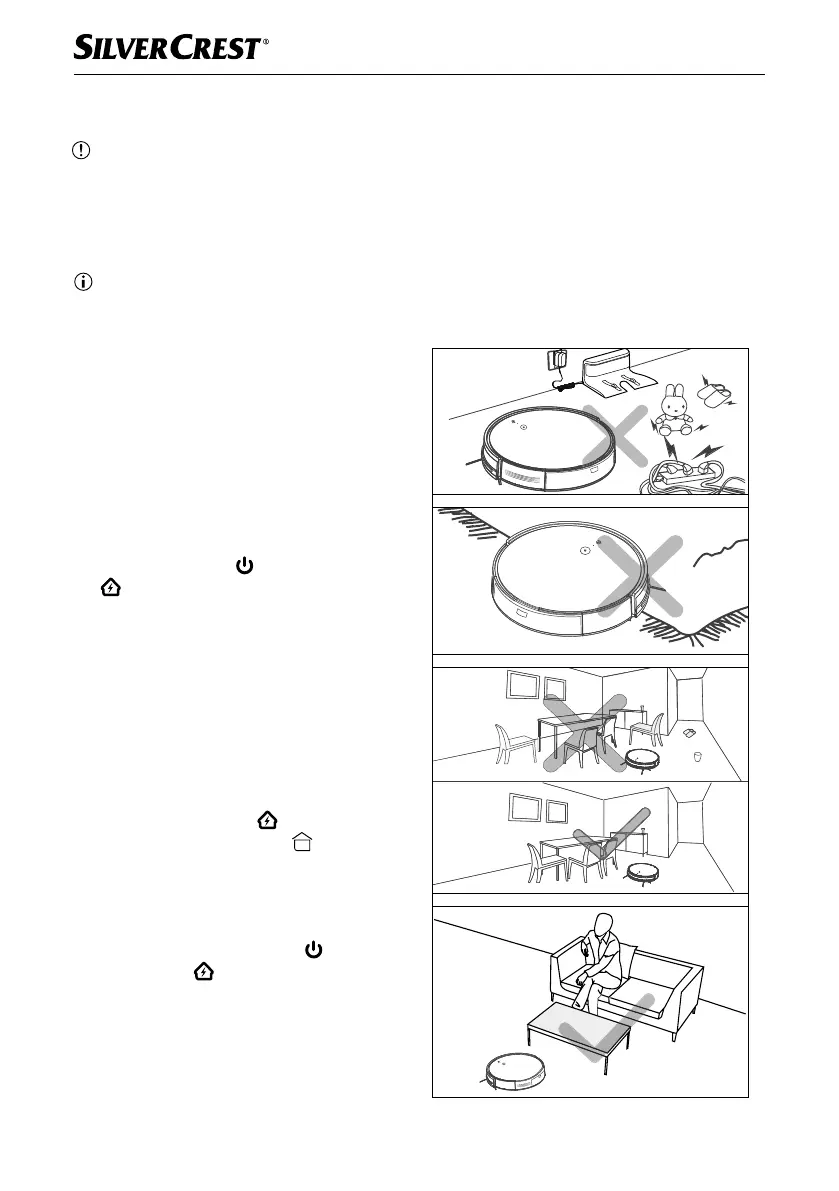
Due to the complexity of the home environment,
the appliance may miss some areas when
cleaning. For better cleaning results, we recom-
mend using the appliance daily. Observe the
following instructions before operating the
appliance (see also Fig. 1):
Fig. 1
IB_452854_SSRCA2_LB6_IE-NI-CY.indb 12 29.04.2024 07:38:13










 To Next Page