■ 22 │ GB
│
IE
│
NI
│
CY
SSRA C2
Cleaning the brushes
ATTENTION!
► Only use the appliance with properly fitted
side brushes
9 and rotary brush i.
Note
► Clean the rotary brush
i and side brushes
9 regularly to ensure proper operation of
the appliance and avoid malfunctions.
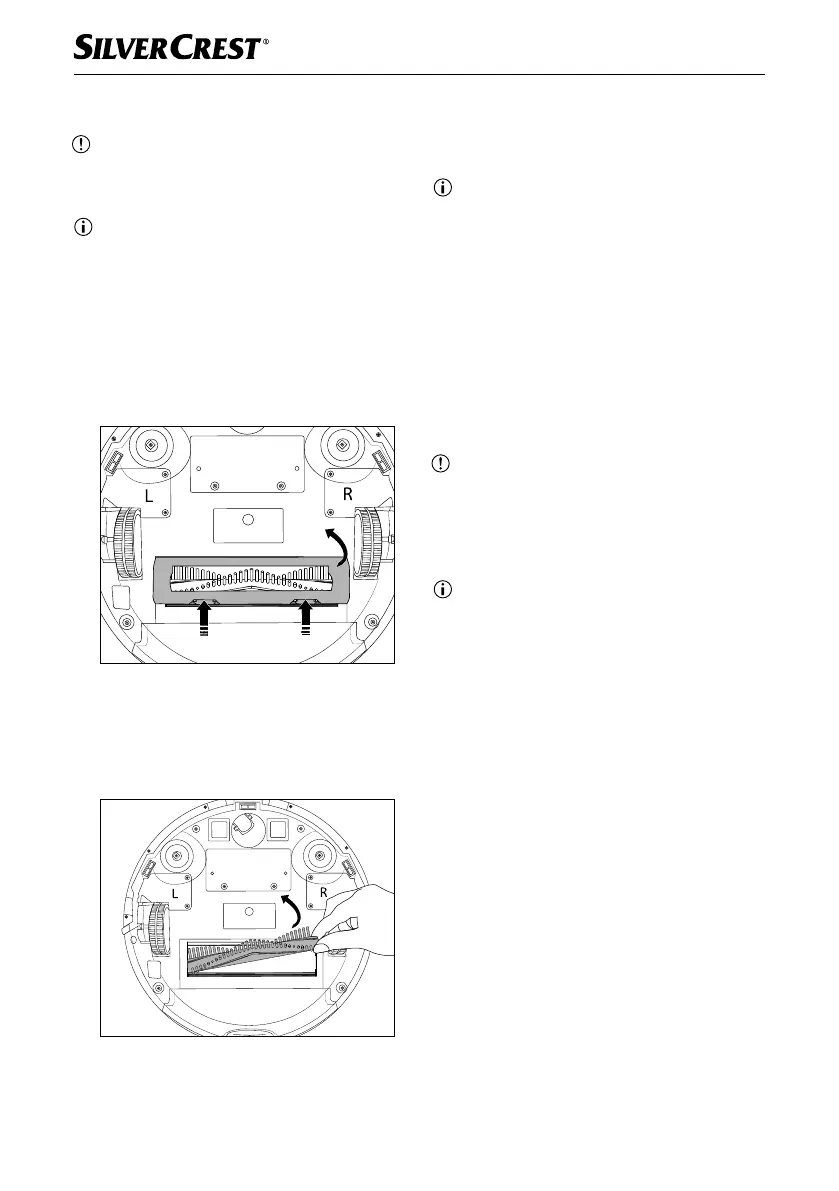
♦ Press the two release buttons on the rotary
brush cover
u to release it. Remove the
rotary brush cover u from the appliance
(see Fig. 14).
Fig. 14
♦ Grasp the rotary brush i on the right-hand
side, and remove it from the appliance (see
Fig. 15). Remove hair and dirt with the
cleaning brush 0.
Fig. 15
♦ Pull the side brushes 9 out of the holders
a/j with a little force, and remove hair
and dirt with the cleaning brush 0.
Note
► When inserting the side brushes, pay atten-
tion to their labelling L (left) and R (right).
Cleaning the charging station
♦ Clean the surface of the charging station 2
with a slightly moist cloth.
♦ Clean the charging contacts 3 with a soft,
dry cloth.
Replacing the battery
ATTENTION!
► Only use the battery type recommended
by the manufacturer (see section Technical
data). Using a different type of battery can
damage the appliance.
Note
► Switch off the appliance before replacing
the battery.
► Charge the new battery fully before using it
for the first time.
► Dispose of the old battery properly.
IB_452854_SSRCA2_LB6_IE-NI-CY.indb 22 29.04.2024 07:38:21










 To Next Page