■ 14 │ GB
│
IE
│
NI
│
CY
SSRA C2
Selecting a cleaning mode
♦ To achieve a better cleaning result, the appli-
ance has various cleaning modes. You can
select a cleaning mode by pressing the cor-
responding button on the remote control
6
or in the main menu of the app (see section
Control via the LIDL Home app).
♦ Before selecting one of the following cleaning
modes, make sure that the appliance is
switched on. If the appliance is in sleep mode,
briefly press the On/Off button
1
on the appliance or the Start/Pause but-
ton on the remote control 6 or select
cleaning mode Auto in the main menu of
the app (see section Control via the LIDL
Home app) to switch the appliance back to
standby mode.
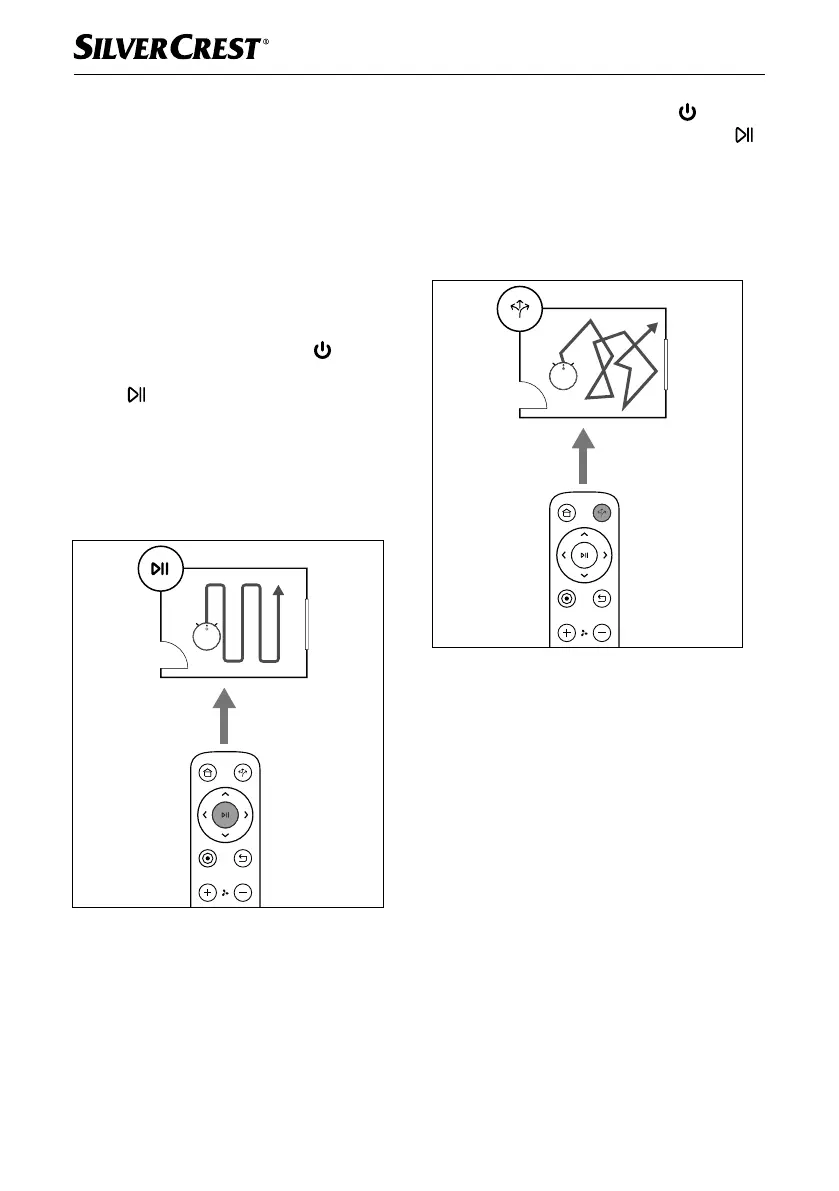
Auto
Fig. 2
In this cleaning mode, the appliance runs a
course in parallel, overlapping paths. The edges
of the room are cleaned beforehand for orienta-
tion and room dimensioning. The cleaning pro-
cess is also recorded in this cleaning mode.
♦ Briefly press the On/Off button
1 on
the appliance or the Start/Pause button
on the remote control 6 or select cleaning
mode Auto in the main menu of the app
(see section Control via the LIDL Home
app) to start this cleaning mode.
Classic
Fig. 3
In this cleaning mode, the appliance follows a
random course. The cleaning process is also
recorded in this cleaning mode.
♦ Press the Classic button on the remote
control
6 or select cleaning mode Classic
in the main menu of the app (see section
Control via the LIDL Home app) to start
this cleaning mode.
IB_452854_SSRCA2_LB6_IE-NI-CY.indb 14 29.04.2024 07:38:14










 To Next Page