GB
│
IE
│
NI
│
CY │ 15 ■
SSRA C2
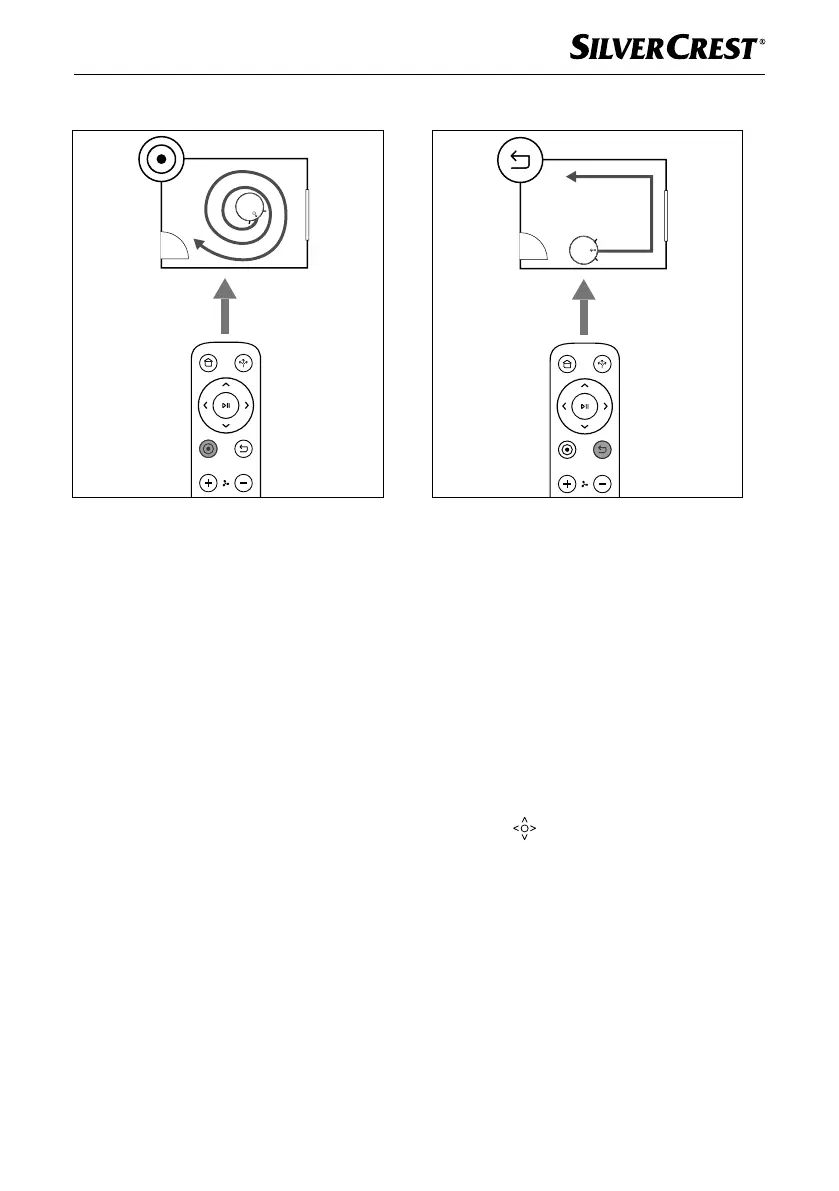
Spot
Fig. 4
This cleaning mode is suitable for an area with
a high concentration of dirt or dust. In cleaning
mode Spot, the appliance concentrates on an
area to be cleaned and vacuums it in a spiral.
♦ Press the Spot a button on the remote
control
6 or select cleaning mode Spot
in the main menu of the app (see section
Control via the LIDL Home app) to start
this cleaning mode.
Corner
Fig. 5
This cleaning mode is suitable for cleaning the
corners and edges of a room. In cleaning mode
Corner, the appliance follows a course along
the edges of the room.
♦ Press the Corner button on the remote
control
6 or select cleaning mode Corner
in the main menu of the app (see section
Control via the LIDL Home app) to start
this cleaning mode.
Manual
♦ In standby mode, you can use the direction
buttons
on the remote control 6 to
move the appliance left/right/forward/
backward.
♦ Alternatively, select cleaning mode Manual
in the main menu of the app and control
the appliance using the direction buttons in
the app (see section Control via the LIDL
Home app).
IB_452854_SSRCA2_LB6_IE-NI-CY.indb 15 29.04.2024 07:38:14










 To Next Page