■ 16 │ GB
│
IE
│
NI
│
CY
SSRA C2
Home
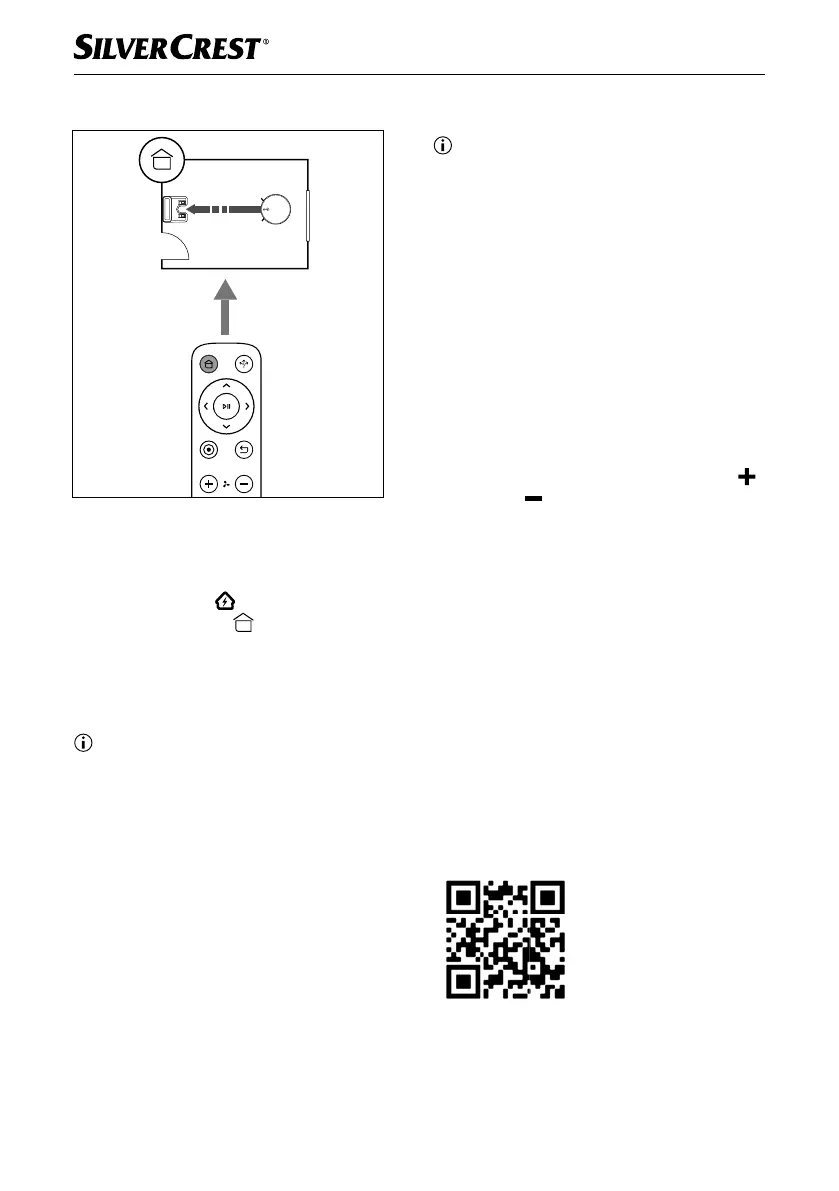
Fig. 6
Use this mode so that the appliance returns to
the charging station 2 for charging.
♦ Press the Home
w button on the appli-
ance or the Home button on the remote
control 6 or select mode Home in the main
menu of the app (see section Control via
the LIDL Home app) so that the appliance
returns to the charging station 2.
Note
► The appliance automatically returns to the
charging station
2 if the battery level is too
low.
Setting a suction mode
Note
► The suction mode of the appliance comprises
three levels, which diff er in terms of suction
power, volume and energy consumption.
► After switching on, the appliance operates
by default in the medium suction mode
Standard.
► With the lowest suction mode Eco, an
operating time of up to 150 minutes is
possible with a fully charged battery.
You can set the suction mode of the appliance
using the remote control
6 or in the app (see
section Control via the LIDL Home app):
♦ On the remote control
6, press the Plus
or Minus button to set the suction mode.
♦ Go to the Settings menu item in the main
menu of the app to select the Suction
mode. There you can set the suction mode
to Eco, Standard or Max.
Control via the LIDL Home
app
System requirements
▯ Smartphone/tablet with at least Wi-Fi
802.11 b/g
▯ 2.4 GHz Wi-Fi
▯ Android 6.0 or higher
▯ iOS 11.0 or higher
Scan the QR code with
your smartphone/tablet or
search for the app LIDL
Home in the App Store/
Play Store, and install the
app.
IB_452854_SSRCA2_LB6_IE-NI-CY.indb 16 29.04.2024 07:38:15










 To Next Page