GB
│
IE
│
NI
│
CY │ 17 ■
SSRA C2
♦ Make sure that the appliance is switched on
and that Wi-Fi and Bluetooth
®
are turned
on on your smartphone/tablet.
♦ Press the Home button
w for approx.
5 seconds to switch the appliance to Wi-Fi
mode. A beep sounds and the Wi-Fi LED
e of the appliance flashes.
♦ Start the LIDL Home app and follow the
instructions in the app to connect the appli-
ance to the app.
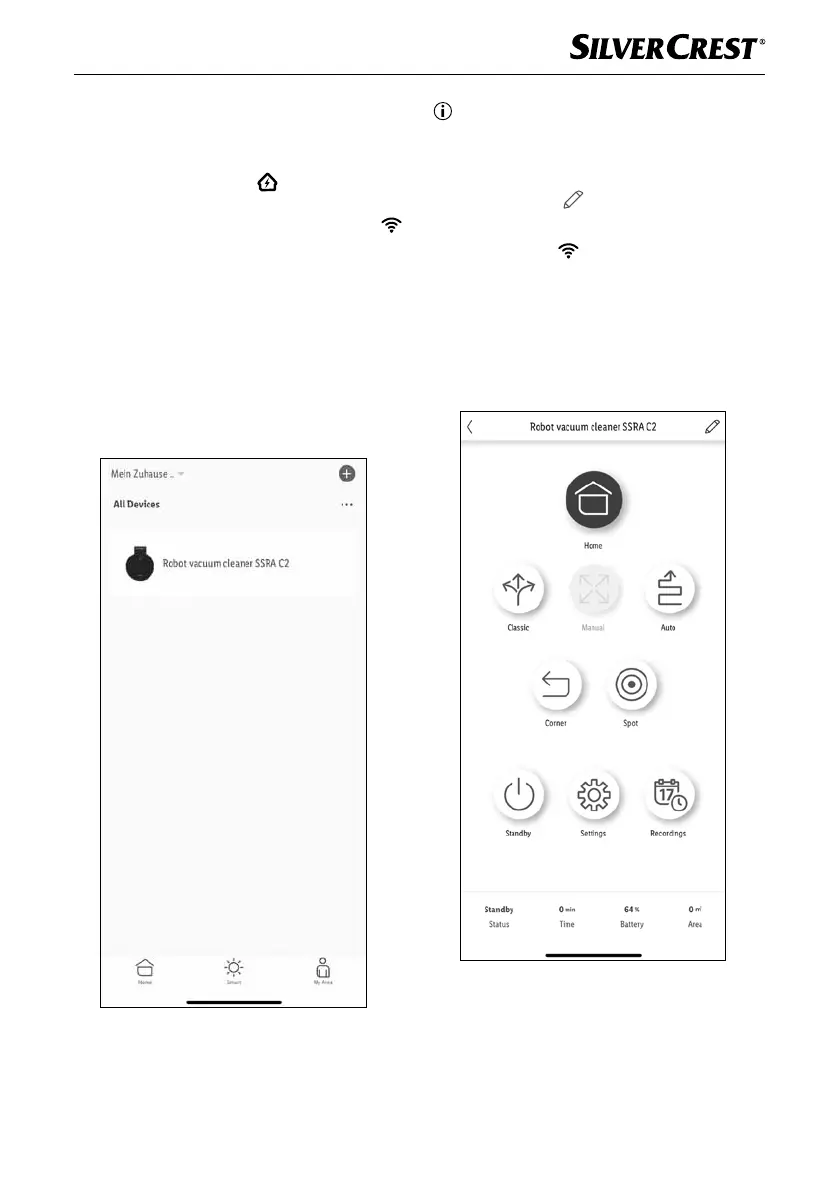
♦ After a successful connection to the app, the
main menu of the appliance opens.
The appliance is also available in the over-
view All devices. Select the appliance to
enter the main menu.
Note
► By default, the device name in the app is
Robot vacuum cleaner SSRA C2. In the
main menu, you can change this name using
the pencil icon
in the top right (e.g. when
using multiple robot vacuum cleaners).
► The Wi-Fi LED
e of the appliance lights
up when it is connected to the app via Wi-Fi.
♦ In the main menu, you can select a cleaning
mode, interrupt a cleaning process with
Standby or return the appliance to the
charging station with Home.
IB_452854_SSRCA2_LB6_IE-NI-CY.indb 17 29.04.2024 07:38:15










 To Next Page