GB
│
IE
│
NI
│
CY │ 19 ■
SSRA C2
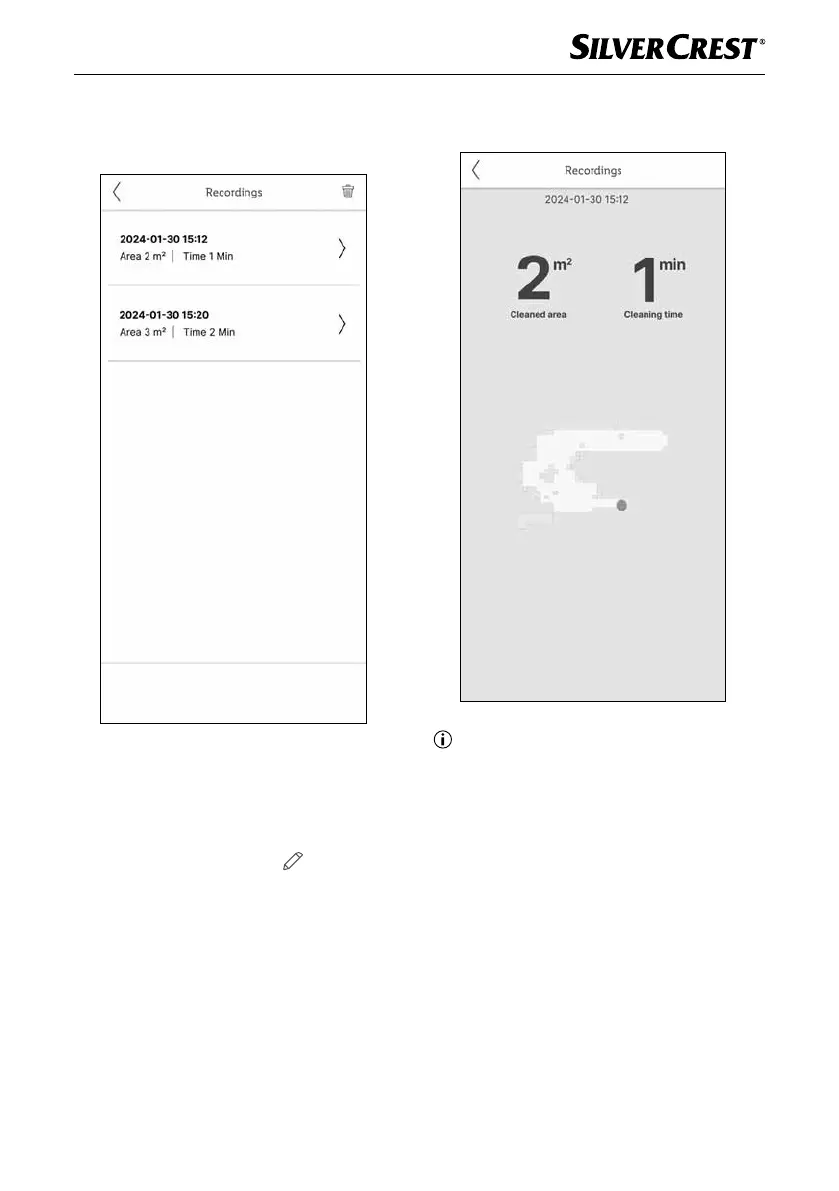
♦ Under Recordings, you can see cleaning
processes that have already been recorded.
You can also delete these.
Remove device and reset to factory
settings
♦ Open the LIDL Home app and select the
Home tab. Select the appliance and tap the
pencil icon at the top right . Tap Remove
device, then Disconnect and wipe data.
After tapping Confi rm the factory settings of
the appliance will be restored and your data
will be permanently deleted.
♦ A detailed graphical view is also available
for each recorded cleaning process.
Note
► Recording of a cleaning process is only
possible in cleaning modes Auto and
Classic. When operating in cleaning modes
Auto and Classic, a recording is started
automatically.
Privacy Policy
The full privacy policy is available in the app in
My Area under Privacy Policy.
IB_452854_SSRCA2_LB6_IE-NI-CY.indb 19 29.04.2024 07:38:17










 To Next Page