CRYSTALCUBE—User Manual
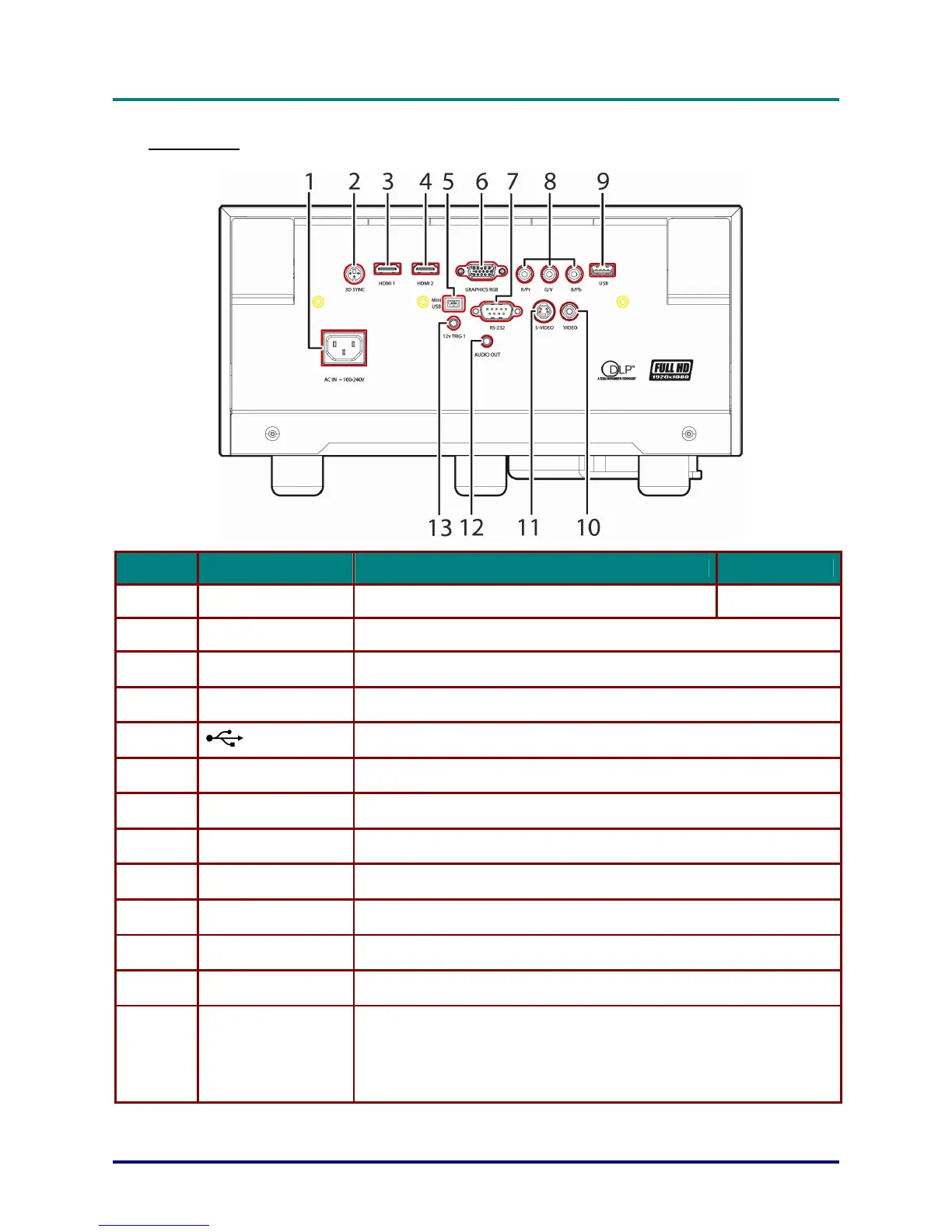
Rear view
ITEM LABEL DESCRIPTION SEE PAGE
1.
AC IN Connect the POWER cable
10
2.
3D SYNC Connect the SIM2 3D glasses IR transmitter
3.
HDMI 1 Connect the HDMI cable from a HDMI device
4.
HDMI 2 Connect the HDMI cable from a HDMI device
5.
(USB)
Connect the USB cable from a computer
6.
VGA IN Connect the RGB cable from a computer
7.
RS-232C Connect RS-232 serial port cable for remote control
8.
COMPONENT Connect the Component cable from a component device
9.
USB POWER For USB charge support DC 5V
10.
VIDEO IN Connect the COMPOSITE cable from a video device
11.
S-VIDEO Connect the S-VIDEO cable from a video device
12.
AUDIO OUT Connect an AUDIO cable to audio amplifier
13.
DC 12V TRIGGER
When connected to the screen through a commercially available cable,
the screen deploys automatically on start up of the projector. The screen
retracts when the projector is powered off (see notes below).
Note: do not use a 3.5mm mono type cable; use a 3.5mm 3 pin type
stereo cable
– 3 –



 To Next Page