SD1
www.simmonsdrums.net
5
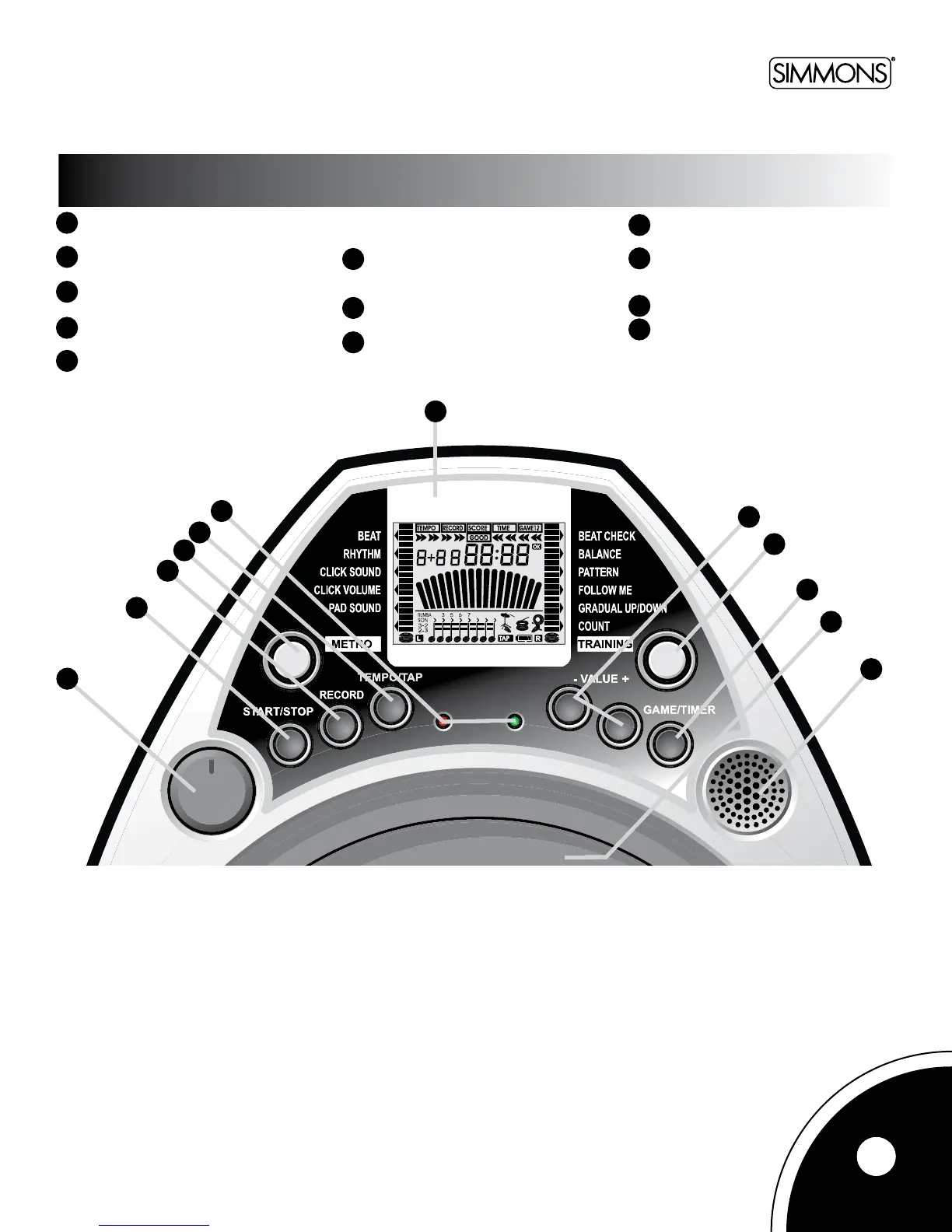
1. Volumeknob–Adjuststhe
sound level.
2. [START/STOP]button–Startsorstops
the metronome.
3. [RECORD]button–Enters
record mode.
4. [METRO]button–Selectspadsounds
and sets the metronome.
5. [TEMPO/TAP]button–Adjuststhe
tempo(from30to240).Holdand
pressthisbuttontoenterTAPmode.
6. Beat Indicator – Flashes in quarter
notetiming.Redindicatorasheson
accent beats.
7. LCDdisplay–Displaystheparameter
for current operating item.
8. [VALUE+]&[VALUE-]buttons–
Changes the value of each parameter.
9. [Training]button–Selectsthe
training mode.
10. [GAME/TIMER]button–Entersgame
mode. Hold and press this button to
enter TIMER mode.
11. Drumpad
12. Minispeaker–Playsthe
metronome sound
Panel
using the metronome/click feature
1
2
3
4
5
6
7
8
9
10
11
12
1
2
3
4
5
6
7
8
9
10
11
12



 To Next Page