Configuring the ES Net Audio Controller Card
Configuring the download speed
Use jumper P1 on the ES Net Digital Audio Controller to select the download speed from the FACU programmer as follows:
• Position 1-2 for download speed 56 K.
• Position 2-3 for download speed 115 K (default).
Configuring the supervision mode for communication to Miniplexes
Use jumper P6 to set the compatibility mode as follows:
• Position 1-2 for silence supervision. Set this for backward compatibility when the card is a retrofit or replacement in systems having Digital Audio
Riser Interface Cards (566-243).
• Position 2-3: Constant Supervision (default). Set this in current systems or systems being retrofitted for constant supervision where all 566-243
Digital Audio Riser Interface Cards [DARICs] are being replaced with later versions 566-407 and 566-1000.
Setting the Address
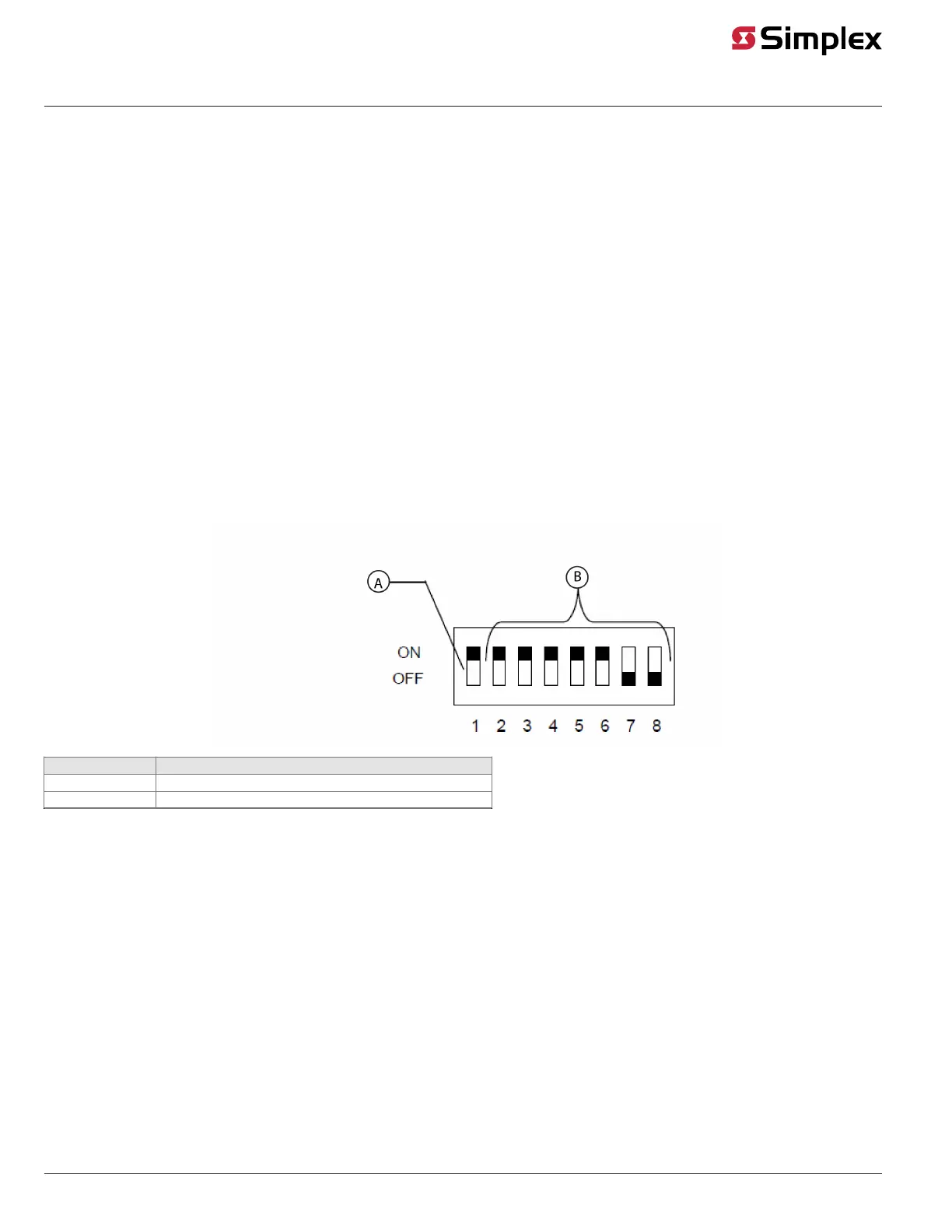
The device address is set using DIP switch SW1, which is a bank of eight switches. From left to right, as shown in Figure 2, these switches are
designated as SW1-1 through SW1-8. The function of these switches is as follows:
• SW1-1: This switch sets the baud rate for the internal 4100 communications line running between the card and the CPU. Set this switch to ON.
• SW1-2 through SW1-8: These switches set the card's address within the FACU. See Figure 3 for a complete list of the switch settings for all of the
possible card addresses.
Note:
• You must set these switches to the value assigned to the card by the Programmer.
• The SW1 setting applies to audio controller slaves, including audio input cards.
Figure 2: DIP Switch SW1
Callout Description
A 4100 Comm. Baud Rate
B DIP Switches SW1-2 through SW1-8 set the Card Address
Note: Switch (SW1-1) must be set to ON.
page 6 579-1408 Rev. B
ES Net Digital Audio Controller Installation Instructions


 To Next Page