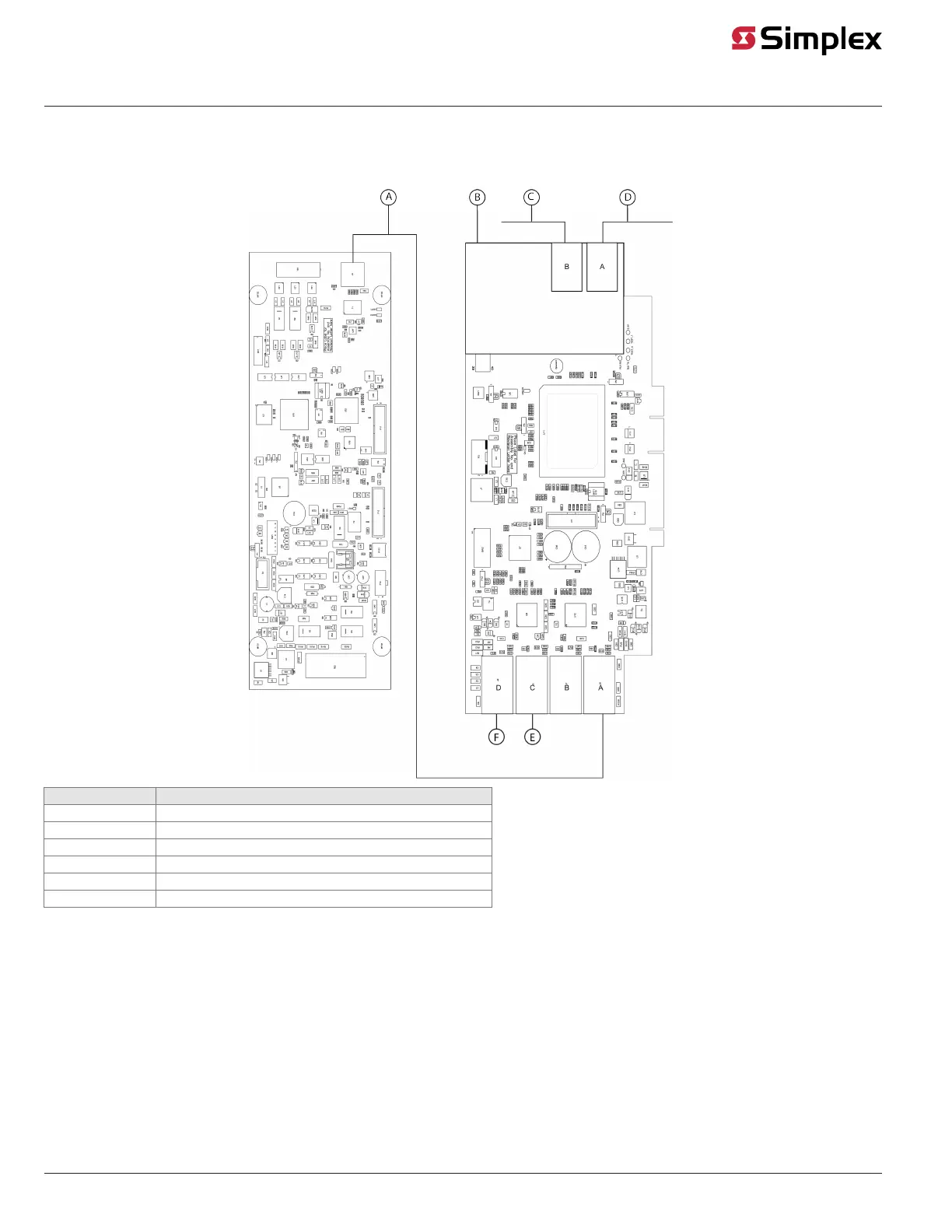
ES Net NIC interconnections
Note: When you set the card to digital audio controller mode, the Ethernet port is unused and must remain unconnected.
Figure 6: ES Net NIC interconnections
Callout Description
A Ethernet cable
B Ethernet or Fiber media card
C ES Net Network
D ES Net Network
E To Master CPU
F To Service Port
Note:
• Figure 6 shows a typical connection of the ES Net DAC to the ES Net NIC card.
• The ES Net DAC Ethernet port should connect to the NIC on either on-board Ethernet ports A or B using the provided two-foot cable. For the
connection of the NIC to the ES Net network, use an Ethernet Media Card (4100-6306), Single-Mode Fiber Media Card (4100-6308) or a Multi-Mode
Fiber Media card (4100-6309).
• The ES Net NIC Ethernet port to which the ES Net DAC card connects must be configured as an audio port in the ES Programmer. Refer to 574-849
for configuration information.
page 9 579-1408 Rev. B
ES Net Digital Audio Controller Installation Instructions


 To Next Page