Installing the Audio Controller onto the power distribution interface (PDI)
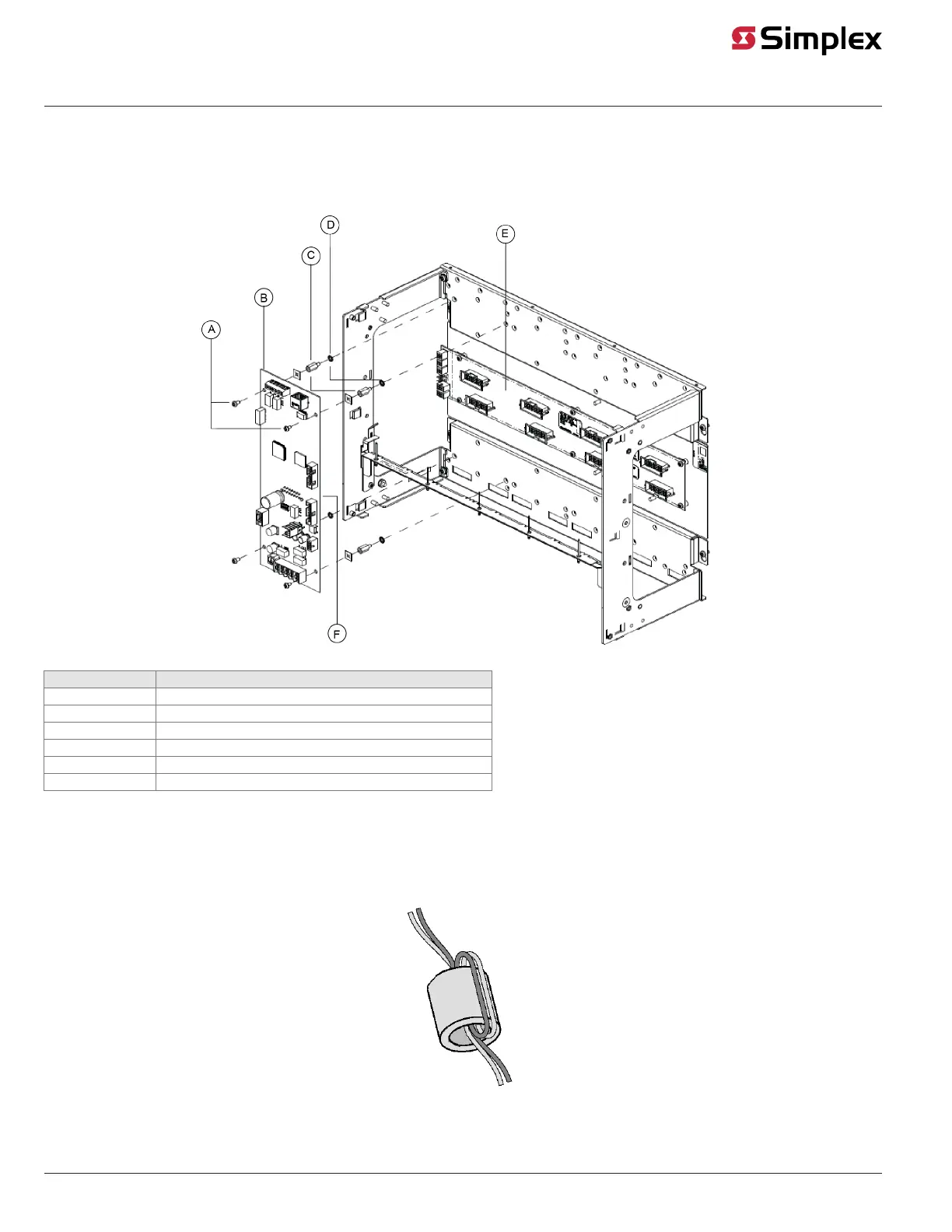
The audio controller assembly is designed to be mounted on the power distribution interface (PDI) in an FACU expansion bay. The card should be
mounted onto the leftmost side of the PDI.
Use the connector on the back side of the audio controller card to connect to the left side of the bay as shown in Figure 4.
Figure 4: Mounting onto the PDI
Callout Description
A #6 screws
B Controller card
C Standoffs
D Washers
E PDI
F PDI connector on the reverse side
Audio controller field wiring
Use supplied ferrite beads with ES Net Digital Audio Controllers. Loop wires once through the supplied ferrite beads as shown in Figure 5. Add ferrite
beads on all field wiring cables: primary and secondary DAR, the remote microphone white and green wires, and the remote microphone PTT and
return wires.
Figure 5: Loop wires as shown
page 8 579-1408 Rev. B
ES Net Digital Audio Controller Installation Instructions


 To Next Page