Using your Bean-Pro Moisture Analyser.
6.0 System Power Up.
Your first power up.
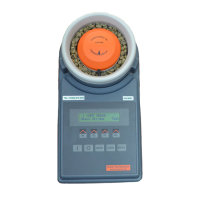
Press the “I” key. The BeanPro powers up in mode 0 showing “0 Reference” in the
display. Use the “Up” (F2) key to step through the crop calibrations.
Ongoing power up’s
The Bean-Pro remembers the last selected crop calibration. On power up, the Bean-
Pro returns to the previously selected calibration.
Always check the correct crop is selected before carrying out a test.
Mode 0 screen.
Warning – Do not rotate the measuring cell anti-clockwise
while putting on or removing from the machine.
7.0 Selecting a Crop Calibration (Mode 0, F1 & F2).
Using the Down (F1) or Up (F2) key, step through the crop calibrations until the
required calibration is displayed. One key press indexes one crop position.
Mode 0 screen.
The display shows the Green Coffee Bean calibration has been selected, and its
curve number is 1.


 To Next Page