Quantum
®
XL-6000
Endless Bobbin
™
- 27 -
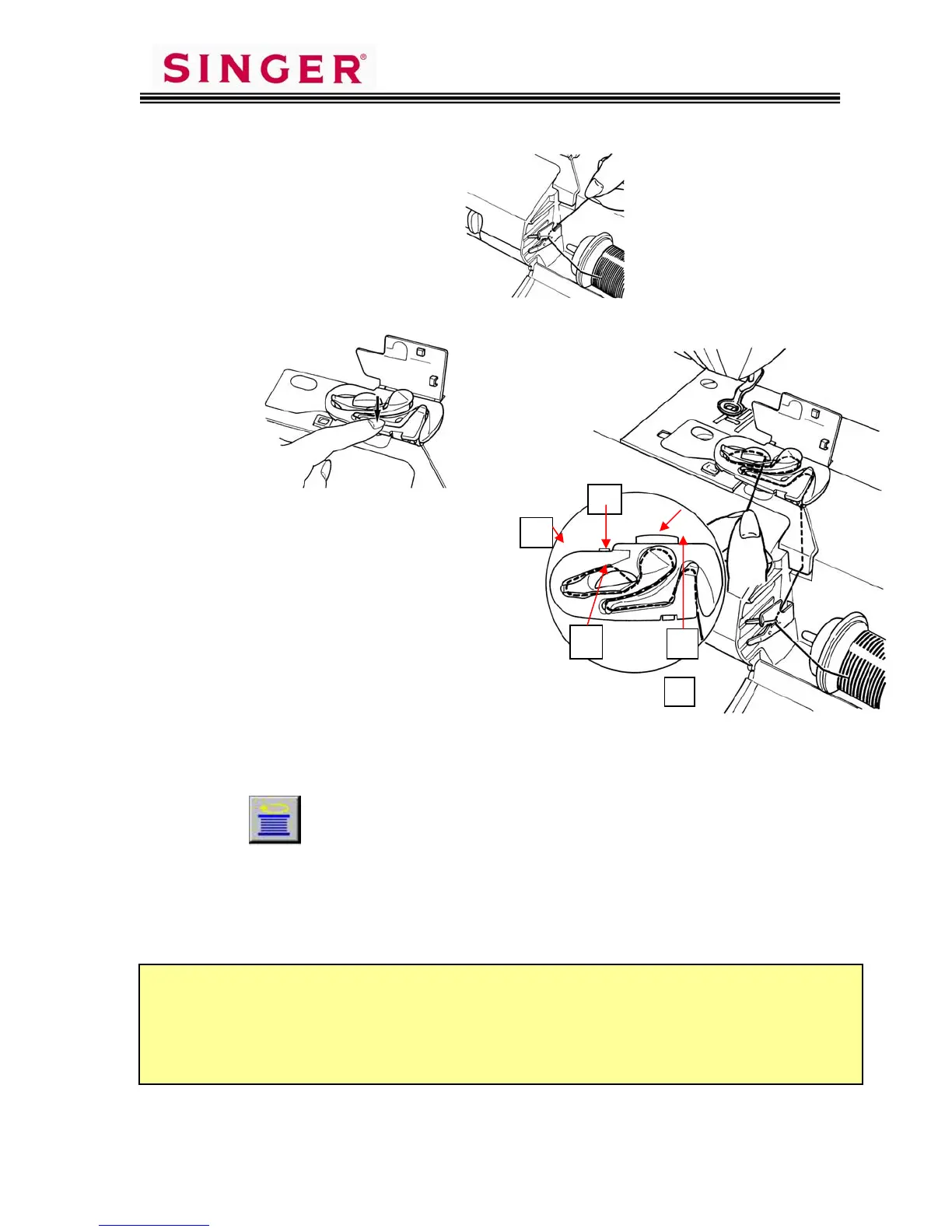
6. Thread the first thread guide.
7. Install the Bobbin Winder Threading guide.
8. Follow the Threading Track around
all the turns and thread points [1]
though [5]. At numbered positions
1 ~ 3, lightly pull thread to assure
it slips into position. At Position
4, pull thread slightly harder to
assure thread passes under final
spring.
9. Cut thread at the cutter blade 5, by
drawing the thread toward you.
10. Remove the Threading Guide and close thread retaining cover plate.
11. Touch Pictogram located directly above Bobbin Winding Operation
Key on LCD Screen. To stop for any reason, touch the
start/stop button, which is yellow while in winding mode.
12. Upon completion of winding of bobbin, bobbin thread is automatically cut.
You can now start embroidery with no additional preparation. When
bobbin thread runs out during embroidery, the bobbin will re-thread itself.
It is important that you keep the Endless Bobbin
™
area clean of lint and thread scraps.
Lint and short cut pieces of thread can be drawn into the Endless Bobbin
™
threading
path and become lodged under the Pinch Plate Spring Finger that threads the bobbin.
In the event that the Endless Bobbin
™
malfunctions, check the threading path and if
necessar
clean out thread and debris from under the Pinch Plate S
rin
.
1
2
4









 To Next Page