BUTTONHOLE SEWING
AUTOMATIC BUTTONHOLE
USING BUTTONHOLE FOOT
Your machine offers you a variety of buttonhole styles,
sewn by a system that measures the size of the button and
calculates the size of buttonhole required. All of this is
done in one easy step.
PROCEDURE
* Use an interfacing in the area of the garment where
buttonholes are placed. Stabilizer or regular interfacing
can be used.
* Make a practice buttonhole on a scrap of the fabric you
are using. Then try the buttonhole with the selected
button.
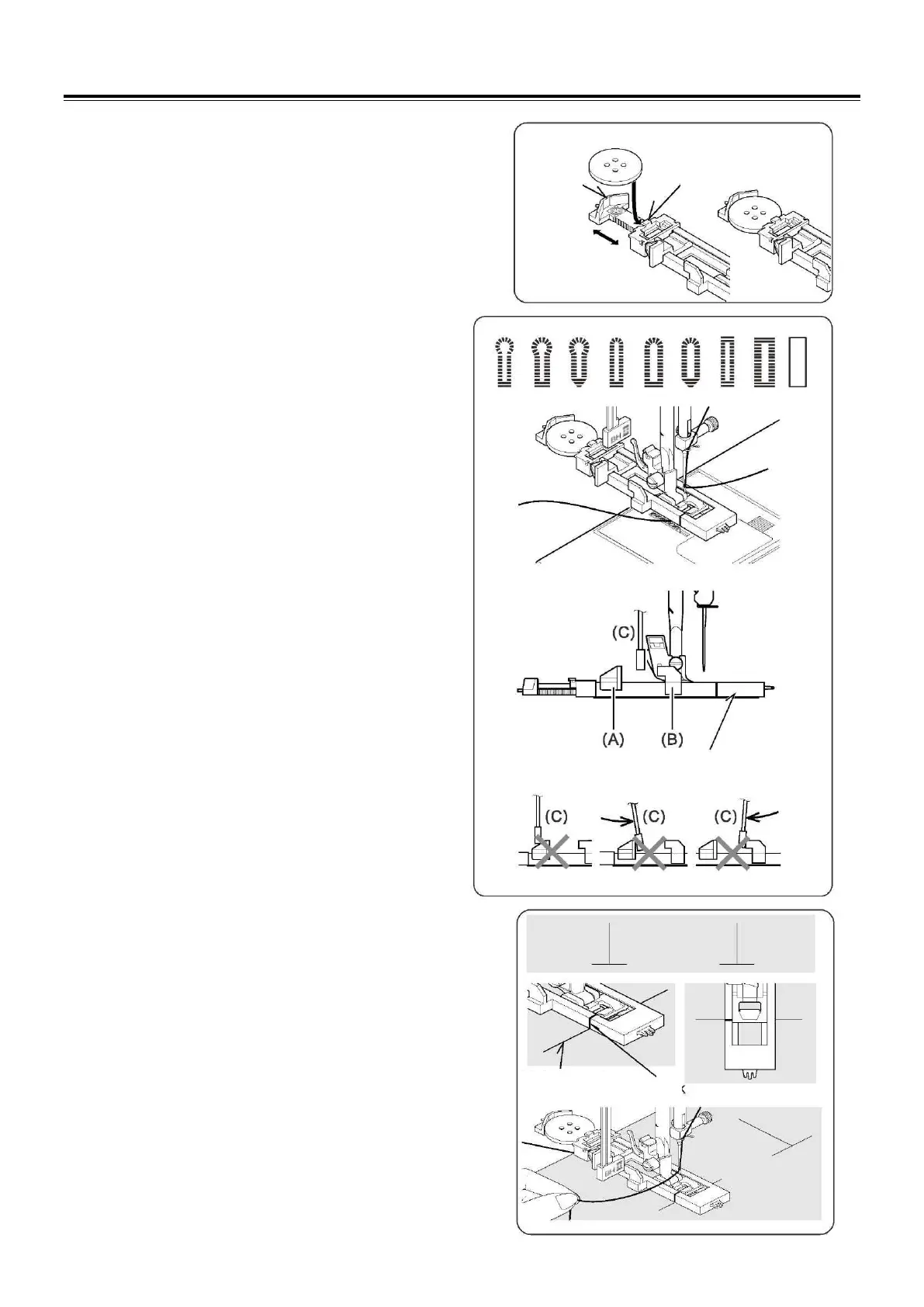
1. Select one of buttonhole patterns.
2. Replace the presser foot with the buttonhole foot.
(Refer to “Changing presser foot” on page 11.)
3. Insert the button into the buttonhole foot. (Refer to
“Using buttonhole foot” above.)
4. Lower the buttonhole lever (C) so that it drops down
vertically between the stoppers (A) and (B).
5. Carefully mark the position of buttonhole on your
garment.
6. Place the fabric under the foot. Pull out the bobbin
thread underneath the fabric to a length of about 4
inches to the rear.
7. Align the buttonhole mark on the fabric with the mark
on the buttonhole foot, and then lower the buttonhole
foot.
8. While holding the top thread, start the machine.


 To Next Page