3-15 Quick guide for installation and use - Strider Transmitter Link
Strider Link Series
SRFStrider-161004A-REV.A
Sinteck Sistemas Eletrônicos Ltda.
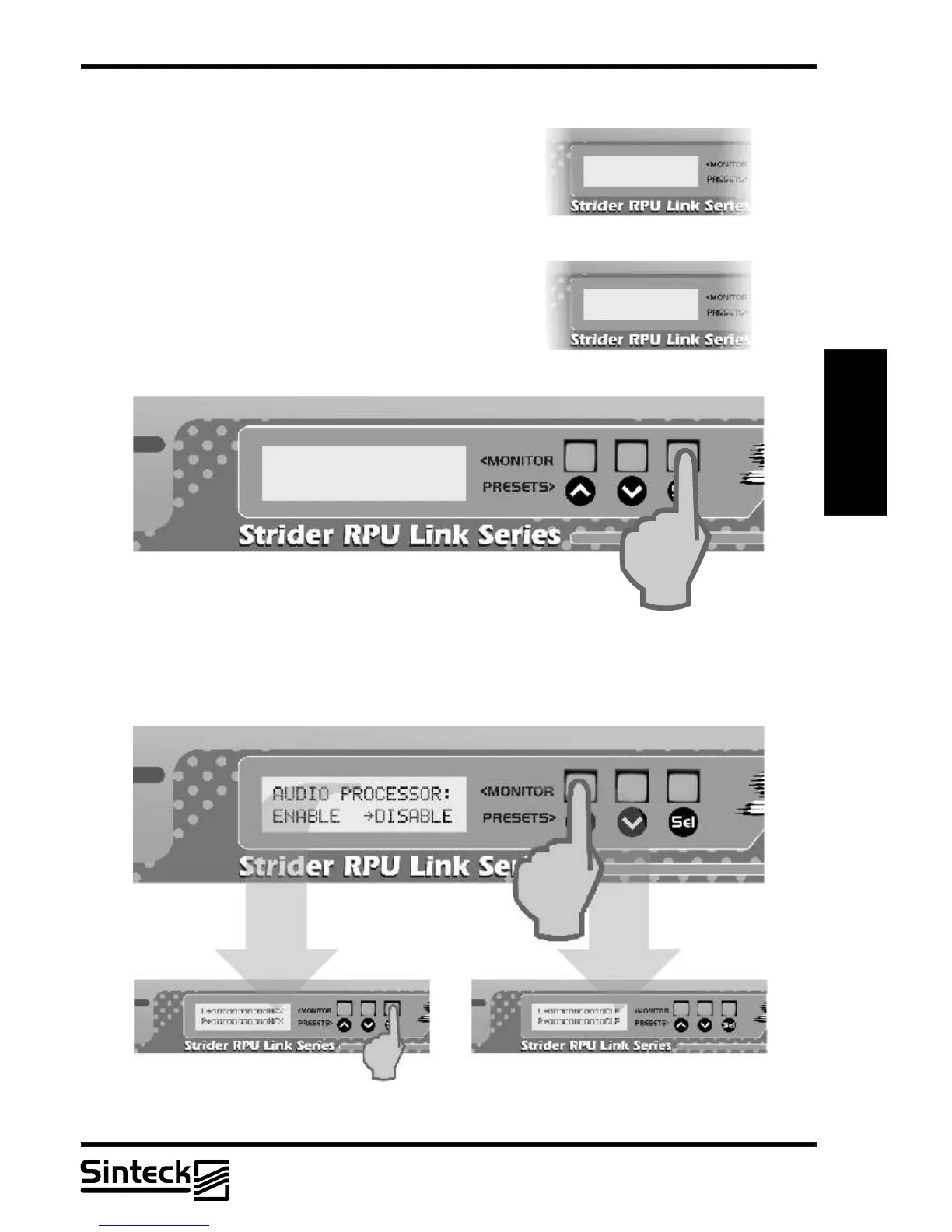
AUDIO PROCESSOR CONTROL MENU
This view only shows if theAUDIO PROCESSOR CARD
is installed and the menu MPX SELECTION is setted to
the position “INT”.
There will be cases that the user will wants to transmit
without limited/processed audio although the AUDIO
PROCESSOR CARD is installed. In this case, the
transmission with the audio processor disabled can be
possible, just pressing the button " UP " and the
transmitter will transmit with any audio limit level. This
funcion was placed for who wants to connect other audio
processor/limiters external to the Strider Transmitter
Link.
3
To change this function, the button “UP’ must be pressed and the AUDIO PROCESSOR
CARD is bypassed (DISABLE). Note that audio level in this moment is not controlled by the
audio processor and must be accompanied for the user. The previous menu “CHANNELS
LEFT&RIGHT” will to show non-controlled audio level measures.
AUDIO PROCESSOR
INSTALLED



 To Next Page