Pocket Printer A6 User’s Guide
SiPix Technical Support http://www.sipixdigital.com/support/
13
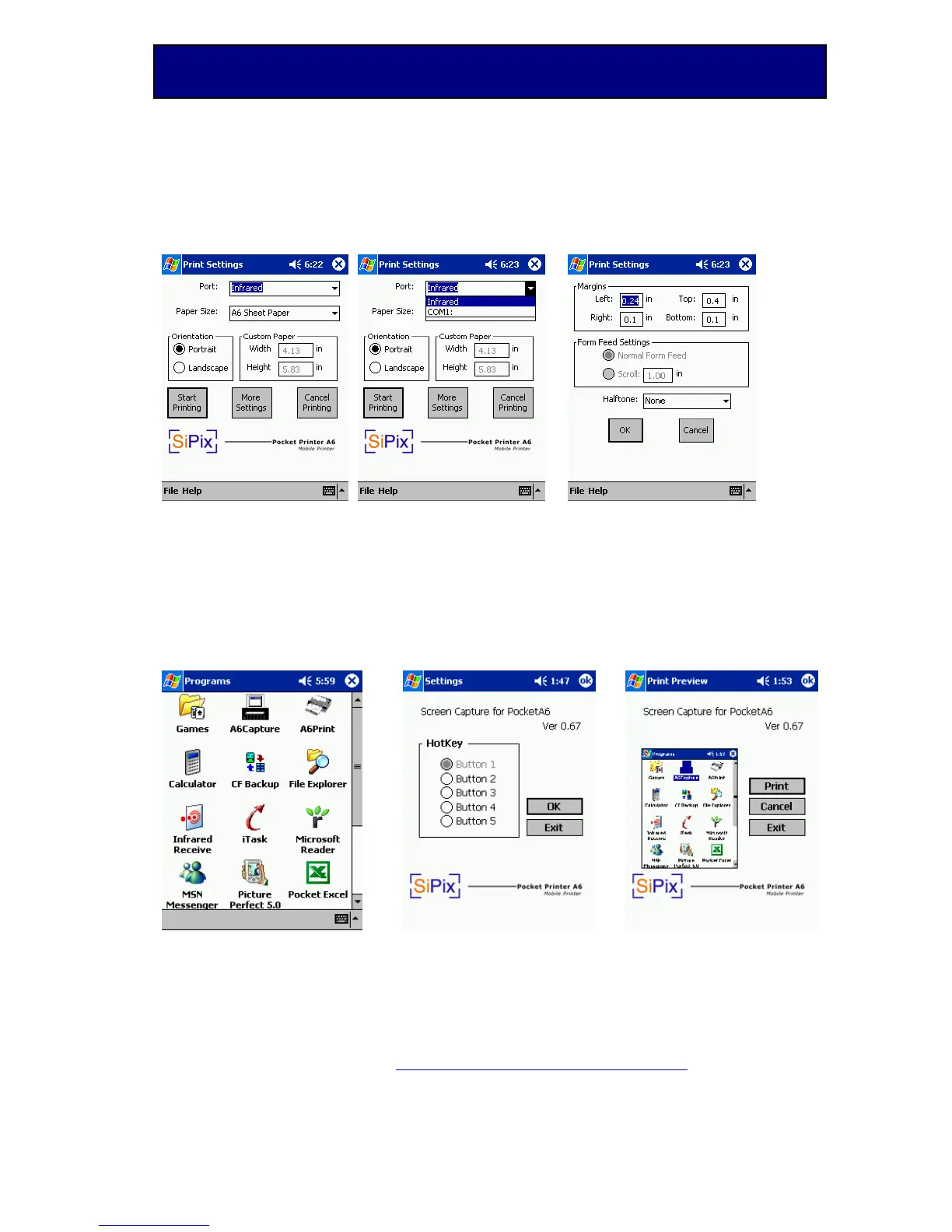
Print Settings:
Figure 4 Figure 5 Figure 6
How to Use Windows CE Capture Software
From your Pocket PC device, go to: Start Æ Programs Æ A6 Capture
(Figure A)
Upon opening the Capture program you will see a screen that allows you to
choose the capture buttons (Figure B). We recommend you choose Button 1 as
the Capture Button and then click OK.
When you want to capture a screen, press the Capture Button, and this will lead
you to the Print Preview screen (Figure C).
Figure A Figure B Figure C
On the Print Preview screen, the following choices are listed:
Print – Brings you to the print setting screen to print the page.
Cancel – Cancel printing, but will leave the program active.
Quit – Exit the program without printing and without leaving the program active.


 To Next Page