Pocket Printer A6 User’s Guide
SiPix Technical Support http://www.sipixdigital.com/support/
15
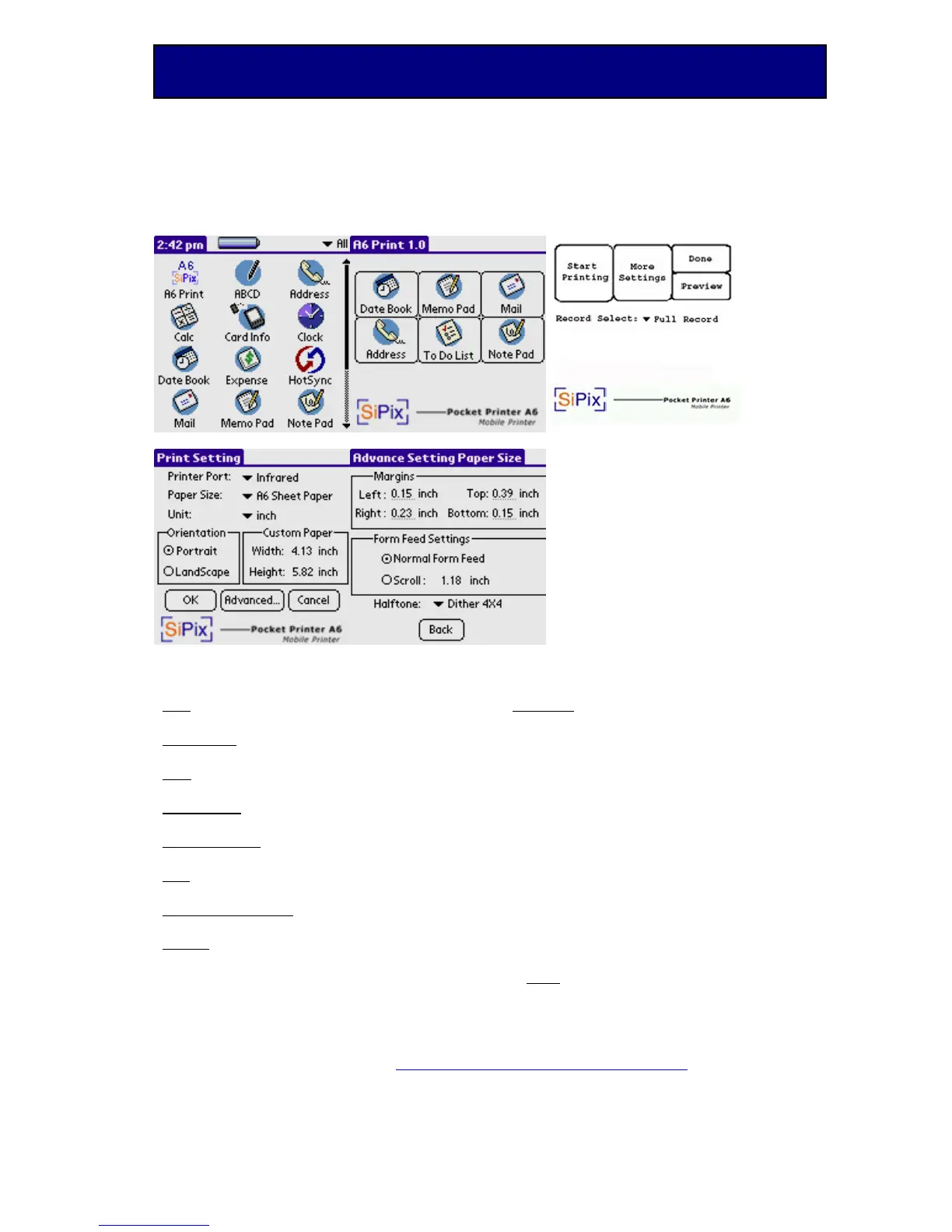
A6Print prints via infrared and in the future to PDA Serial Cables
Figure 1 Figure 2 Figure 3
Start Printing ~ Starts Print
More Settings ~ Defined in Table II
Done ~ Cancels Print Job
Preview ~ Allows you to view document
before printing.
Record Select ~ Defined in Table III
Figure 4 Figure 5
Figure 4 ~ More Settings Page Figure 5 ~ Advanced Settings
Port
- Set the interface from the Palm to the
Printer. Infrared ~or~ Cable
Paper Size
: - Set the appropriate paper type.
Sheet Paper ~or~ Roll Paper ~or~ Custom
Unit
- Set the unit of measure to be used for
print. Inch ~or~ MM
Orientation
- Change the orientation of the
document. Portrait ~or~ Landscape
Custom Paper
- For custom fitted paper.
Width ~or~ Length
OK:
- This will save settings and close the
“More Settings” / “Print Settings” screen.
Advanced Settings
- Go to the Advanced
Settings menu
Cancel
- Cancel any changes made to this
screen and return to the Print submenu. (This
does not cancel the print)
Margins:
Set Values for all four margins in
inches or mm.
Left ~ Right ~ Top ~ Bottom
Form Feed Settings:
Normal Form Feed ~ Standard settings
Scroll Feed ~ is a custom setting for the
amount of feed after a print on roll paper. It
adjusts if you wish for more or less room at
the bottom of the print.
Halftone:
None = B/W
Dither 4x4 = 16 shades of gray
Dither 8x8 = 32 shades of Gray
Back
- Return to the Print Settings Menu


 To Next Page