Pocket Printer A6 User’s Guide
SiPix Technical Support http://www.sipixdigital.com/support/
3
Welcome!
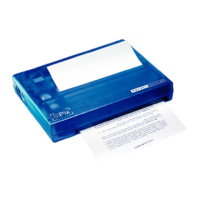
Thank you for purchasing your SiPix Pocket Printer A6.
We think that you will find the printer to be an exceptional value, as it offers a broad
range of connectivity options and functions. Because of it’s light weight and modest
power requirements, it’s likely that you will find that the Pocket Printer A6 will become
an important part of your everyday work life, whether you are a mobile professional,
student, or are simply interested in reclaiming valuable desktop real estate.
The Pocket Printer A6 can be connected to either a Windows-based PC, or to a Palm-
based PDA. Users interested in printing from a Windows CE environment should review
the information regarding third-party solutions.
Generally, the Pocket Printer A6 is an easy to use, easy to install product. But we’ve
created extensive technical resources for users who experience performance problems, or
require additional information regarding the installation or use of the printer. We
encourage users to read this guide, and to save it for future reference.
Further, the SiPix web site is an excellent resource for in-depth review of even more
technical information, as well as late-breaking news, updates, and recently released
drivers and software. Please visit the SiPix web resources at your leisure:
We encourage you to register your Pocket Printer A6 online, as it will ensure that you
receive service and support during the one-year warranty period. You can also elect
(optionally) to receive product news and updates, and information regarding special
offers on printer paper and accessories.
Again, thank you for choosing SiPix!


 To Next Page