3 Network Settings and Software Installation
3.1 Windows 2000/XP
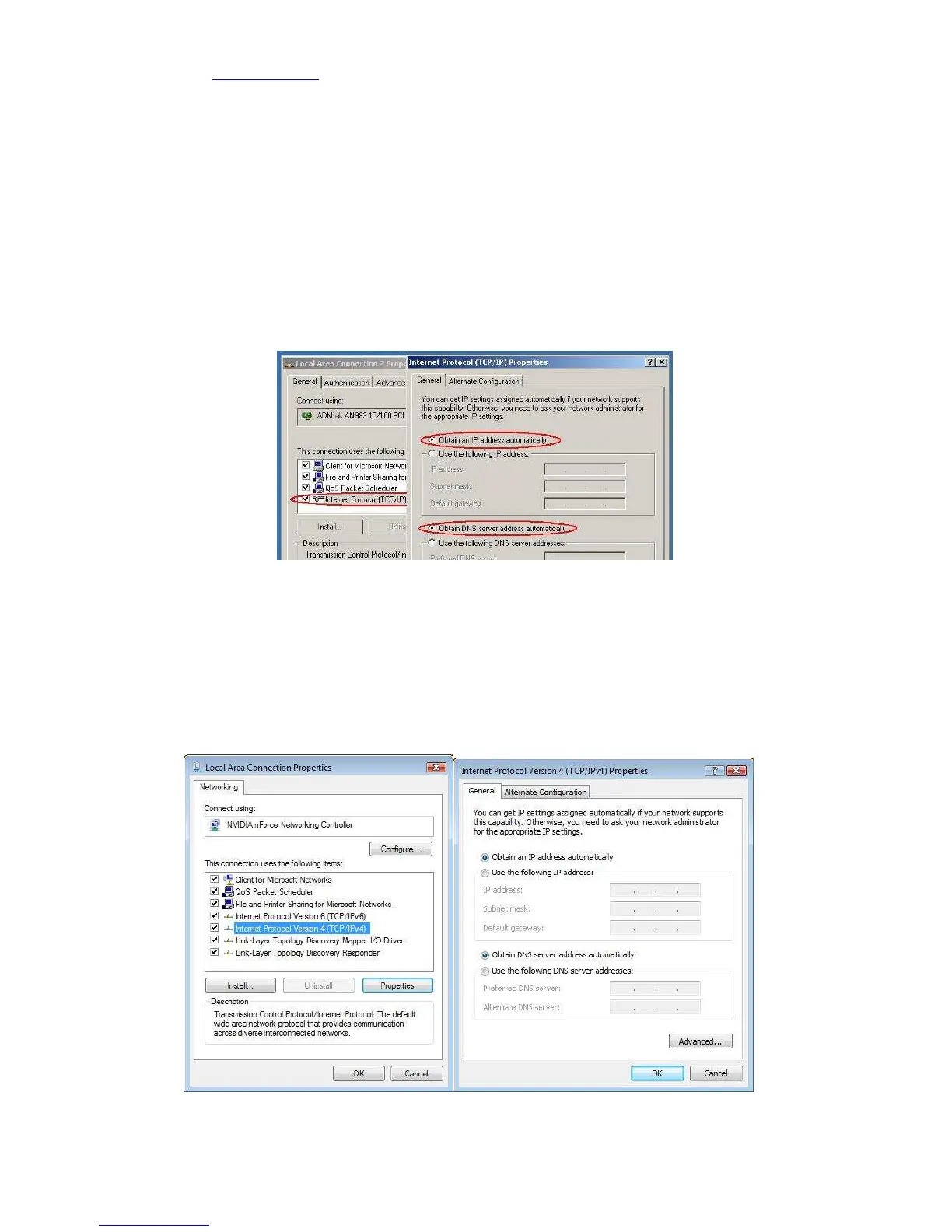
1. Go to START > Configuration screen > (Network and Internet connections >) Network
connections.
2. Click on your network connection with the right hand mouse button and select
‘Properties’.
3. Click on ‘Internetprotocol (TCP/IP)’, and click on the button ‘Properties’.
4. Select ‘Obtain an IP address automatically’.
5. Click on OK, then on Close, and restart your PC.
3.2 Windows Vista
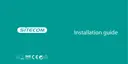
1. Click the Windows (Start) button.
2. Right-click with the mouse on ‘Network’, and select ‘Properties’.
3. Click ‘status’ of your network connection, and select ‘Properties’ in the new window.
4. In User Account Control click ‘continue’.
5. Click ‘Internet Protocol Version 4 (TCP/IPv4)’, then click ‘Properties’.
6. Select ‘Obtain an IP address automatically’.
7. Click OK, then close all windows and restart your PC.



 To Next Page