You can also remove the memory card and insert it into a card reader connected to your computer.
Files are not automacally deleted when copied to a computer ( unless you use the “Cut” command
instead of “Copy”).
In order to delete selected videos and photos (except protected content), you can use one of the
following two methods:
In Playback mode navigate to a specific video or photo. Press and hold the “Up” buon and then a
“Delete” dialog box will appear with opons: “Delete Current?”, “Delete All?” or “Cancel”. Select
“Delete Current?”, and when prompted “Erase This?” select “OK”.
In Playback mode navigate to the specific video or photo you want to delete. Press the Mode buon
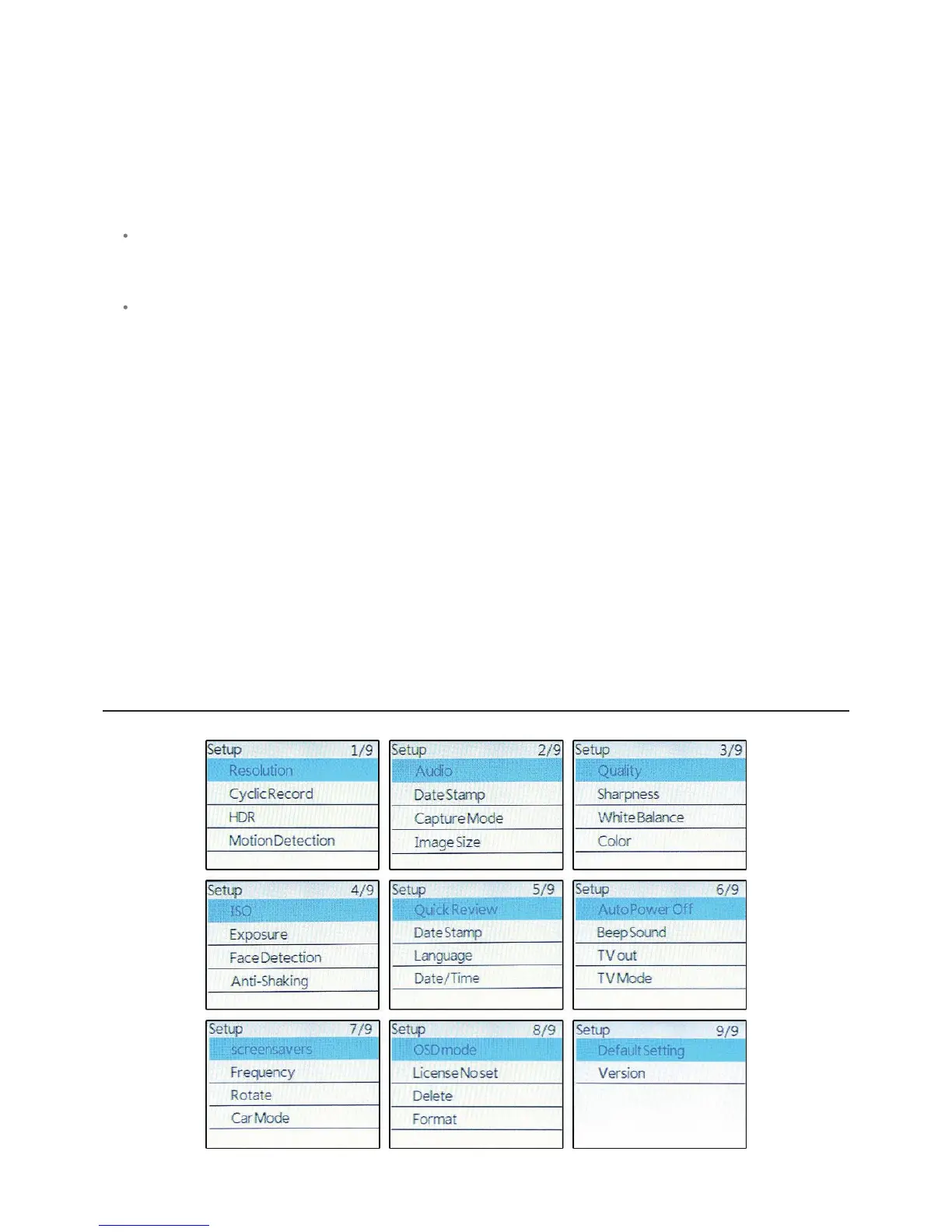
to advance to the Setup menu and then highlight “Delete” on page 8 of the Setup menu and press
the “Shuer/Select” buon. A Delete dialog box appears with opons: “Delete Current?” or “Delete
All?”. Highlight “Delete Current?” and press the “Shuer/Select” buon, and when prompted “Erase
This?”, highlight “OK” and press the “Shuer/Select” buon.
In order to delete all the recorded content, you can follow the same steps as above, and choose
“Delete All?” instead of “Delete Current?”. This will delete all the content, except the ones you have
protected i.e. the ones that have the “key” icon. If you aempt to delete a protected video a blue
pop-up appears with the word “Protected!”. A message then appear across the screen and you will
not be able to change modes using the Mode buon unl you have played the video for a moment.
In order to delete all the content on the memory card, including the protected videos or images,
enter the “Setup” menu and navigate to page 8. Here you can select the “Format” opon, that will
format the memory card, effecvely and irreversibly deleng all stored content. You can also format
the memory card through the computer, but it is advisable to do so by using the camera.
SETUP MENUSCREEN



 To Next Page