The route guidance takes place as follows
▶
Through graphical driving instructions in the Infotainment display screen and
in the display of the instrument cluster.
▶
With navigation announcements.
Infotainment tries to allow for continued guidance even if the navigation data
is incomplete or there is no data at all for the given area.
The route is recalculated each time if you ignore driving recommendations or
change the route.
CAUTION
The nav. announcements provided may vary from the actual situations, e.g. due
to out-of-date navigation data.
Destination details
Fig. 238
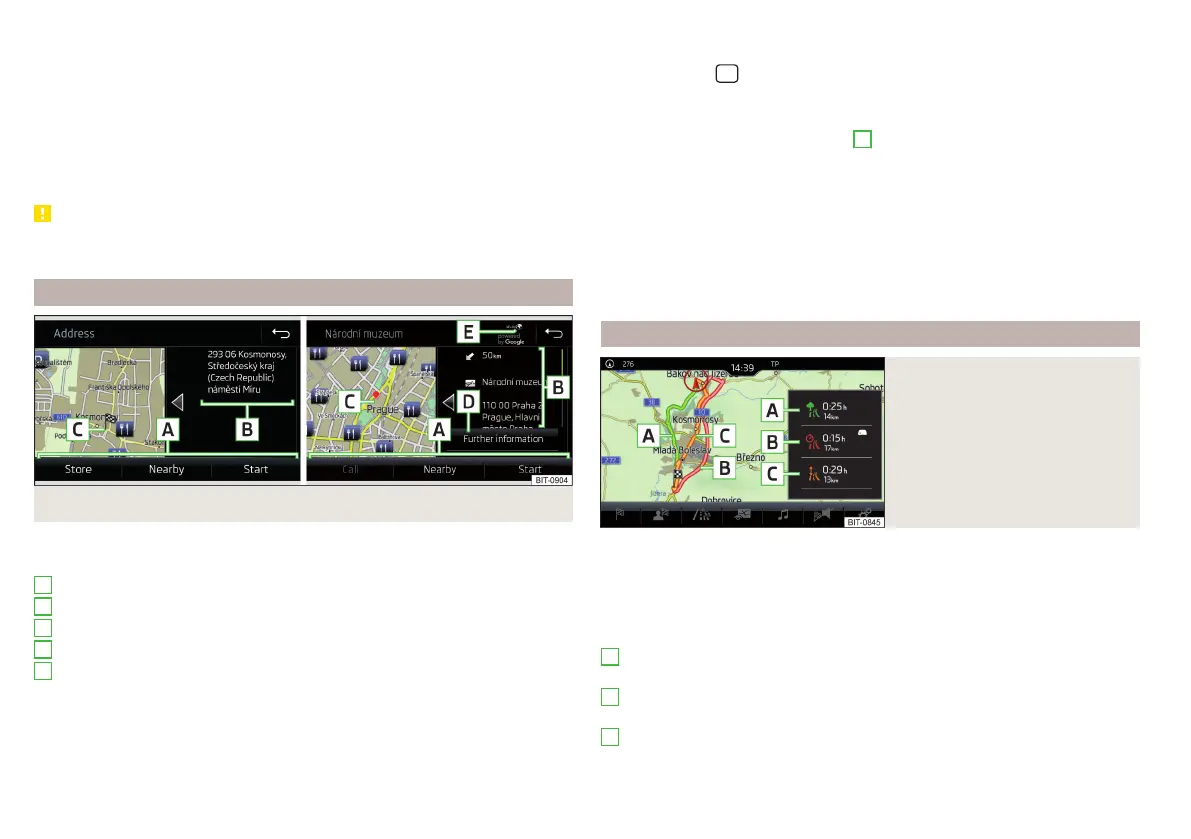
Details of: destination found in the navigation data/online
The following menu items and information are displayed in the destination de-
tails » Fig. 238.
Area with functional surfaces
Detailed destination information
Destination position in the map
Detailed target information (if available)
Status of online services
Display the destination details
The destination details can be displayed in one of the following ways.
A
B
C
D
E
▶
While entering a destination.
▶
By tapping the function surface in the destination list.
▶
By tapping the
sensor field in the Navigation main menu (not applicable
to Infotainment Columbus), the details of the last destination are displayed.
Function surfaces
Using functional surfaces in the field
A
the following functions can be per-
formed, depending on the context.
▶
Start / Stop route guidance.
▶
Searching for a nearby destination » page 180.
▶
Setting route options.
▶
Store destination.
▶
Edit destination (the object can be deleted, renamed or saved).
▶
Dial the POI telephone number (if Infotainment is connected to a tele-
phone» page 160, Pairing and connecting).
Route calculation and start route guidance
Fig. 239
Alternative routes
Route calculation is done on the basis of the set route options. The route op-
tions can be set: →
Route options
.
Alternative routes
With selection of alternative routes turned on, the following menu is displayed
after the calculation of a new route » Fig. 239.
- calculate the most economical route with the shortest driving time
and shortest distance travelled – the route is highlighted green
- calculate the fastest route to the destination, even if a detour is nec-
essary –the route is highlighted in red
- calculate the shortest route to the destination, even if a longer driving
time is required – the route is highlighted in orange
A
B
C
190
Infotainment















 To Next Page