43
Support Hotline: +49 (0) 2661 98088-112
Support E-Mail: support@sks-kinkel.de
Version No. 2.0
Document No. 97010703
SKS-Kinkel Elektronik GmbH
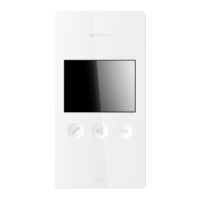
10006901 BSV2012 Video indoor station hands-free
EN
Set the SKS BUS call address at the DIP switch on the back of
the BS2012 video indoor station hands-free. Each address is as-
signed to a bell button at the door station. The SKS BUS table of
call addresses can be found in the appendix.
Pay particular attention to the setting of the DIP switch when
the BS2012 video indoor station hands-free is replaced!
Remount the BS2012 video indoor station hands-free in the upper
part of the supporting frame.
Subsequently press the BS2012 video indoor station hands-free
onto the frame until it clicks into place.
When joining the indoor station and its frame both parts must
match exactly, so that the contacts on the frame t properly into
the terminals of the indoor station.
7.3 Surface mounting
Using the screws attach the supporting frame of the BS2012 vid-
eo indoor station hands-free to the wall. Please use the fastening
holes provided on the supporting frame.
Pull the installation cable through the opening of the support-
ing frame before screwing it onto the wall! When doing so put
only those wires into the device which are actually needed. The
cable mustn’t be squashed or bent sharply.


 To Next Page