SKS-Kinkel Elektronik GmbH
10006901 BSV2012 Video indoor station hands-free
EN
Support Hotline: +49 (0) 2661 98088-112
Support E-Mail: support@sks-kinkel.de
Version No. 2.0
Document No. 97010703
56
Attention
After a reset of the device only the call address set at the DIP switch is eective.
9 Operation
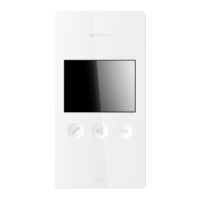
The BSV2012 Video Indoor Station is operated by using both the touch keys below the display and the touch screen.
9.1 Touch keys
1. Receiver touch key
2. Mute touch key
3. Door opener touch key
9.2 vOperating with touch keys
Image Function Description
Take call
To take a call after the indoor station has rung, push the
receiver key to activate the speech function with the door
station. Push the receiver key again to end the call.
Please mind that a call is active for a maximum of two
minutes only after ringing and that the door opener will
also function in this time span only. In case the call is
not answered, LED 1 starts ashing to indicate the active
call. Flashing stops as soon as the call is answered.
Deactivate ringtone
Hold the Mute touch key (for 3 seconds) until you hear a
sound conrming that the ringtone (both for door and oor
calls) is now deactivated. To signal this LED 2 (situated below
the mute touch key) is ashing once every two seconds.
Please mind that the ringtone is automatically reactivated
after 12 hours or after power failure.
Incoming calls are still recognizable by the ashing of LED 1.
Activate ringtone
Shortly touch the Mute touch key. You will hear a high signal
tone indicating that the ringtone is active again.


 To Next Page