213201ACA SJ40 T+, SJ45 T+, SJ61 T+, SJ66 T+
56
Section 4 – Inspections Before Operation Function tests
4.3-11 Do a test of the footswitch and all
the boom and platform functions
1. Make sure the emergency-stop button is pulled
out.
2. Make sure the engine start/on/off switch is in
the on position.
3. Do not start the engine.
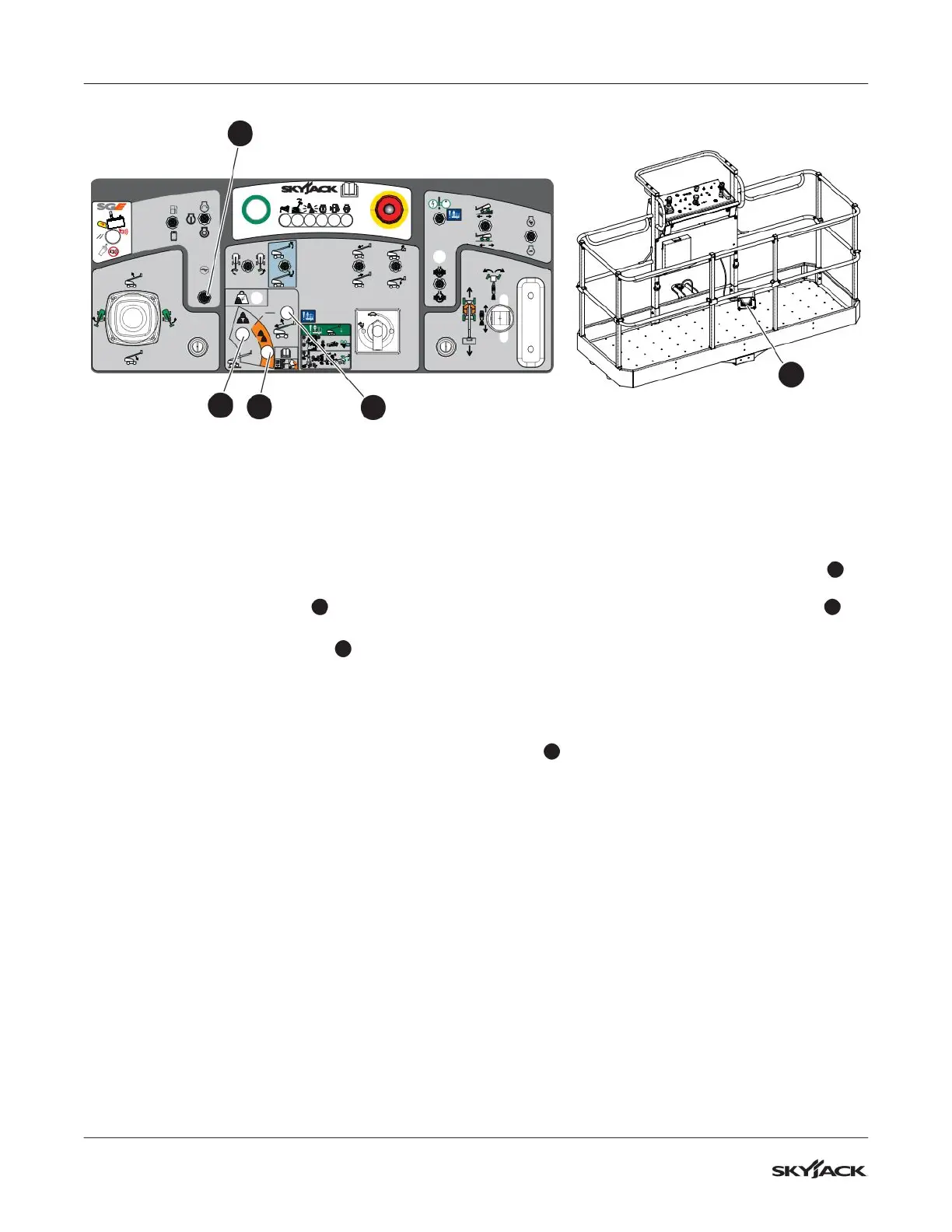
4. Move the generator switch
2
(optional
equipment) to the off position.
5. Press and hold the footswitch
6
and select
the start position from the engine start/on/off
switch to try to start the engine.
▪
Result: The engine does not start.
6. Do not press the footswitch, and try to start the
engine.
▪
Result: The engine starts.
7. Do not press the footswitch, and do a test
of each boom and platform function with the
engine on.
▪
Result: The MEWP functions do not operate.
NOTE
A 7-second anti-tiedown feature prevents the
footswitch operation when the operator presses it
for 7 seconds without the activation of a function.
8. Press and hold the footswitch, and do a test
of all the boom and platform functions with the
engine on.
▪
Result: All MEWP functions operate.
4.3-12 Do a test of the platform capacity
zone indicator lights
1. Make sure the boom is in the stowed position.
2. Push the emergency-stop button.
3. Pull the emergency-stop button.
▪
Result: The capacity zone border light
5
illuminates for 1 second and then goes off.
The high-capacity zone indicator light
3
illuminates.
4. Start the engine.
5. Press and hold the footswitch and extend
the boom until the high-capacity zone indicator
light goes off.
▪
Result: The low-capacity zone indicator light
4
illuminates.
6. Press and hold the footswitch and fully retract
and lower the boom.
1
3
4
+
STOP
=
2
+
2
6
3
4
5









 To Next Page