GB 20
7. The OSD Menu – Miscellaneous
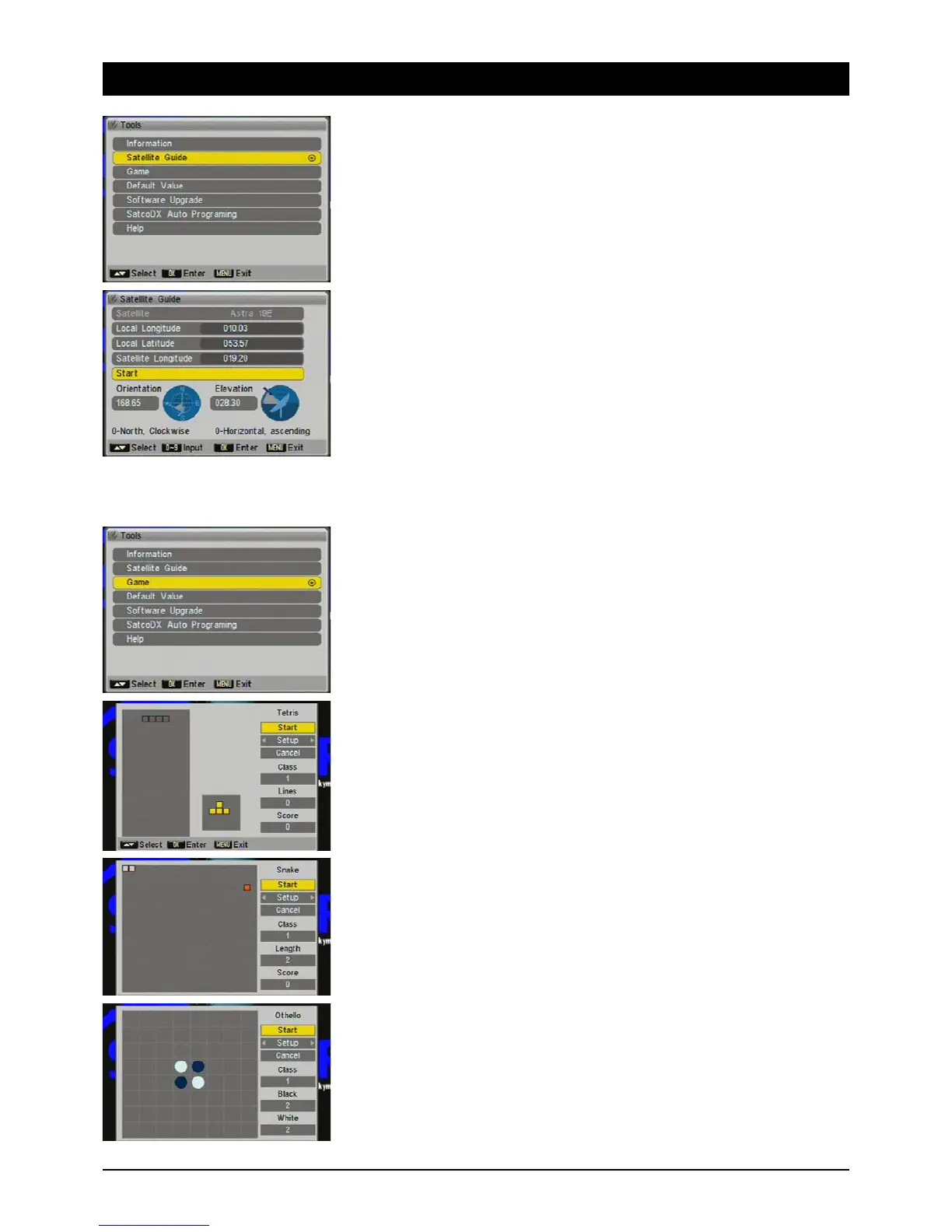
4.2 Antenna alignment
To align the antenna to the desired satellite, this menu provides useful help. Coordinates 0° North,
90° East, 180° South and 270° West.
Local longitude
Enter the longitude of where the antenna is here.
Example Hamburg: 10.03 (Enter 01003).
Local latitude
Enter the latitude of where the antenna is here.
Example Hamburg: 53.57 (Enter 05357).
Satellite position
Enter the orbiting position of the desired satellite here.
Example ASTRA 19.2° East: enter 01920 or HOTBIRD 13° East: enter 01300.
Calculation
After calculating these values the alignment angle for Hamburg is 168.65° and the antenna
inclination 28.3°.
Direction
With the aid of a compass turn the antenna to 168.65° (example Hamburg). Note: alignment
with a compass is not very accurate and is only a rough guide. Check the satellite receiver's
signal strength and quality displays.
Inclination
The satellite antenna has a mechanical scale to adjust the tilt angle (elevation angle). For
example, in Hamburg set the angle to 28.3°. Note: check the satellite receiver's signal strength
and signal quality displays. The calculated tilt angle only applies if the antenna is mounted
100% perpendicular.
4.3 Games
You have a choice of three entertaining classic games.
4.3.1 Tetris
4.3.2 Snake
4.3.3 Othello



 To Next Page