SMS
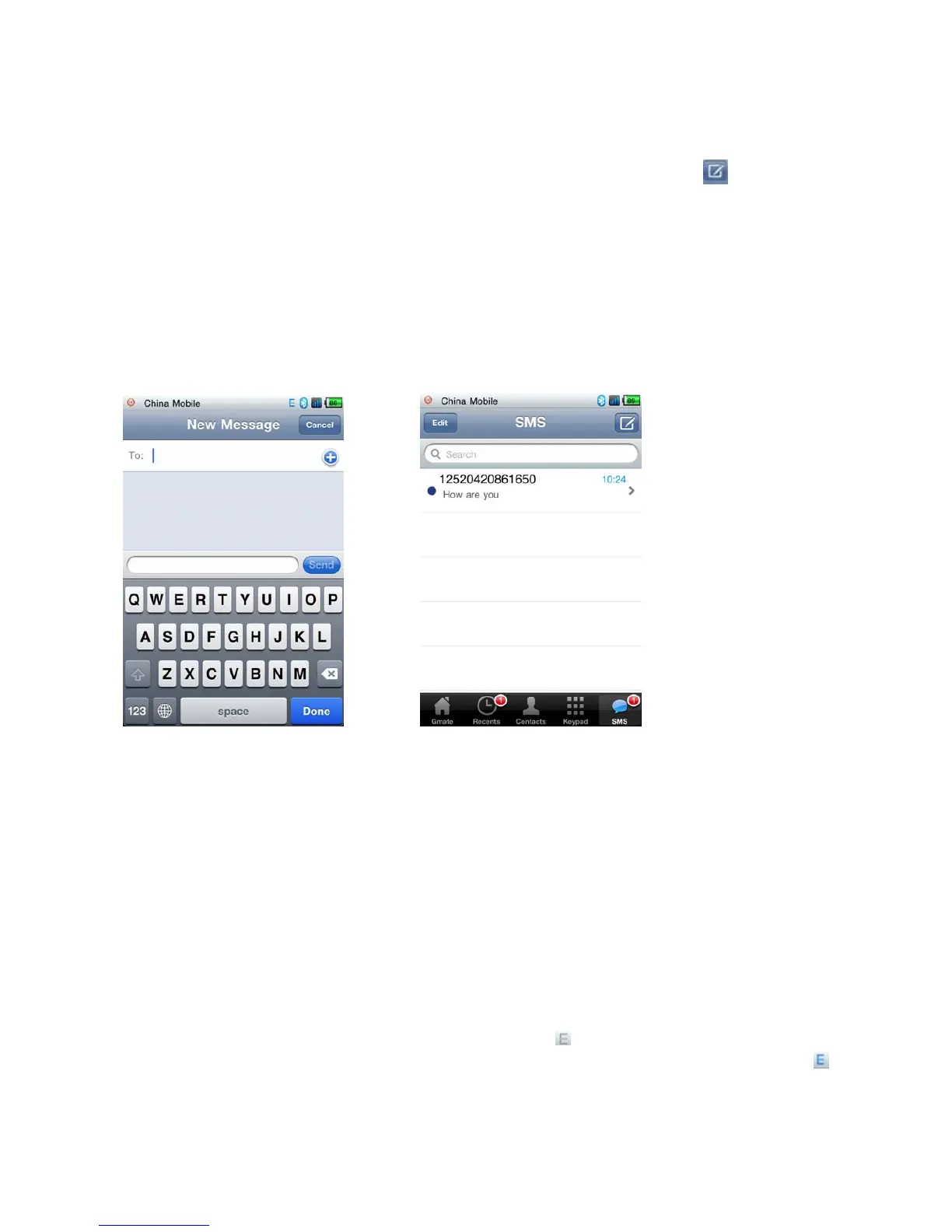
A) Compose and Send Short message: Select SMS on the client’s main interface, select the icon to
compose a new message, press send once complete (As shown in Fig.1).
B) Receive and Read Short Message: Mobile phone will alert with text and tone, Gmate+ will also vibrate; open
and view messages from the SMS menu of the Gmate client (Blue dot indicates unread messages, as shown in
Fig.2).
Note: At present, Gmate+ only supports SMS but not MMS (multimedia message sending) function.
Fig.1 Fig.2
Internet
Note: When using Gmate+ internet, internet settings on your i-Device must be disabled; Gmate+ supports
gsm(edge), and can be used with or without proxy settings.
Without Proxy
1.SettingsInternet SettingAPN Name:Input APN Name (Your APN Name depends on your SIM card,
please consult with your operator for details)。The figure below uses China Mobile as example.
2.Switch on Internet from the client’s main interface, the
icon will appear in the upper-right
corner of the screen of your i-Device(indicating internet function enabled),once the
icon turns blue(indicating online status),internet is online and available for use(As
shown below)。



 To Next Page