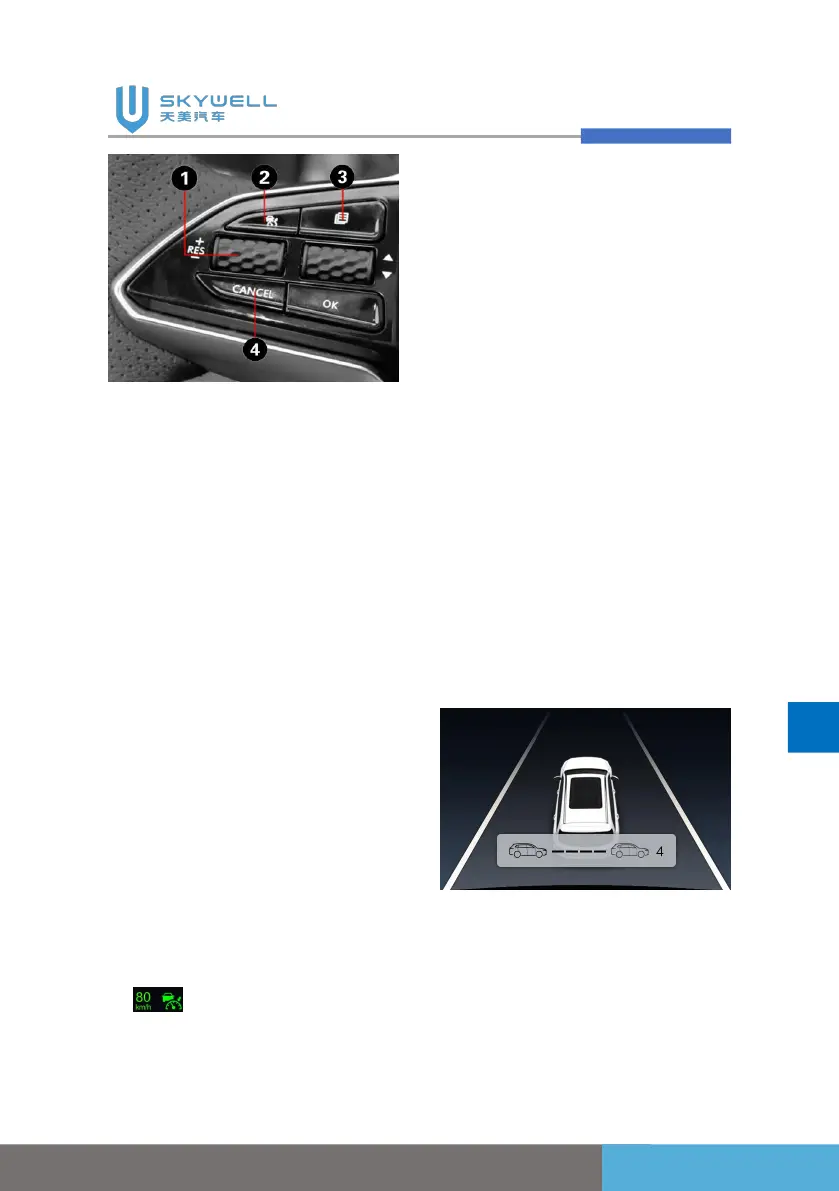
1. Scroll up: Cruise
speed+/Resume Scroll
down: Cruise speed-/Set;
2. Cruise on/off;
3. Active cruise distance
adjustment;
4. Cruise cancellation
Ways to increase the preset
cruise speed:
When the adaptive cruise
system is activated, scroll up
button1 (see the figure above),
and each time you press it
increases the preset speed by
5km/h, the maximum speed is
120km/h, and the set speed
will be displayed in front of the
function icon, such as setting
the speed to 80km/h, the icon
is .
Ways to reduce the preset
cruising speed:
When the adaptive cruise
system is activated, scroll up
button1 (see the figure above),
and each time you press it
increases the preset speed by
5km/h, and the minimum set
speed is 30km/h.
Ways to increase/decrease
following distance:
When the adaptive cruise
system is activated, press the
active cruise distance
adjustment button to adjust the
distance to one to four levels,
which can be
cycled.
Cancel adaptive cruise:
1. Step on the brake pedal;
2. Press the cruise cancel
button on the steering


 To Next Page