The Intelligent Cruise Assist
function integrates adaptive
cruise and lane centering
functions, which can keep the
vehicle in the middle of the
lane and follow the preceding
vehicle or drive at a constant
speed when the vehicle is>
0km/h and the lane line is
recognized.
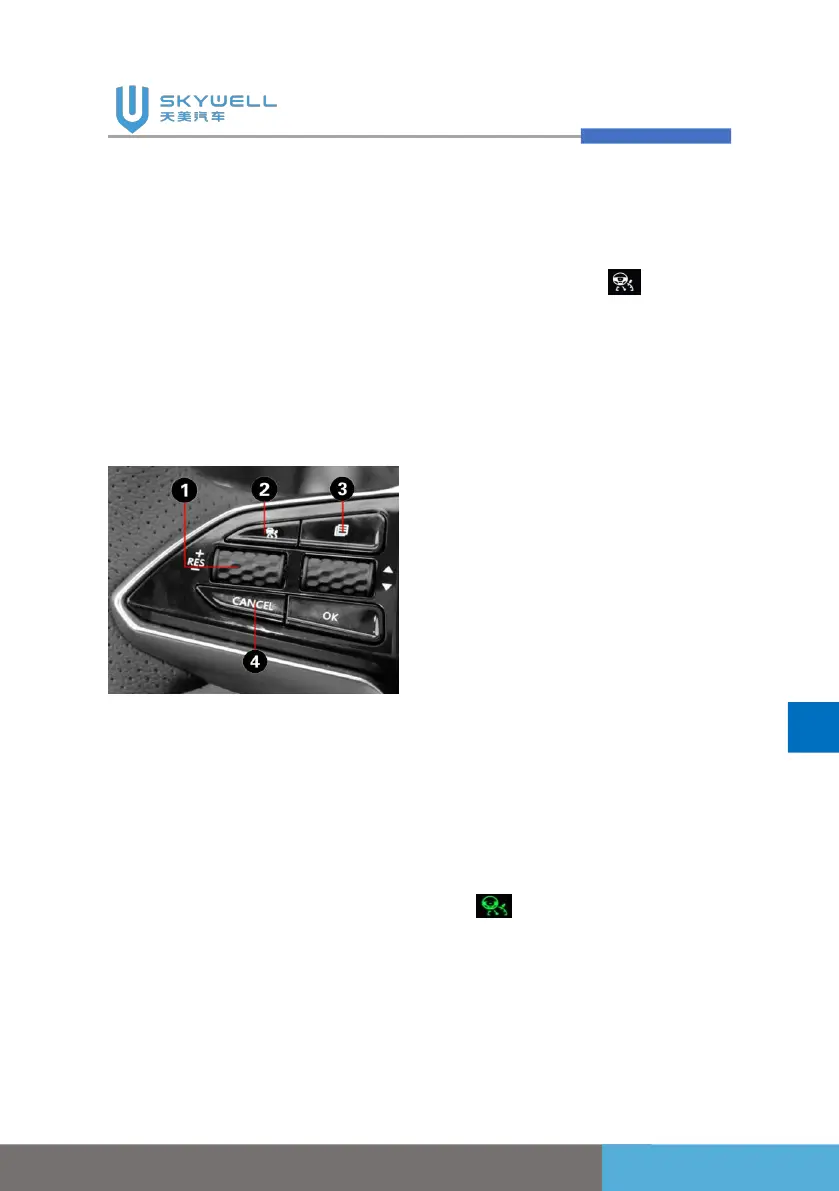
1. Scroll up: Cruise
speed+/Resume
Scroll down: Cruise
speed-/Set;
2. Cruise on/off;
3. Active cruise distance
adjustment;
4. Cruise cancellation
Function ON:
Press the cruise control button
on the left side of the steering
wheel twice, the intelligent
cruise control indicator on the
instrument cluster assy lights
up the white icon .
Function activation:
1. 0 km/h < vehicle speed <
150km/h, release
acceleration and brake
pedal;
2. Click the set button
(activate at the current
speed to enter the cruise
mode) or resume button
(activate the cruise function,
and use the speed set in
the last cruise mode as the
target speed for this cruise),
the adaptive cruise control
on the instrument indicator
lights up the green icon;
3. The lane line is clearly
visible, and the lane line
becomes a green icon
.
4. Set the following distance
level during cruise through
active cruise distance


 To Next Page