Driving preparation and setting
79
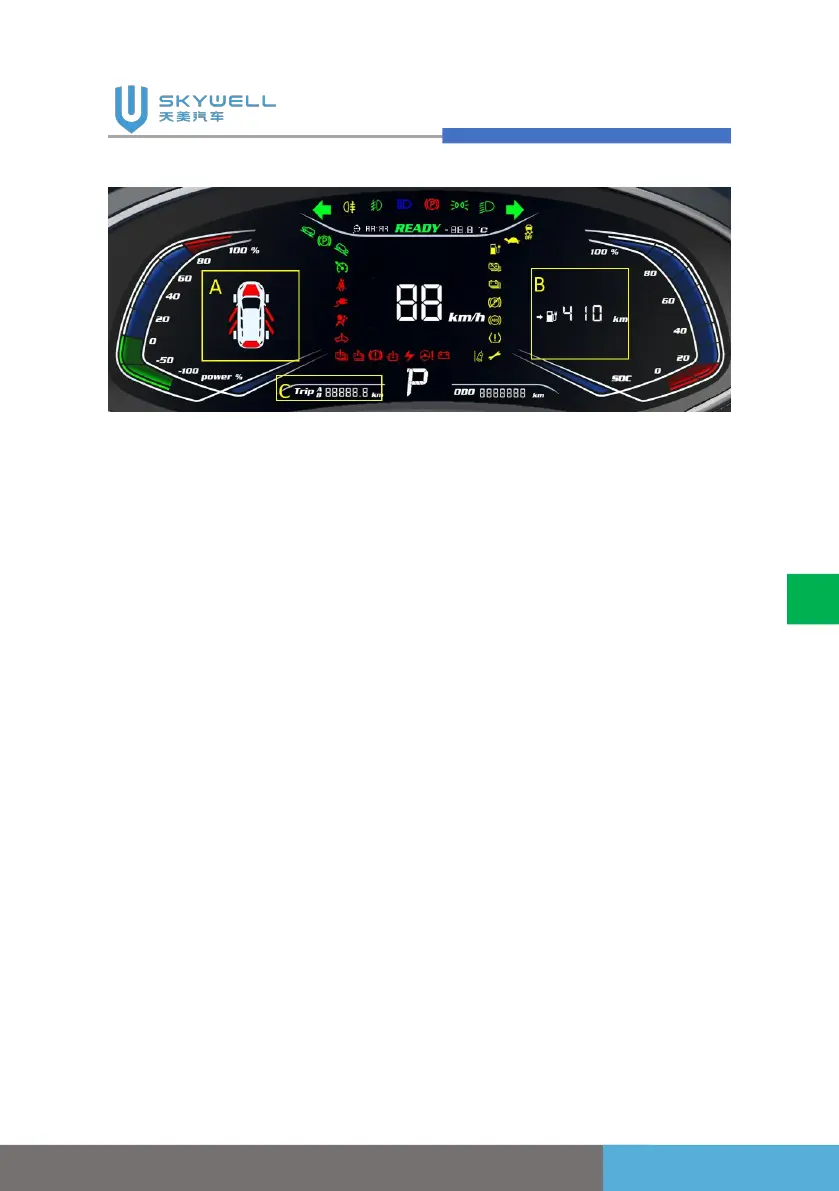
12.3IN instrument cluster assy(segment code screen)
1. Press the "Instrument
confirmation/return" button
to switch related
information display in area
A (door opening prompt/tire
pressure monitoring
display area), area B
(display area for average
energy consumption,
cruising range), and area C
(subtotal mileage trip A, trip
B). And when the subtotal
mileage trip A or trip B in
area C is selected, the
subtotal mileage can be
cleared by long pressing
the "Instrument
confirmation/return key".
2. Press the "Instrument page
up/page down" key to
adjust the brightness of the
instrument backlight.
3. If the cruise function is
configured, the cruise
function can be set via the
"Cruise on/off" button,
"Cruise cancellation"
button, "Active cruise
distance adjustment+/-"
button and "Cruise reset;
Cruise speed+/-" button.
4. The time on the instrument
comes from the network. If
the network time is lost,
you can press the
"Instrument
confirmation/return" key to
switch to the non-trip A\trip



 To Next Page