SL-10N Cloud
21 22
Alarm
Motion
I/O
Channel
I/O alarm status
Record
3
NC
Alarm
Motion
I/O
Channel
Sensitivity
Detection area
MD enable
Record
Push
3
4
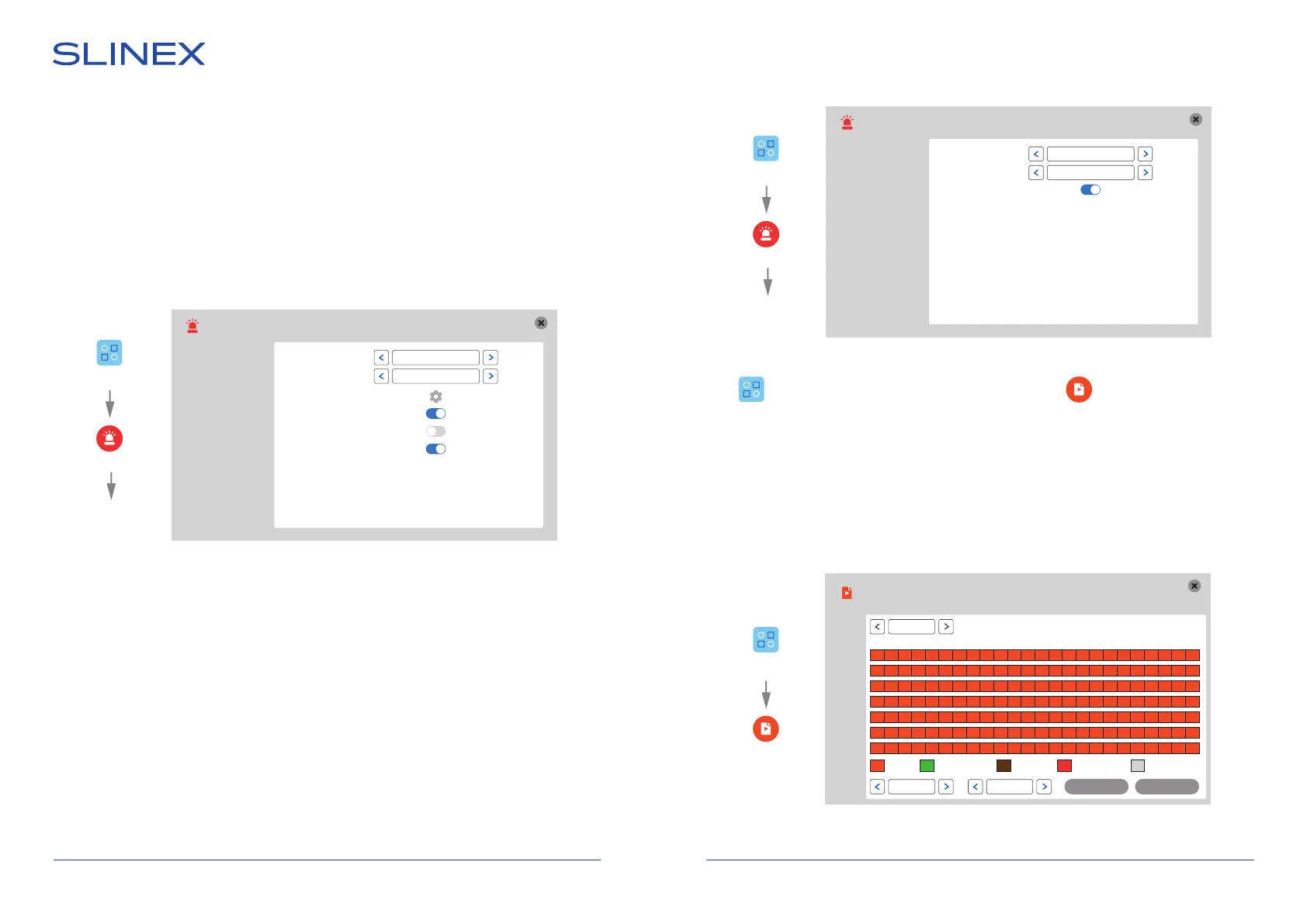
Hardware motion detection can detect motion by means of external device (hardware motion sensor).
There are two types of sensors that can be connected to the monitor: sensor with normally opened
contacts (NO) and sensor with normally closed contacts (NC).
Depending on the type of sensors appropriate settings must be made in the hardware motion detection
settings menu.
Hardware motion detection has a number of settings described below:
Settings → Alarm → I/O
Channel − current channel number for making settings (3 or 4);
I/O alarm status:
«NO», motion sensor with normally disconnected contacts are used;
«NC», motion sensor with normally connected contacts are used;
«Close», motion sensor is not used;
Record − enable/disable recording if motion is detected.
6.3.5. Schedule settings
Press icon on the tool bar to enter monitor settings, then press icon to enter schedule
settings.
There are five types of schedule settings:
«MD» – program motion detection recording (orange color in schedule table);
«Normal» – constant recording (green color in schedule table);
«I/O» – motion detection recording using external sensors (brown color in schedule table);
«MD, I/O» – recording using program motion detection and external sensors (red color in schedule table);
«None» – disable recording (grey color in schedule table).
Scheduling
CHN 3
Copy
00 06 12 18 23
MD Normal I/O MD, I/O None
Mon.
Tue.
Wed.
Thu.
Fri.
Sat.
Sun.
Copy
Save
All
Mon
>>
Alarm
Motion
Settings
Alarm
I/O
Settings
Scheduling
Settings
Software motion detection has a number of settings described below:
Settings → Alarm → Motion
Channel − current channel number for making settings (1,2,3,4 or All);
Sensitivity − software motion detection sensitivity (from 1 to 8);
Detection area − motion detection area setting, press and hold the touch on any point of the
screen to exit current menu;
MD enable − enable/disable software motion detection for current channel;
Record − enable/disable recording if motion is detected;
Push − enable/disable push messages sending if motion is detected.


 To Next Page