18 snapperpro.com
C. Choke
D. Ignition Switch
E. Hour Meter
F. Malfunction Indicator Lamp (M.I.L.)
G. Electronic Throttle Control Rocker Switch
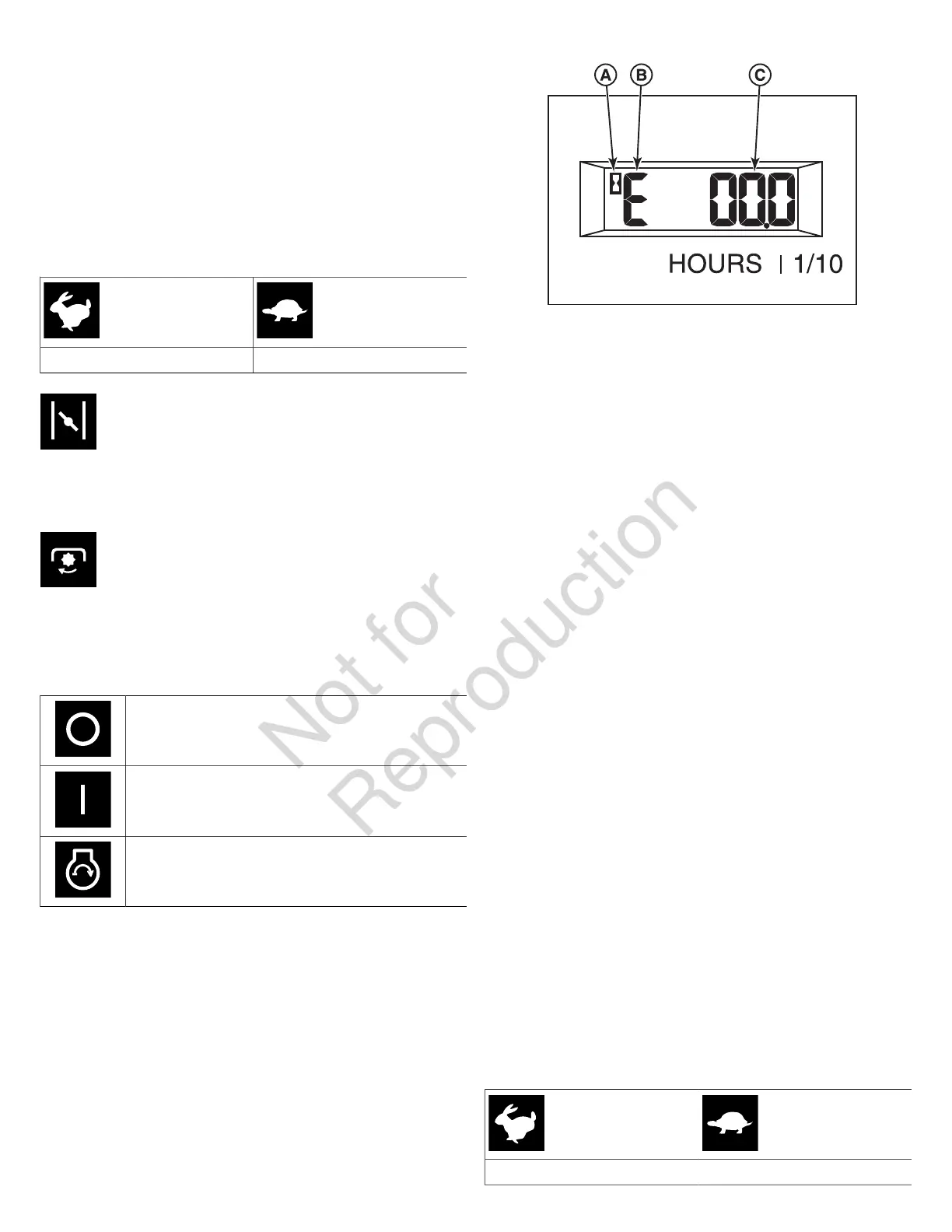
Throttle Control: The throttle controls engine speed. Move
the throttle forward to increase engine speed and back to
decrease engine speed. Always operate at FULL throttle
when mowing.
Fast throttle speed. Slow throttle speed.
Choke: Close the choke for cold starting. Open the
choke once the engine starts. A warm engine may not require
choking. Pull the knob UP to close the choke. Push the knob
DOWN to open the choke.
PTO (Power Take Off) Switch: The PTO switch
engages and disengages the mower blades. Pull UP on the
switch to engage, and push DOWN to disengage.
Ignition Switch: The ignition switch starts and stops the
engine, it has three positions:
OFF: Stops the engine and shuts off the
electrical system.
RUN: Allows the engine to run and powers the
electrical system.
START: Cranks the engine for starting.
Note:Never leave the ignition switch in the RUN position with
the engine stopped—this drains the battery.
Your machine is equipped with one of the different styles of
hour meter listed below.
Hour Meter (Displays Numbers Only): The hour meter
measures the number of hours that the engine has run. The
hour meter has a self contained power source so the total
hours are always visible.
Hour Meter (Displays Numbers and Letters): This unit is
equipped with a dual function hour meter that records the
number of hours that the engine has run and the number of
hours that the PTO switch has been engaged.
"A" - Hour Glass Icon - The hour glass icon flashes when
the hour meter is recording the passage of time.
"B" - Mode Icon - The mode icon will display an "E" when
displaying engine hours, and a "P" when displaying PTO
hours.
"C" - Time Display - This is the number of hours that are
recorded.
The default display of the hour meter is engine hours. The
mode icon will display a "E" and the hour glass icon will not
flash.
To begin recording engine hours, start the unit's engine and
release the parking brake. The hour glass icon will flash.
To begin recording PTO hours, pull the PTO switch up to
engage the PTO clutch. The unit's engine must be running.
The mode icon will display a "P" and the hour glass icon will
flash.
While recording PTO hours, the hour meter also records
engine hours; however, the hour meter only displays PTO
hours when recording PTO hours.
To stop recording PTO hours, push the PTO switch down to
disengage the PTO clutch.
To stop recording engine hours, engage the parking brake.
The hour meter has a self contained power source so that the
recorded hours are always visible even when the engine is
OFF.
Malfunction Indicator Lamp (M.I.L.): The malfunction
indicator lamp detects problems with the engine. If the
malfunction indicator lamp begins to flash while you are
operating the unit, see the engine operator's manual.
Throttle Control Rocker Switch: Pressing the throttle
control rocker switch forward will increase the throttle
position. Pressing the throttle control rocker switch backwards
will decrease the throttle position. Always operate at FULL
throttle when mowing.
Fast throttle speed. Slow throttle speed.


 To Next Page