23
D745 User Manual Getting to Know Your Phone
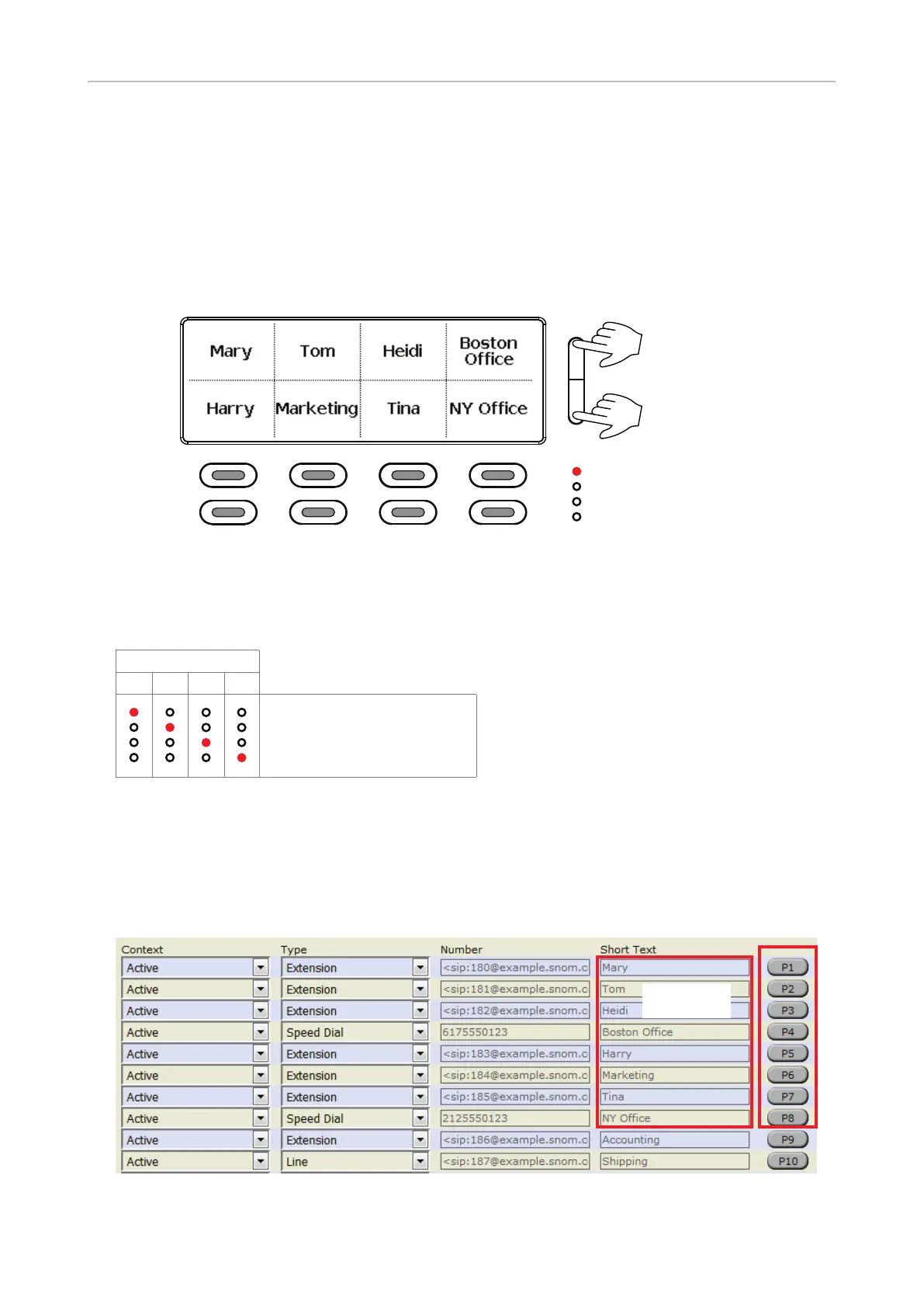
LEDs located to the right of the LED function keys indicate which function key page is on-screen at the
moment, i.e., page 1 when the uppermost LED is lit, etc. (Fig. 2).
The LED of the associated key will react in accordance with the visible key's mapping; pressing the
key will aect its visible setting.
or bottom to change
page
Page key indicators.
Upmost LED is lit,
indicating that page 1
is on-screen
Top row:
Bottom row:
P1
P5
P2
P6
P3
P7
P4
P8
Page 1 keys
Top row:
P1
P2
P3
P4
Fig. 1
Page
1 2 3 4
Page 1: Keys P1 - P8
Page 2: Keys P9 - P16
Page 3: Keys P17 - P24
Page 4: Keys P25 - P32
Fig. 2
Function key page of phone's web interface
For more information on opening and using the phone's web interface, see page 24; for information
on programming the function keys, see "Configuring the function keys" on page 65.
Fig. 3 - Page 1 keys on phone's web interface
Labels shown
on display



 To Next Page