55
D745 User Manual Using the Phone
Fig. 3 Fig. 4 Fig. 5
• When the connected call is on-screen, you can transfer it to a third party or terminate it by
pressing
.
• When a held call is on-screen, press
to connect to it and put the currently connected call on
hold.
Conference
The maximum number of participants is three.
Initiating a conference
1. Call the first intended participant and put him or her on hold.
2. Call the second intended participant and put him or her on hold.
Fig. 1
3. Press
to start the conference.
Conference screen navigation
Your input on the phone's keys will aect the caller/callee(s) or the entire conference shown in the
contact area of the display.
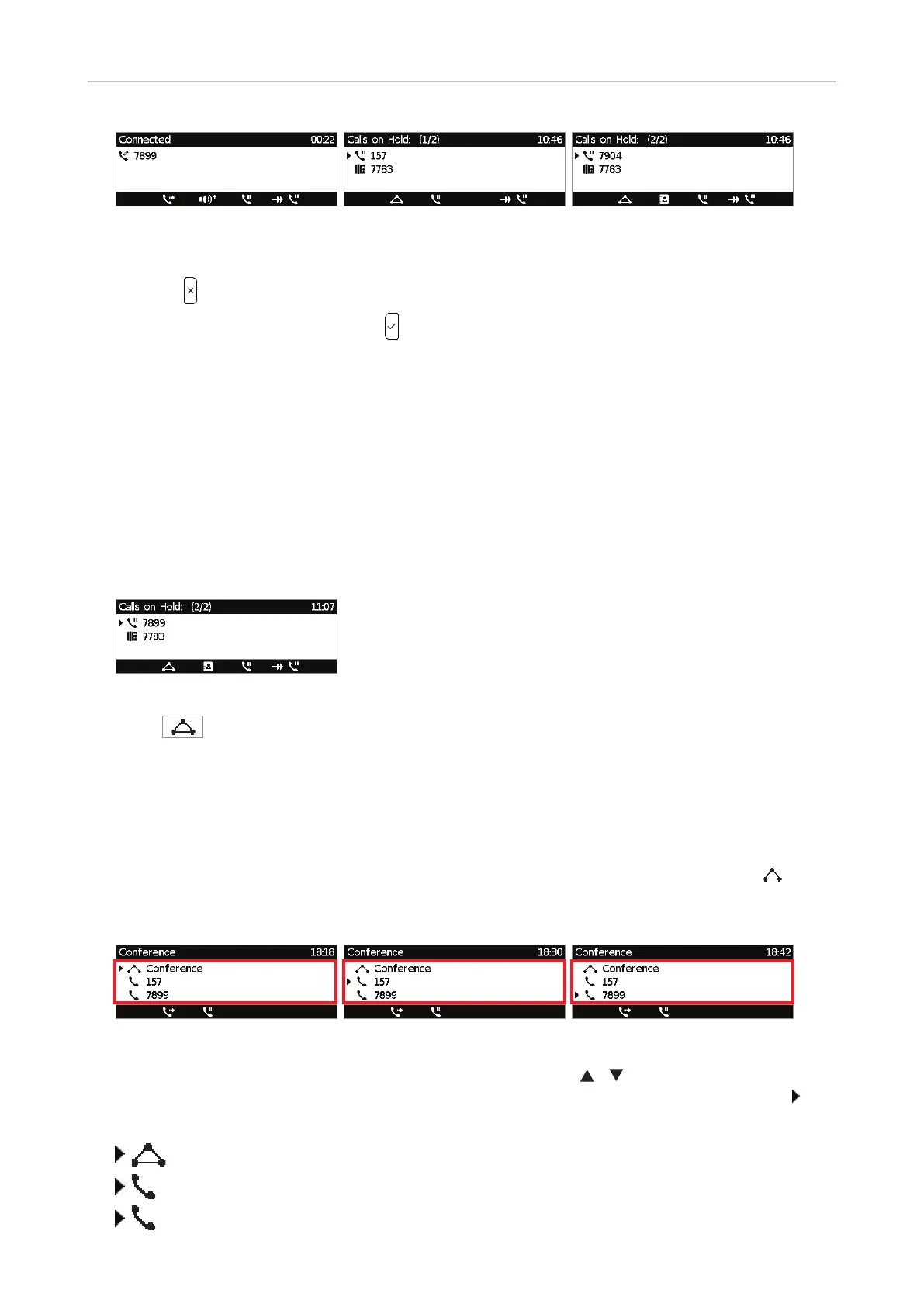
Example: A conference with three participants, including yourself. After you have pressed
(Fig. 1)
to start the conference, the names, if available, or phone numbers of the other participants are shown
on-screen (Fig. 2 - 4).
Fig. 2 Fig. 3 Fig. 4
• Selecting individual participants. Press the up or down arrows / on the navigation key to
select one of the participants or the conference. The selected item is indicated by the arrow
preceding the symbol indicating the conference or one of the participants, respectively:
Conference
157
7899



 To Next Page