A46JRT – 0260996 19
Chapter 6 – Controls
Danger
Pinch points may exist between moving components.
Death or serious injury will result from becoming
trapped between components, buildings, structures,
or other obstacles. Make sure all personnel stand
clear while operating the aerial platform.
• Controls to position the platform are located on the
lower control panel on the turntable and on the upper
control panel in the platform.
• Controls to drive the aerial platform are located on
the upper control panel only.
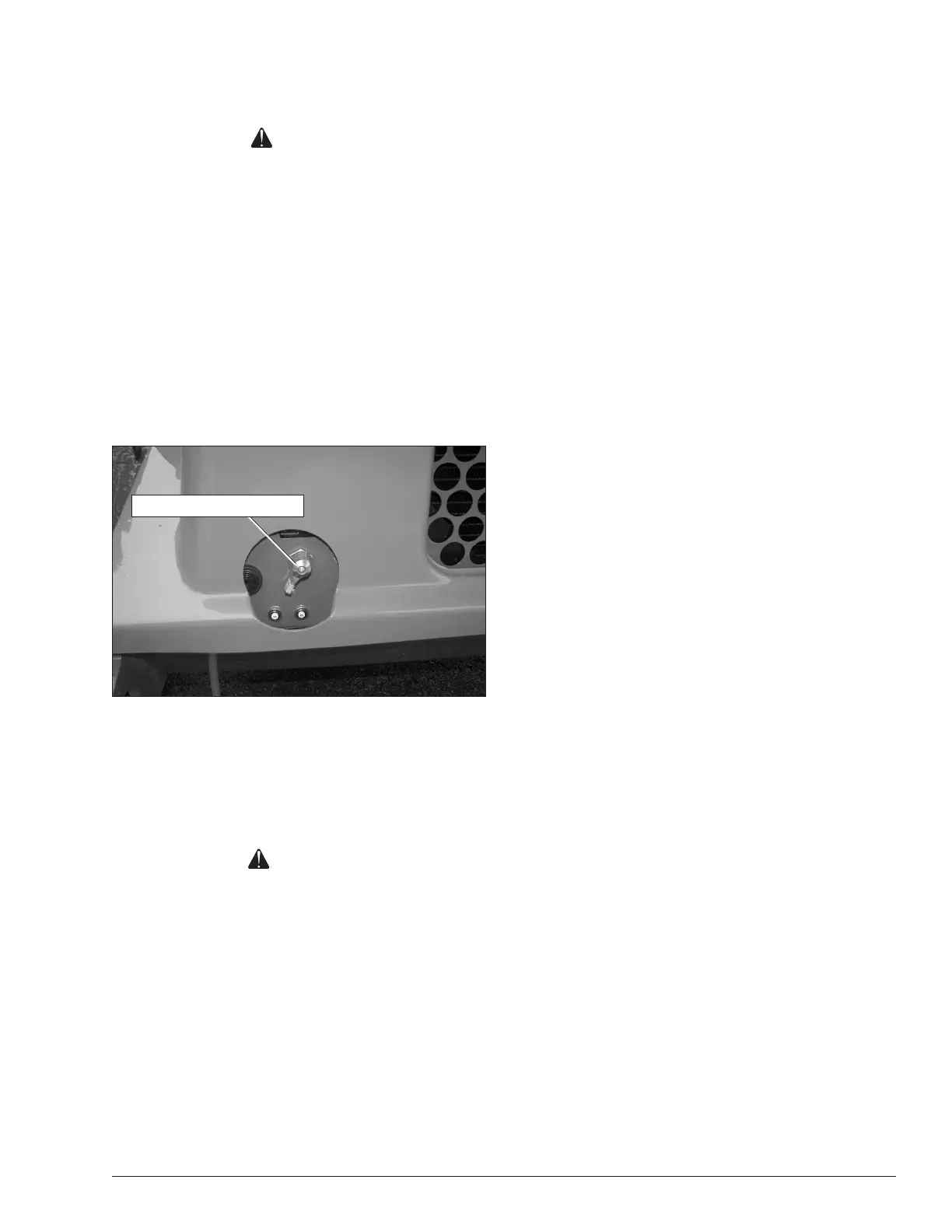
Battery Disconnect Switch
The battery disconnect is located at the left rear of the
chassis (refer to Figure 6.1).
Figure 6.1 – Battery Disconnect Switch
The battery disconnect removes electrical power from all
electrically controlled functions when in the off position.
• Place the switch in the on position to electrically
connect the battery to the electrical system.
Caution
Only authorized personnel should operate the aerial
platform. Unqualified personnel may cause injury
to coworkers or property damage. Lock the battery
disconnect switch in the off position before leaving
the aerial platform unattended.
• Lock the battery disconnect switch in the off position
to prevent unauthorized use of the aerial platform.
Lower Controls
The lower controls (refer to Figure 6.2) are located on the
left side of the turntable. Boom and platform functions can
be operated from the lower controls. The following are
located on the lower control panel:
• Start button
• Emergency stop button
• Controls selector switch
• Ground operation switch
• Rotation switch
• Riser switch
• Boom elevation switch
• Boom extension switch
• Jib articulation switch
• Platform level switch
• Platform rotation switch
• Engine/Emergency power switch
• Fuel switch (dual fuel machines)
• Hydraulic system warm-up switch (option)
Start Button
The start button (refer to Figure 6.2) works like an auto-
mobile ignition button. Press and hold the button inward
to start the engine.
Emergency Stop Button
The emergency stop (refer to Figure 6.2) is a two-position,
red push button.
• Push the button inward to disconnect power to all
control circuits.
• Pull the button outward to restore power.
Controls Selector Switch
Use the controls switch (refer to Figure 6.2) to select
between lower control and upper control operation.
• Place the switch in the upward position to operate
the aerial platform from the upper controls.
• Place the switch in the downward position for lower
control operation. An alarm sounds, when the button
is pressed, to warn others that the machine engine
is being started.
• If the platform is to stay in a particular position for a
long time, turn the switch to off to shut off the engine
and save fuel.
Ground Operation Switch
Hold the ground operation switch (refer to Figure 6.2)
upward continually to operate the machine from the
lower controls. The engine speed increases when the
switch is held upward. This switch is spring returned to
the off position.
Rotation Switch
The rotation switch (refer to Figure 6.2) is used to rotate
the turntable in a clockwise or counterclockwise direction.
The switch is spring returned to the center off position.
• Hold the switch to the right to rotate the turntable
counterclockwise.
• Hold the switch to the left to rotate the turntable
clockwise.
Battery Disconnect Switch


 To Next Page