34 EN
MASTERYS BC+ 10-40 kVA - IOMMASBCXX0G-EN 02 - SOCOMEC
8.4 Menu function descriptions
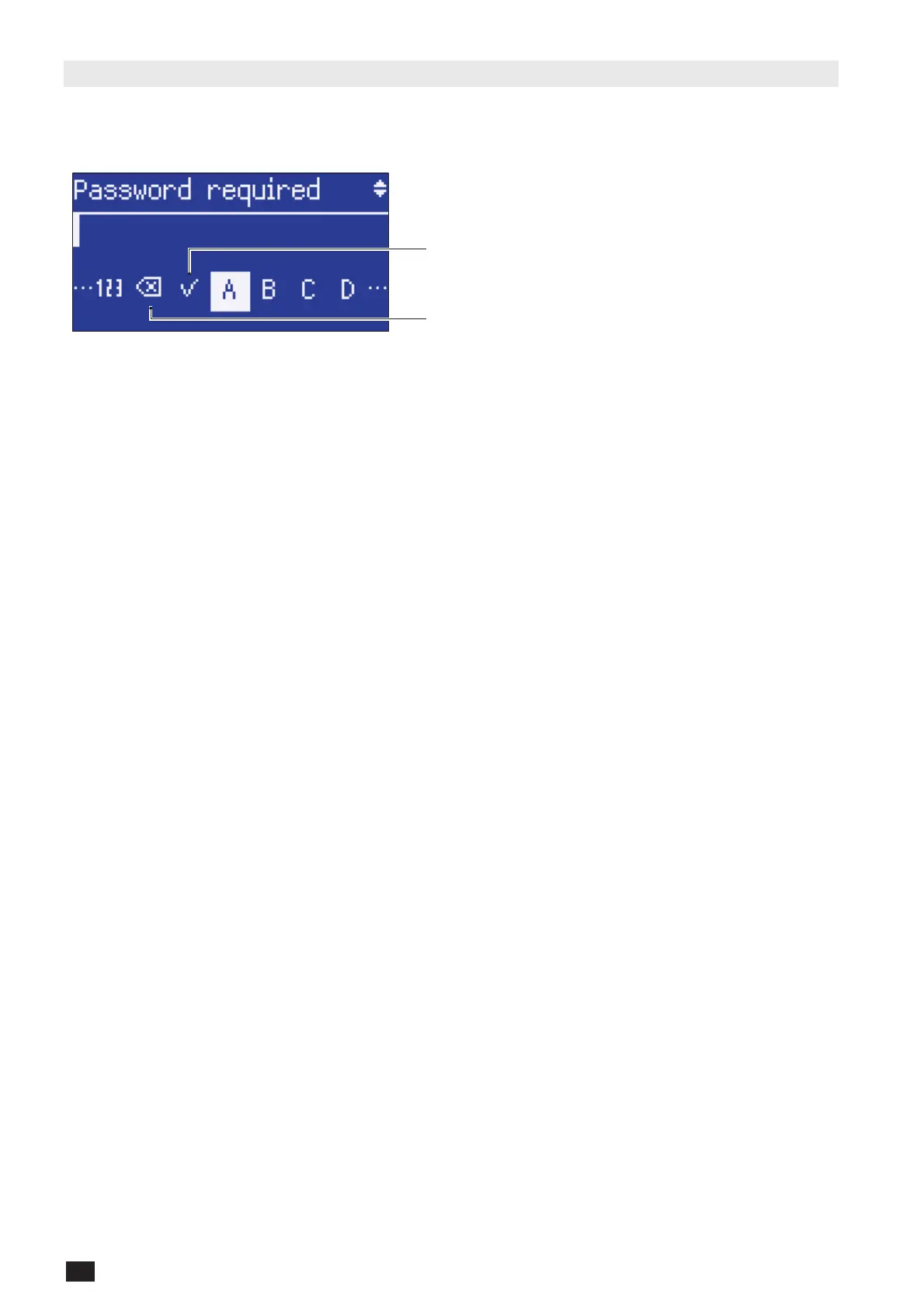
8.4.1 Entering passwords
Some operations and settings require a password in order to be performed.
Confirm password
Cancel character
The default password is SOCO.
Press UP and DOWN to scroll the letters. Press ENT to confirm the selection or ESC to abort.
8.4.2 ALARMS menu
This menu displays all pending UPS alarms.
To reset alarms enter the menu MAIN MENU > CONTROLS > MAINTENANCE > ALARMS RESET.
If there is more than one page press UP/DOWN to scroll pages.
8.4.3 STATUS menu
This menu displays all UPS ON statuses.
If there is more than one page press UP/DOWN to scroll pages.
8.4.4 EVENT LOG menu
This menu accesses the event log (Status and Alarms).
8.4.5 MEASUREMENTS menu
This menu displays all UPS measurements relating to the input stage, output stage, batteries and auxiliary mains
(bypass).
If there is more than one page press UP/DOWN to scroll pages.





 To Next Page