January 26
th
, 2022 27
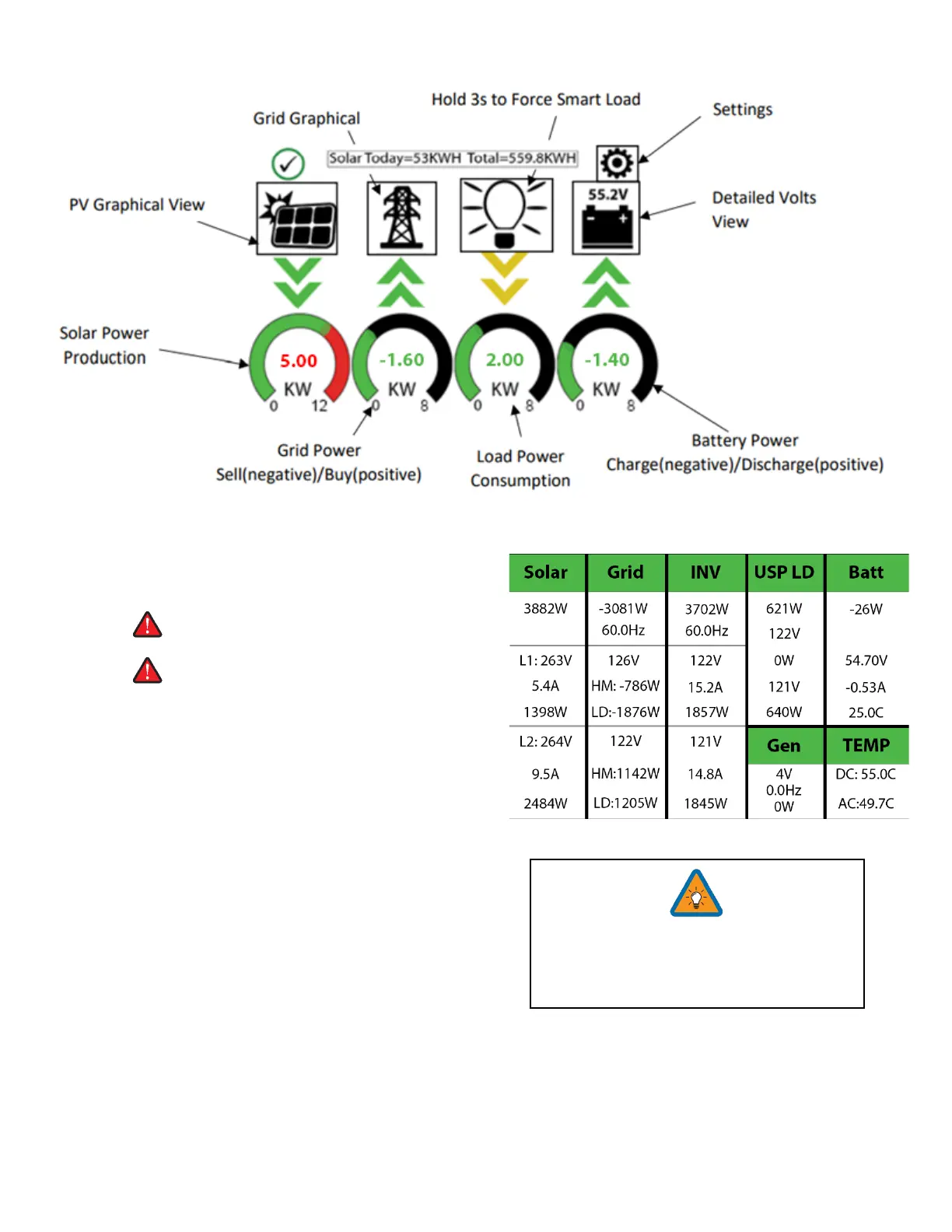
Main Screens (Touchscreen)
Detailed Volts View
• Top row = Total power for column
• Middle Row = Line 1/PV1 voltage, Amps, and Watts
(note: PV Voltage not to exceed 500V)
• Bottom Row = Line 2/PV2 voltage, Amps, and Watts
(note: PV Voltage not to exceed 500V)
• Batt Temperature will show -20°C if the temperature
sensor is not connected. Batt SOC % = % batteries are
charged
• DC Temp = Temperature of DC conversion electronics
o Batt AC
o PV Batt
o AC Batt
• AC Temp = Temperature of AC conversion electronics
o Batt AC
o PV AC
• Grid Column
o If selling to the Grid, Grid Watts = negative
o If buying from the Grid, Grid Watts = positive
o HM = power detected by the external current
sensors on the entire home L1 & L2
o LD = power detected using internal sensors on AC grid in/out breaker
PV Graphical View
A. Displays power production over time for the PV array
B. Use up/down buttons to navigate between days
C. Month view, Year view, and Total view
Note: Reversed Grid Watt values may
indicate incorrectly installed current sensors
(reversed polarity). See Page 38.



 To Next Page