January 26
th
, 2022 29
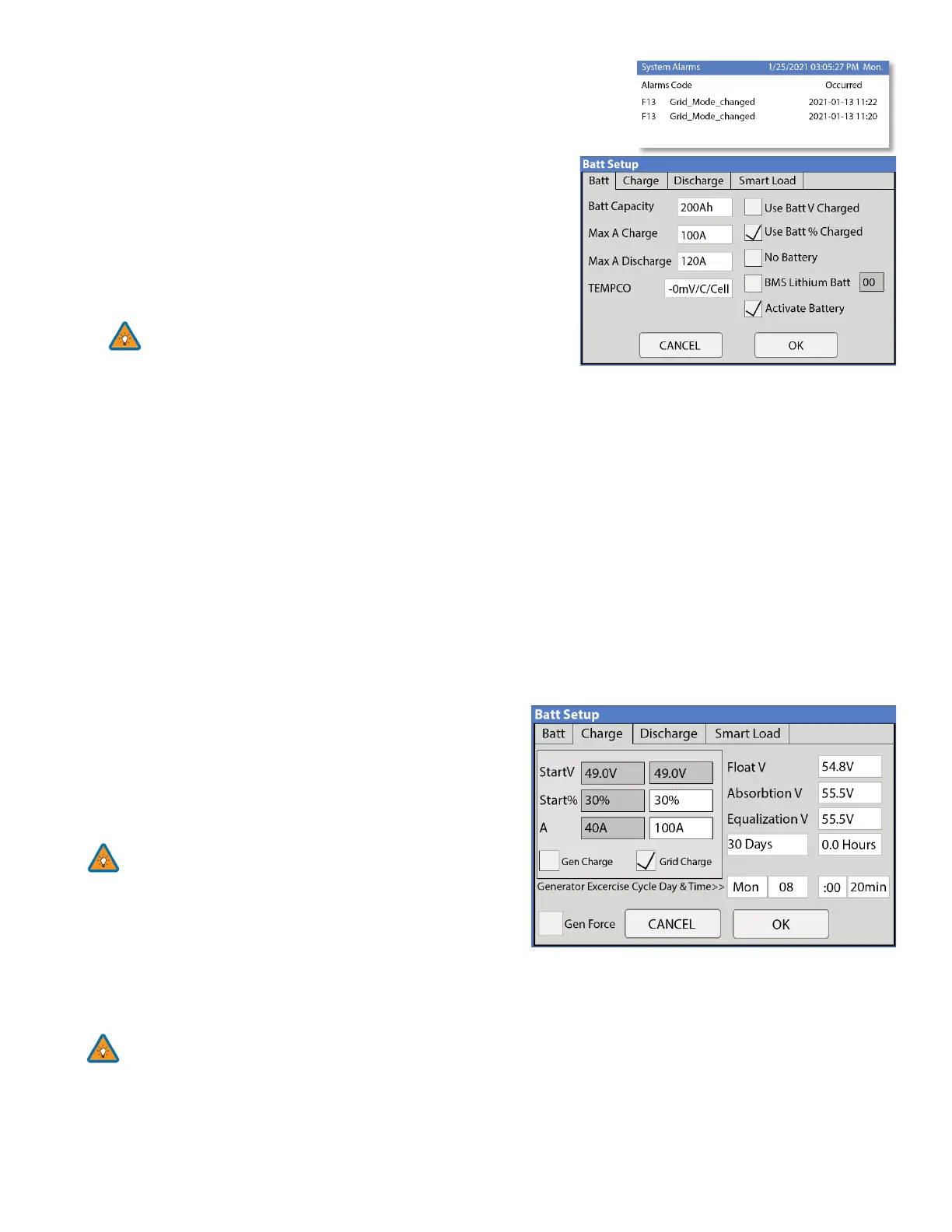
System Alarms
A. Lists all recorded System alarms in chronological order
Battery Setup
Batt
Batt Capacity: enter the size of the battery bank connected to the
system. Series = add Voltage | Parallel = add Amp-Hours
Max A Charge: set the max charge rate for the batteries (This also
sets PV Battery charge rate)
Suggest 20%-30% of battery capacity for lead-acid
Max A discharge: set max discharge for battery bank (In off-grid
mode, the battery bank will discharge 120% of this value for 10 seconds before the inverter shuts down to prevent
battery damage)
TEMPCO: Temperature coefficient used in conjunction with the batt temp sensor to adjust optimal voltages for lead-
acid batteries
Use Batt V Charged: displays battery charge in terms of voltage
Use Batt % Charged: Battery voltage can be misleading for determining the % Charged. So, we use algorithms
measuring power in and out to measure a true value for % Charged. It compensates for aging batteries also.
Charge
Float V: Set value appropriate for the batteries connected to the system
Absorption V: Set value suitable for the batteries connected to the system
• Absorption will stop at 2% of the capacity of the battery bank and drop to float
• Ex: 400Ah battery would be 8A
Equalization V: Set value appropriate for the batteries in use.
Days: the period between equalization cycles
Hours: period taken to equalize batteries
Note if Hours = 0 system will not equalize the batteries
Gen Charge: uses the gen input of the system to charge the
battery bank from an attached generator.
Start V: voltage at which system will AutoStart a connected
generator to charge the battery bank
Start percentage: Percent S.O.C at which system will AutoStart a corresponding generator to charge the battery bank
A: Charge rate from the attached Generator in Amps (DC)
Size this value according to the generator size
Grid Charge: uses Grid input to charge batteries from grid or generator



 To Next Page