January 26
th
, 2022 28
Grid Graphical View
A. Displays power drawn from and sold to the grid over time
B. Bars above the line indicate power bought from the grid
C. Bars below the line indicate power sold back to the grid
This view can help determine when the peak power is used in the Home and for Time of Use programing
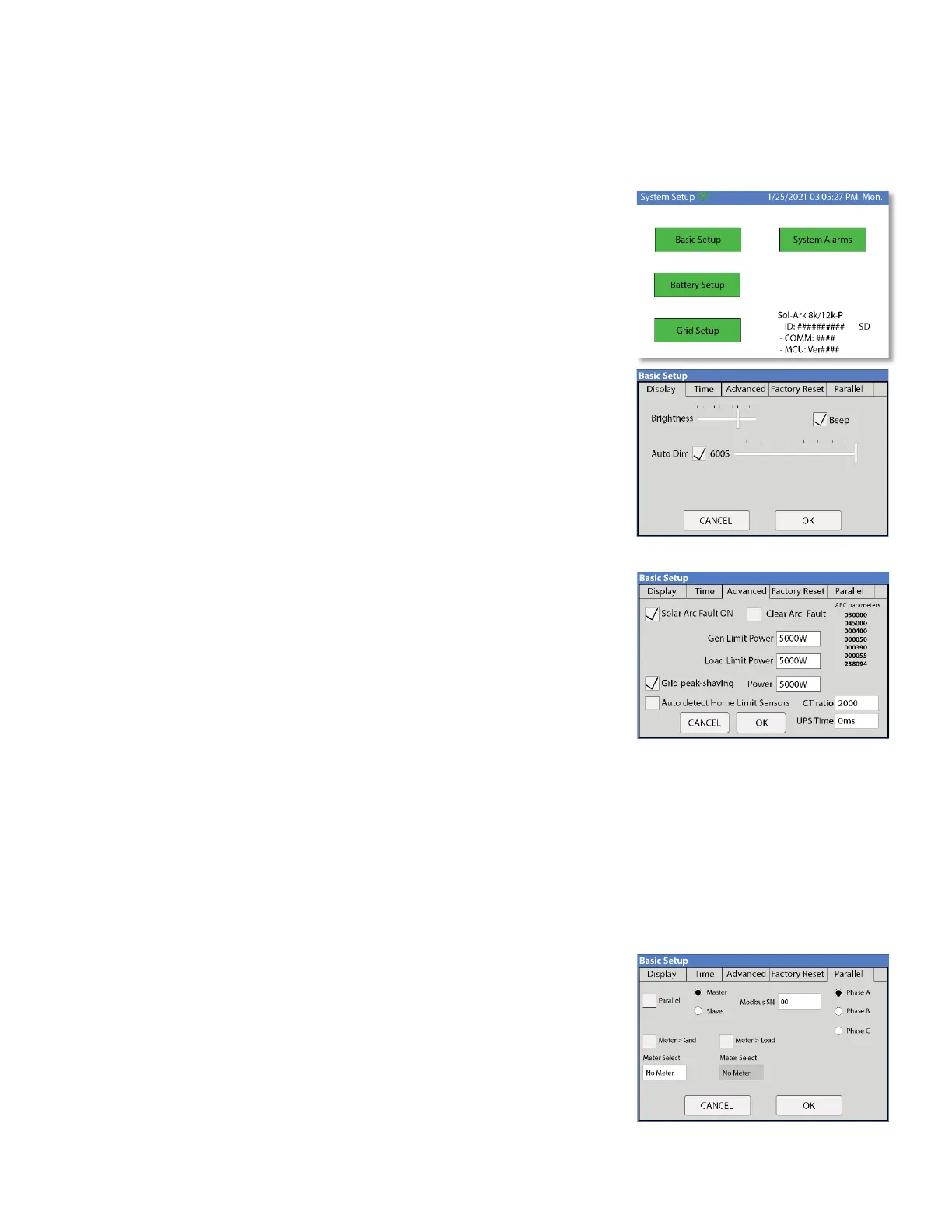
System Setup Menu
A. ID = LCD serial #. Support uses the Wi-Fi serial #.
B. COMM = LCD software version
C. MCU = Inverter software version
Basic Setup
Display
A. Brightness adjustment
B. Auto dim (must be enabled for the warranty to cover LCD screen)
C. Enable/disable BEEP
Time
A. Set date and time for the system
B. Set up to 3 seasons for Time of Use to follow
Gen Peak Shaving (Gen Limit Power)
Set the threshold at which the Sol-Ark will contribute to the generator to prevent
large loads overloading the generator.
Load Limit Power
Set the total AC Output of the Sol-Ark, excess power will be curtailed. The default
value is always the Maximum output of the inverter.
Grid Peak Shaving
Set the Sol-Ark's threshold to begin contributing power to keep the power drawn from the grid below the threshold.
CT Ratio
Set the CT ratio; Default value is 2000/1. DO NOT change this value unless you speak with support, use of 3
rd
party CT
sensors require our permission to not void warranty.
UPS Time
Set the delay to Sol-Ark’s UPS transfer time; When set to 0ms, the UPS transfer time will be 4ms.
Parallel (connecting multiple systems)
A. Select parallel mode when using more than one system
B. Set the Master/Slave status of each system
i. Label only one system as the "Master"
C. Set the MODBUS address of each system starting at 01
D. When using multiple Systems in 120/208V mode, select which phase
each system is responsible for (A, B, C) (see pg.



 To Next Page