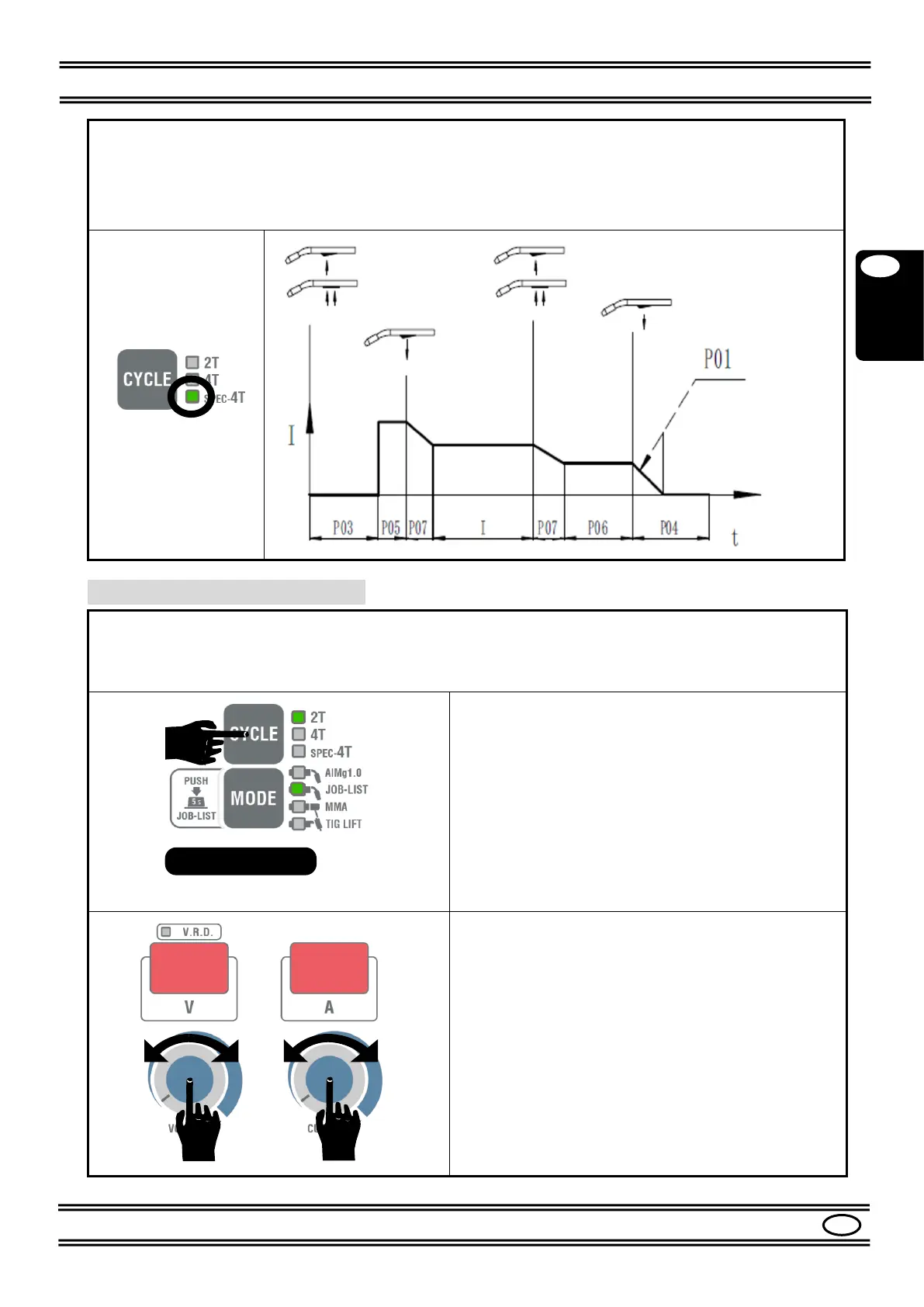
4-TIMES Special cycle: press the CYCLE button and select the SPEC 4T LED.
Note: the abbreviations “P01, P03, etc” shown below refer to Par. 8.5 - Parameters submenu.
The 4-Times Special cycle has the same functions as the 4-Times cycle but with the possibility of
making numerous additional adjustments. Refer to Table 4.
You can adjust
other parameters
by entering the parameters
SUBMENU
as described below.
You can restore all the set values to the factory settings
by proceeding as described in Chap. 11.
Table 4 shows the parameters that you can adjust.
Turn on the machine.
Press the button (17)
for at least
5 s.
The display will show the codes of the parameters
SUBMENU
.
The
left
display will indicate the submenu
code
P01,
P02 etc. The right
display
will show the set
value
.
Select the parameter
to be adjusted with the knob
(21)
.
Adjust the value
with the knob
(20)
.
To save the change and exit the submenu, press the
CYCLE button
(17)
again.
After 5 s, the machine automatically exits the
parameters submenu and saves the change if no
other action is performed.


 To Next Page