34
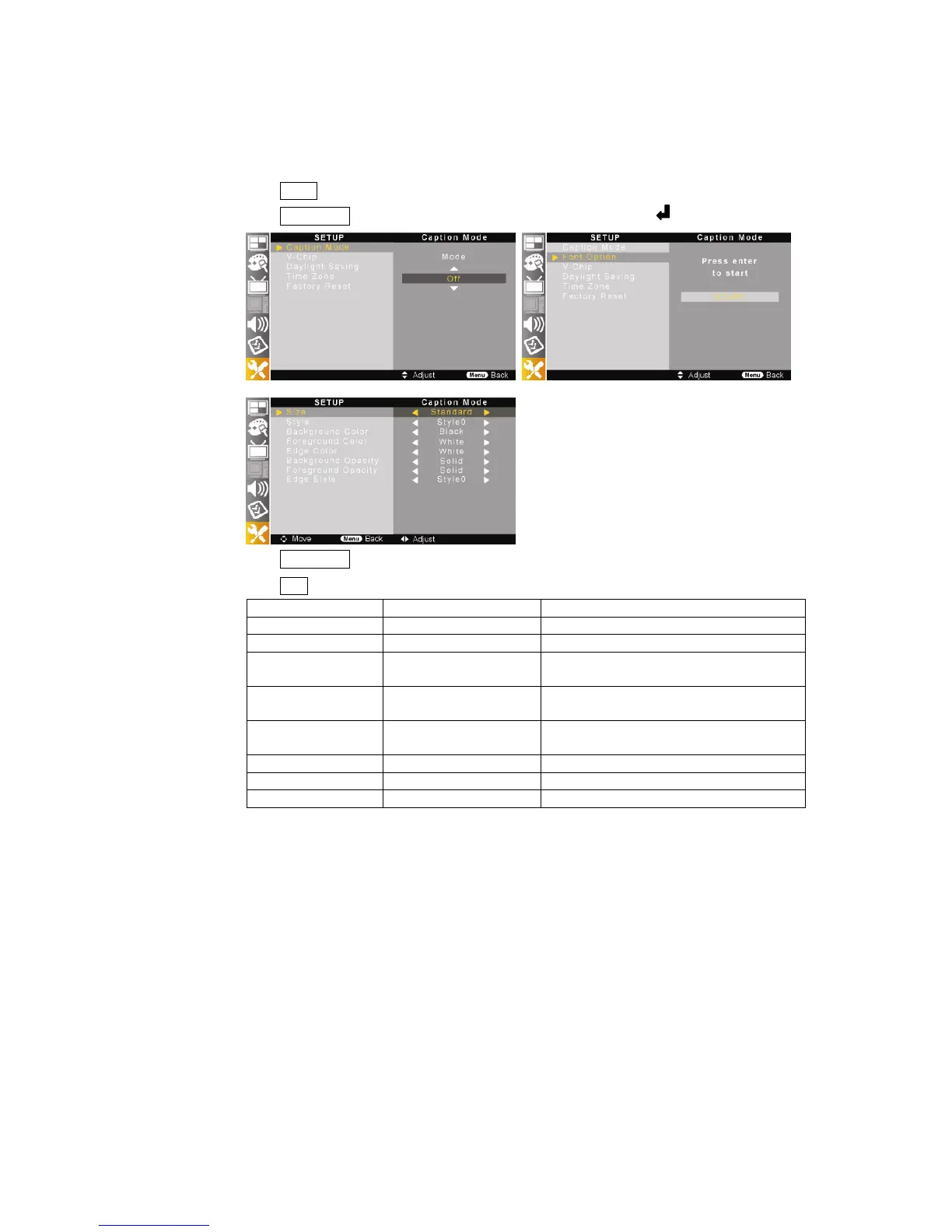
2) Font Setting (Digital Closed Caption only)
This function allows you to adjust the digital closed caption screen appearance to suit your preference.
①
Press MENU button on the remote control and move to <SETUP – Caption Mode> and execute caption.
②
Press ▲/▼//◀▶ buttons to move <SETUP – Font Option> and press the button.
③
Press ▲/▼//◀▶ buttons to select digital closed caption screen appearance.
④
Press EXIT button to return to the normal screen.
Menu Description Item
Size Font size Standard – Large – Small
Style Font style Style0 ~ Style 7
Background Color Font background color (White) – Black – Red – Green – Blue – Yellow
– Magenta - Cyan
Foreground Color Font color White – (Black) – Red – Green – Blue – Yellow
– Magenta - Cyan
Edge Color Edge table color White – Black – Red – Green – Blue – Yellow
– Magenta - Cyan
Background Opacity Font background opacity Solid – Flashing – Translucent – Transparent
Foreground Opacity Font color opacity Solid – Flashing – Translucent – Transparent
Edge Style Edge table style Style0 ~ Style5
⑤
Select different color of “Background Color” and “Foreground Color”.



 To Next Page