Getting Started
1 2
1
3
Note: you must be connected to Wi-Fi to live stream.
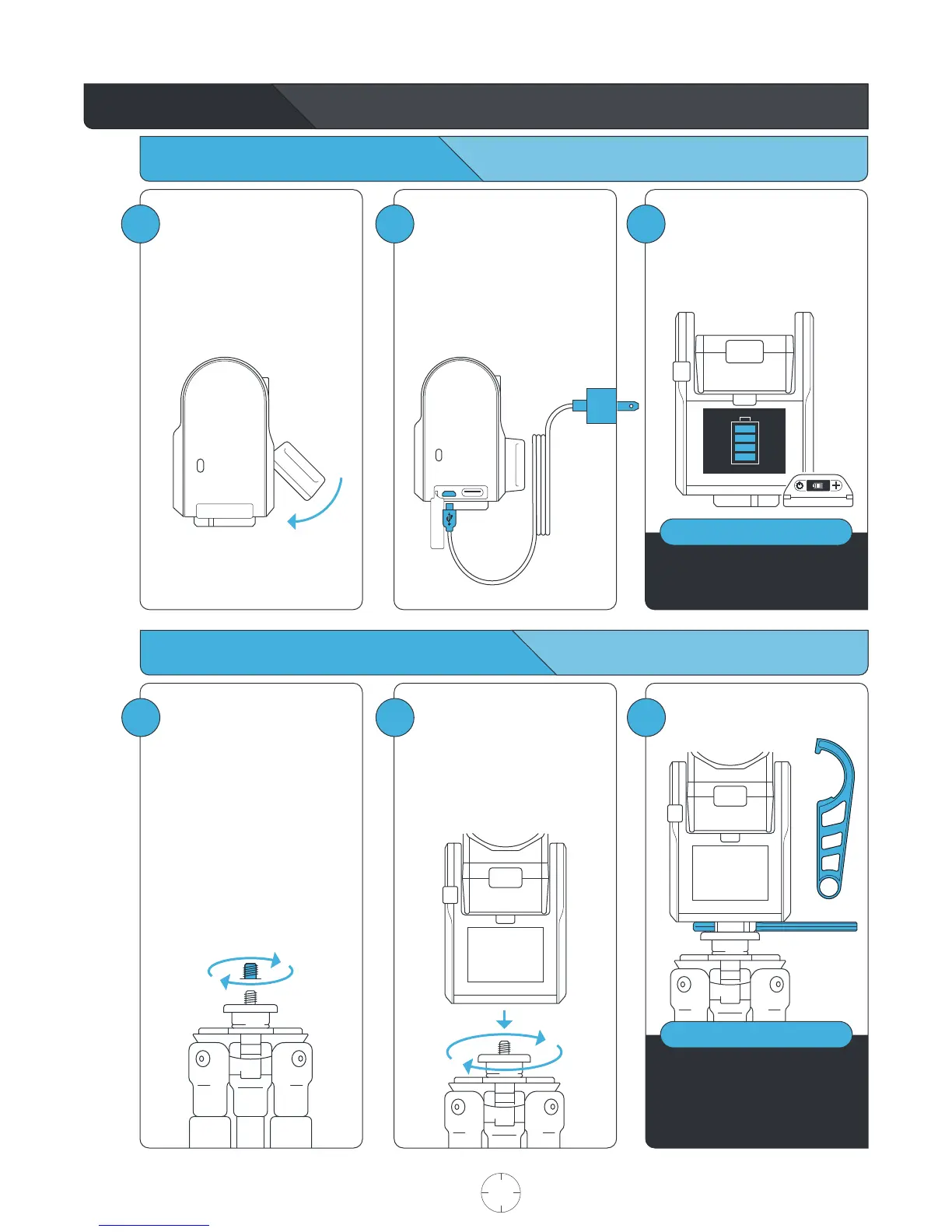
Dock the Tag, with buttons facing
up, into the Accessory Port on
the front of the Base.
Attach the Tag to the Base by
first inserting from the top, as
depicted in the graphic below.
Insert the Mini USB Charging
Cord into a USB outlet adapter
(not included) rated at 1.5A to
2.1A (most tablet charger
adapters) and plug it into the
Base.
For the best results, we
recommend mounting the Base
on a Tripod with a 3/8”
mounting screw.
If you already have a pan/tilt
head on your tripod, please
remove it prior to connecting
your Base.
If your tripod only has a ¼”
screw, use the provided Tripod
Adapter Screw.
Fully charge the Base and Tag
prior to use. This will take about
4 hours. Charging time varies
based on USB wall adapter
rating.
Charging your Base and Tag
Connecting the Base to your Tripod
ONLY Base & Tag contain batteries
and must be recharged.
NOTE
2
Hand tighten the Base onto your
tripod until you feel light
resistance from the panning
motor. Avoid excessive manual
panning and tilting of the Base
motors by hand.
4
Use the provided Tripod Tool to
finish tightening.
For the best experience, use a
sturdy tripod.
Visit soloshot.com to purchase a
recommended tripod.
NOTE
USER MANUAL 03 SOLOSHOT.COM



 To Next Page