Operation
11/2014 1015420-00 Operating instructions – 23/78
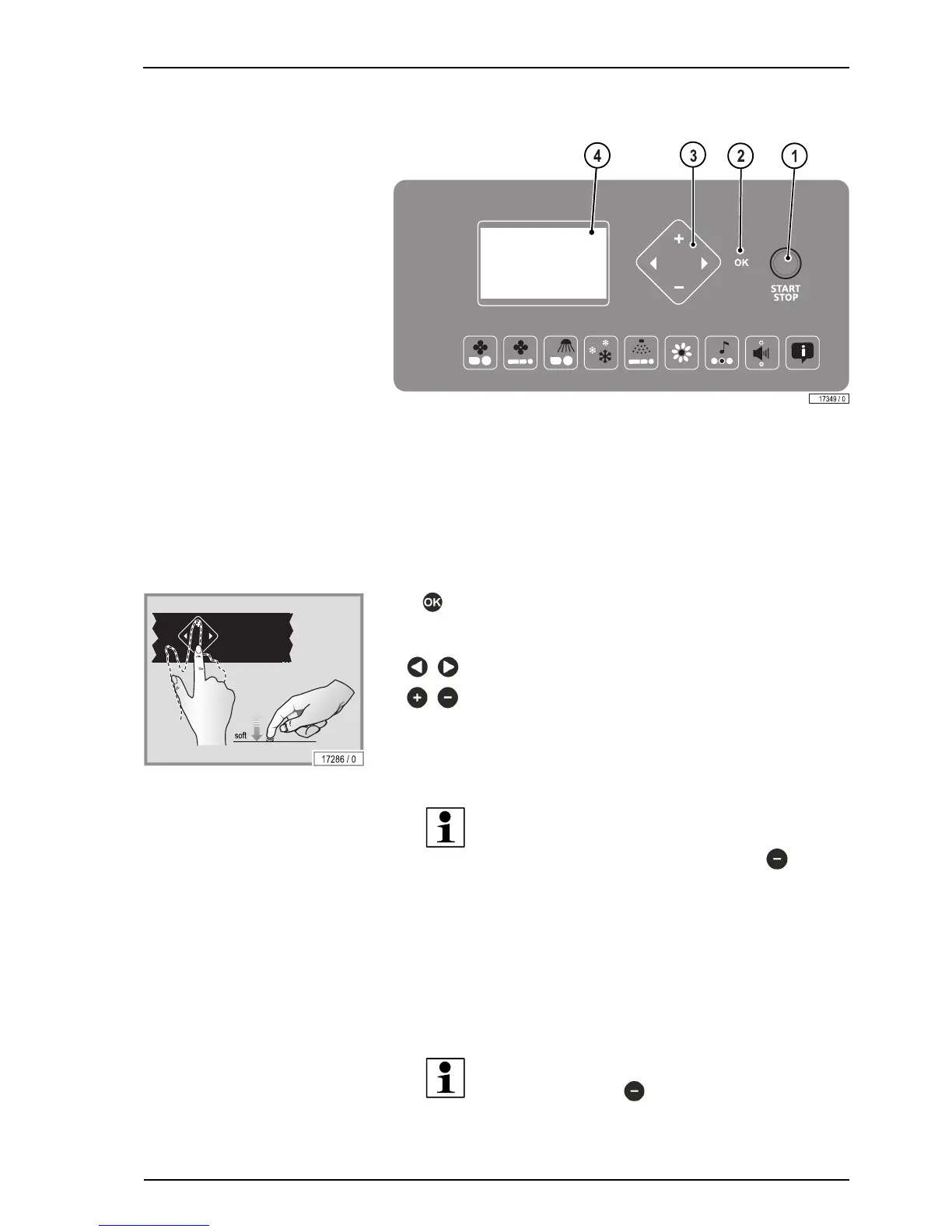
6.3.3 Navigation unit
1. START/STOP button
2. OK button
3. Feature selection
4. Display – Functions …
6.3.4 Navigation
Acknowledge selection.This button's availability is displayed
on the Operating panel, depending on the function that has
been selected.
Select device function.
Functions or settings can be activated, deactivated or
changed.
Information about the setting options can be found in the separate user man-
ual 'Professional Setup Manager' in the folder Technical Documentation.
NOTE:
To open the Professional Setup Manager, press the button
for approximately 3 seconds in standby mode
.
All of the pictograms displayed on the screen are illuminated in default mode
after the device starts up.
The relevant pictogram will start to flash after a device function has been
selected. The settings or selection options available for the selected function
will be displayed on the screen.
If the START/STOP button is pressed and held for 3 seconds while in standby
mode, the accent lighting switches off or back on.
NOTE:
Pressing and holding
for 3 seconds activates the demo
mode. This allows




 To Next Page