REPLACING THE HEPA FILTER
This procedure is performed by technicians during annual maintenance.
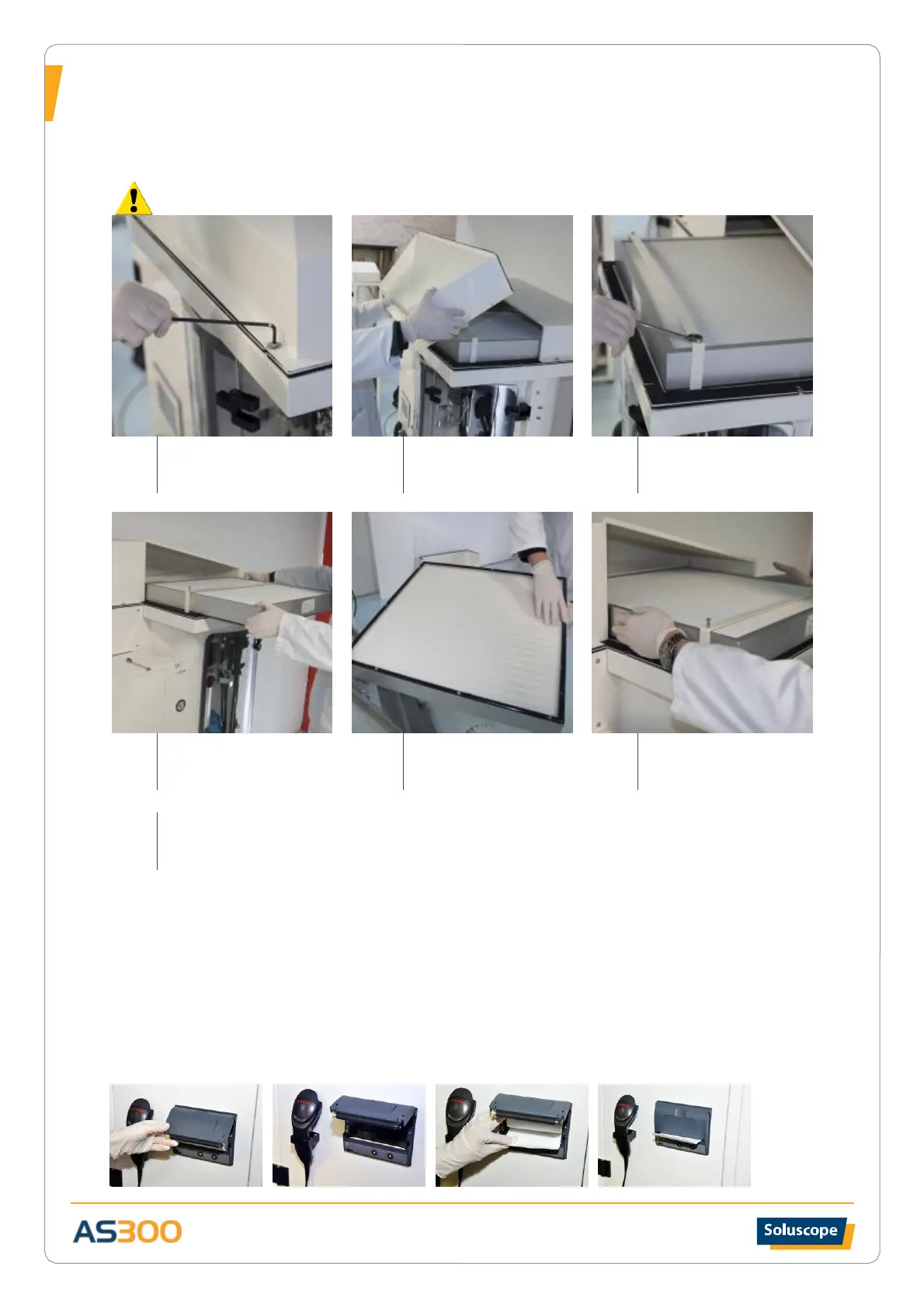
Before changing the filters, deactivate the alarm via the maintenance menu on the touch screen.
Unscrew the HEPA cover
on the top of the cabinet
with a 2.5 mm Allen key.
Partially unscrew the 4
screws that hold the HEPA
filter.
Remove the old filter by
sliding it toward the front
of the machine.
Apply silicone on the
gasket of the new filter.
Place the filter into its slot
as far as it will go.
Repeat steps 1-3 in reverse order to finish the reassembly.
IMMOBILIZATION
In the event that the AS300 is out of service for a prolonged period, please contact your authorized distributor
who will provide you with instructions to be followed.
REPLACING THE PRINTER PAPER
1 - Open the roll access cover.
2 - Remove the old paper roll and position the new roll making sure it unrolls from the bottom.
3- Leave a few centimetres of paper hanging out and close the cover.


 To Next Page